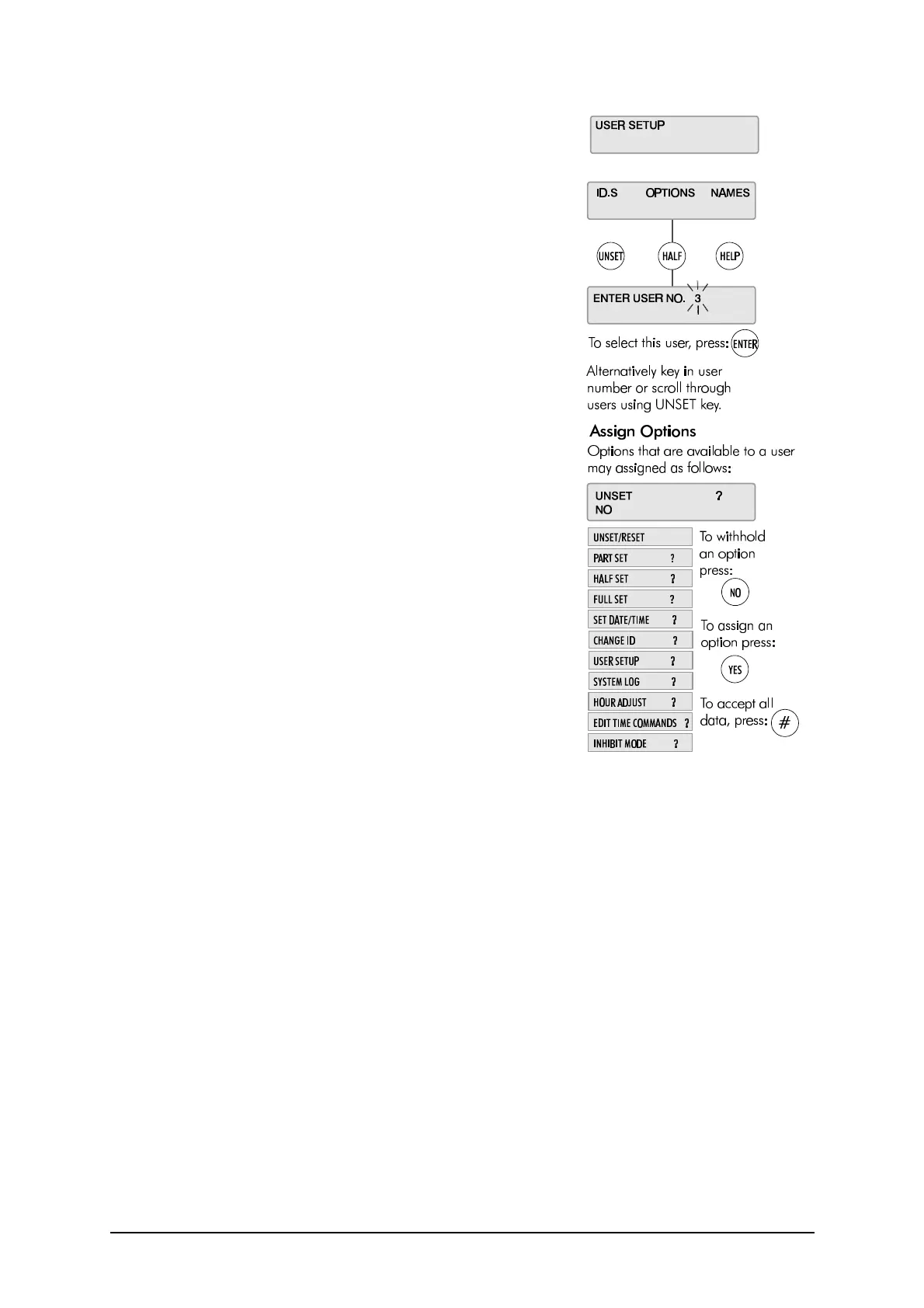
User Setup
20 3GS User Guide
Changing User Options:
The Master User can assign the following menu options to all users.
Some options are linked to other functions, so that assigning an
option to a user may automatically give the user other options as
well.
l Unset/Reset (also Accept All Alerts)
l Part Set / Area Unset
l Half Set / Area Set
l Full Set (also Coded Reset)
l Set Date/Time
l Change ID
l User Setup (also Setup Areas and Radio PA Assign)
l System Log (also Test Radio PA, Setup Cards, Card Information
and Manual Door Control)
l Hour Adjust
l Edit Time Commands
l Inhibit Mode
Any user can be assigned some or all of these options. The Master
User has all of these options by default.
✍ By default, User 1 is the installer and User 2 is the
Master User.
✍ The User Options menu also features Mode 5/6/7/8/9
options. These options are for installer use only and
cannot be accessed.



 To Next Page