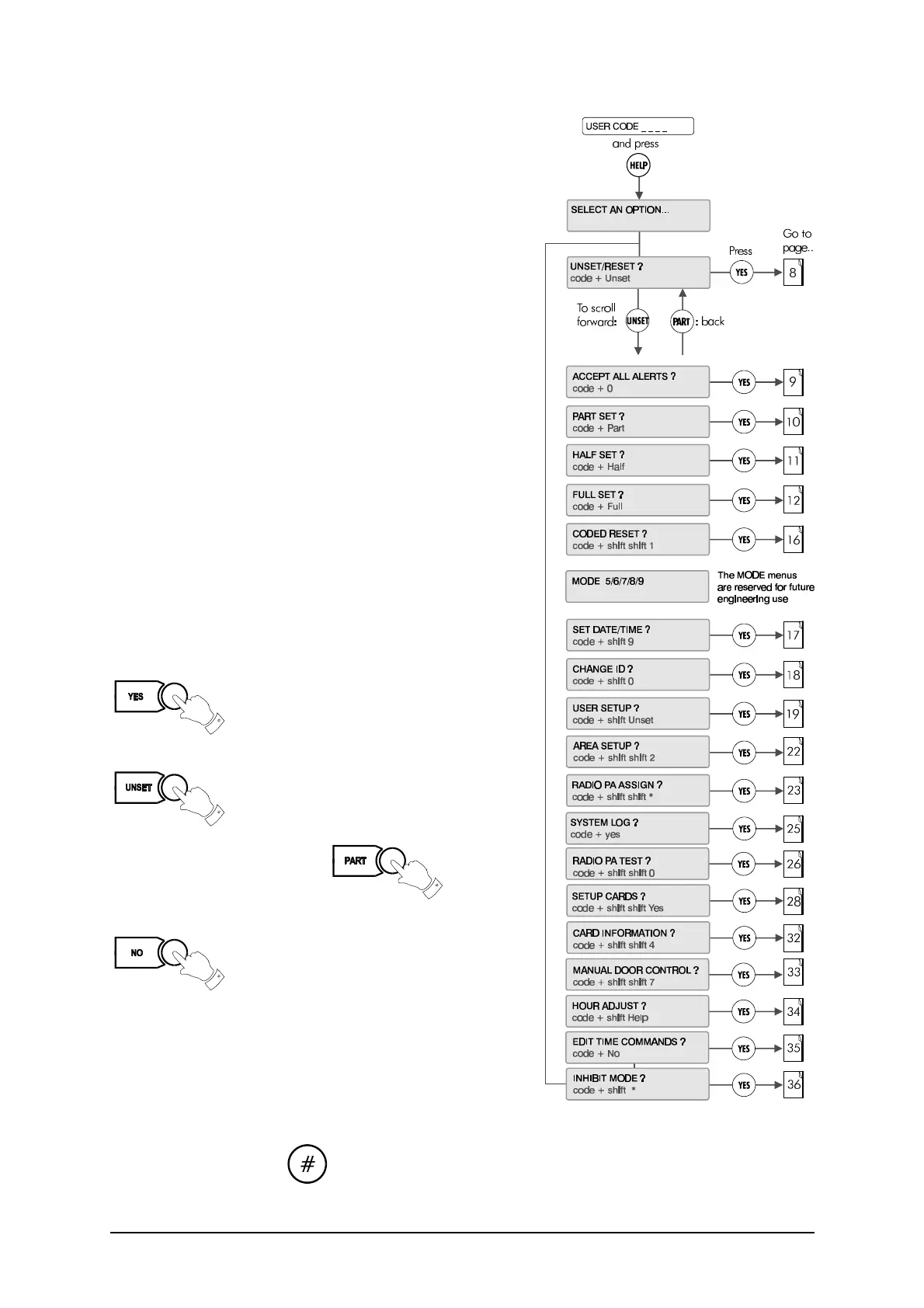
Menu options
6 3GS User Guide
The system is programmed using the Help menu options:
In sequence, you can use these menus to :
l Disarm the system and reset all warning devices
l Remove system display messages and silence the buzzer
l Part set the system/Unset an area
l Half set the system/Set an area
l Full set the system
l Reset the system following an alarm
l Set the system date and time
l Change existing user codes
l Set up new users
l Set up a new area system
l View system log
l Adjust the system for summer / winter hour change
(daylight saving time)
l Isolate a troublesome zone that is, for example, preventing
the system from arming
All of these options are accessed by entering your CODE
followed by the HELP key.
Your installer will have configured your own unique CODE,
which will allow you to display and scroll through the options
available to you.
An option is selected by pressing the YES key
.
Use the UNSET key to move to the next option
Use the PART key to move back
To exit without selecting an option, use the NO key
✍ Only options which have been assigned to a user
are displayed. The Master user will have all
options.
Once the help routine is entered a selection must be made
within 90 seconds, otherwise the system will exit from this menu.
✍ The hash button acts as an ENTER key for the keypad.



 To Next Page