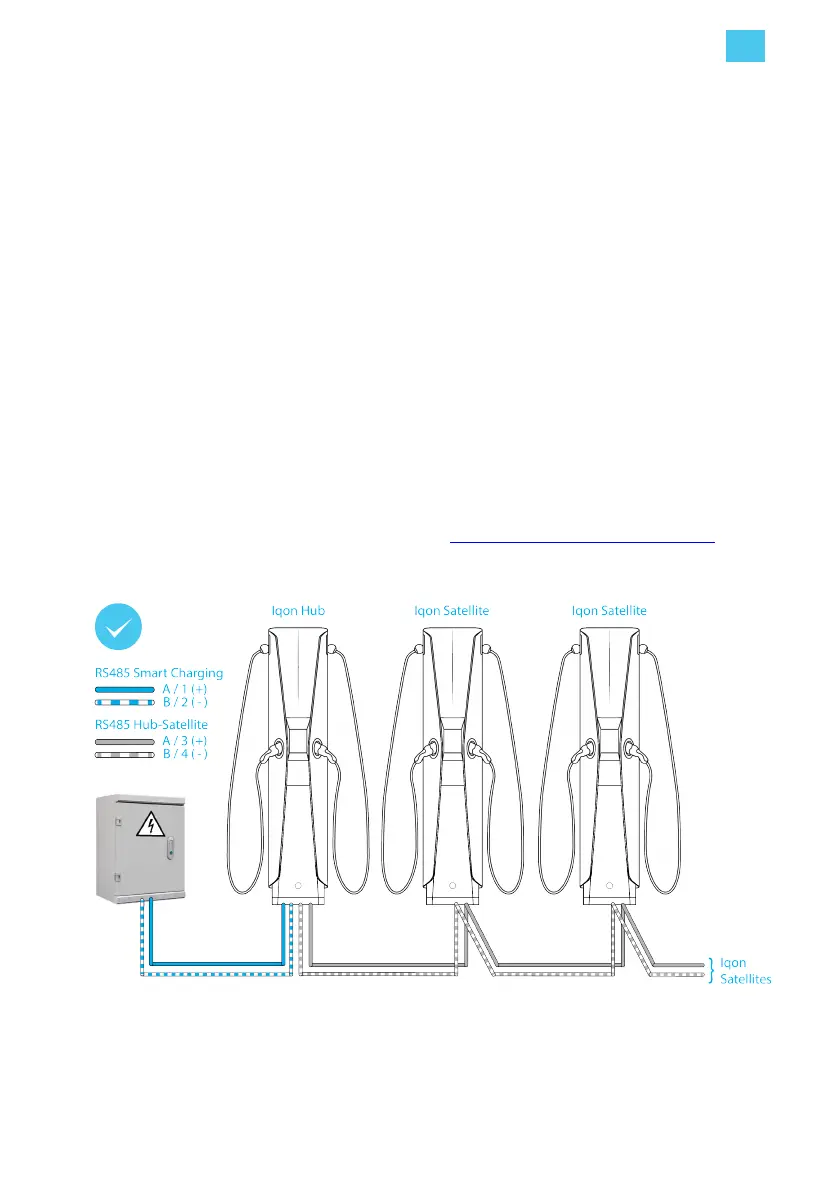
Smart Charging optimizes load balancing across the Hub-Satellite installation.
• Hub-Satellite - from the Hub in series to each Satellite. The Hub uses either a pre-programmed
SIM to connect through a cellular network, or a Wi-Fi connection to a local Wi-Fi router.
RS485 serial connection
When RS485 serial data connections are required, install the RS485 cables when the area is being
prepared. Note the following guidelines:
• For correct load balancing, a Hub-Satellite configuration must be connected from a single power
supply cabinet. If a group of charging stations is powered from a different power supply cabinet
then that group of stations must be a separate Hub-Satellite configuration.
• Use SFTP Category 6 network cable.
• Use the green/green-white twisted pair of wires for the RS485 Hub-Satellite connections.
• Use the blue/blue-white twisted pair of wires for the RS485 smart charging (MAX protocol)
connections.
• Terminate the RS485 Hub-Satellite loop at the last Satellite with the 120 Ω resistor (supplied with
the Iqon small components). The 120 Ω resistor is not required when only a Hub is installed.
• In a Hub-Satellite installation, if one or more LED rings constantly flash red then there is an
incorrect connection in one of the satellite RS485 connections.
For connection of the RS485 network cable to Iqon, see Connect RS485 data cables on page 32.
Example of a RS485 serial data connection
4. Installation instructions
EN
23



 To Next Page