Customer Service 1-888-707-1880
Or email customerservice@dyaco.ca 16 Dyaco Canada Inc.©2021
COMPUTER INSTRUCTIONS
Functions and Operations
Batteries Installation
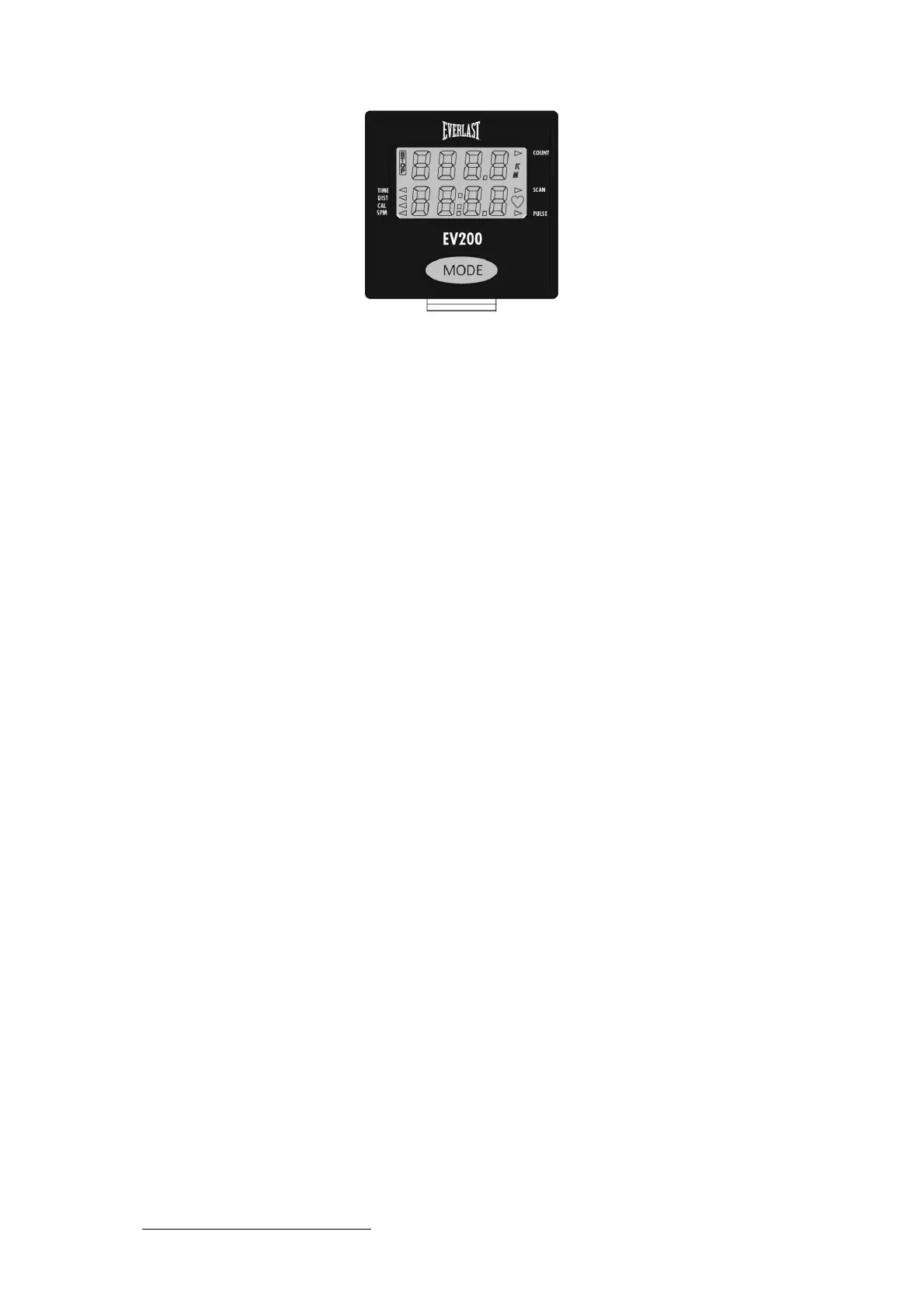
Please install 2 AA batteries in the battery case on the back of the Console (95).
(Whenever batteries are removed, all values will be reset to zero.)
Auto On/Off
Whenever a user starts to do exercise, the display will light up and show the workout values
automatically. After 4.5 minutes of no exercise input, the display will shut off. When a user
begins to exercise again, the workout values will continue from where they left off.
(Holding the MODE button for 2 seconds will cause all the values, except odometer, to reset
to zero.)
Auto Scan
After the Console (95) is powered on or when the Mode button is pressed, the display will
cycle through all functions values "Time - Distance - Calories - SPM - Pulse." Each value will
be held for 6 seconds.
Distance
Displays the distance from 0 to 9999 meters. In "Autoscan" mode, the value will hold for 6
seconds before continuing to the next value, users also can press the MODE button to cycle
WKURXJKWKHRWKHUYDOXHVXQWLOWKH$552:LFRQŻSRLQWVWRGLVSOD\WKHGLVWDQFHYDOXH7KLV
will end "Autoscan" mode, and only the selected value will display continuously.
Time
Displays the workout time from 00:00 to 99:59. Users can press the MODE button to cycle
WKURXJKWKHRWKHUYDOXHVXQWLODQ$552:LFRQŻSRLQWVWR"Time" to display the workout time
value.
Count
Displays the step from 0 to 9999. Users also can press the Mode button to cycle through the
RWKHUYDOXHVXQWLODQ$552:LFRQŹSRLQWVWR"Count."
Calories
Displays the calories burned during training from 0.0 to 9999. Users also can press the
MODE button to cycle through other values XQWLODQ$552:LFRQŻSRLQWVWKHFDORULHV
SPM
Displays current Strokes Per Minute from 0 to 120. Users also can press the MODE button to
F\FOHWKURXJKWKHRWKHUYDOXHVXQWLODQ$552:LFRQŻSRLQWVWRGLVSOD\"SPM."
Pulse
Displays the current heart rate in beats per minute. Users also can press the MODE button to
F\FOHWKURXJKRWKHUYDOXHVXQWLODQ$552:LFRQŹSRLQWVWRGLVSOD\"Pulse."
Reset
Hold the button for 2 seconds. All the function values, except odometer, will be reset to zero.
Note:
If the console displays abnormally, please re-install the batteries and try again. Please
properly dispose of your batteries after use.



 To Next Page