37
USING THE MANUAL MENUS
Each process menu operates in the basic same way. Navigation is similar
between all the functions. See the below menus and notes about naviga-
tion of each of the following menus.
MIG/Flux-Cored Manual Menu:
The MIG manual menu is essentially the same between all MIG process
selections, whether selecting C25, C100, Aluminum, or Stainless Steel.
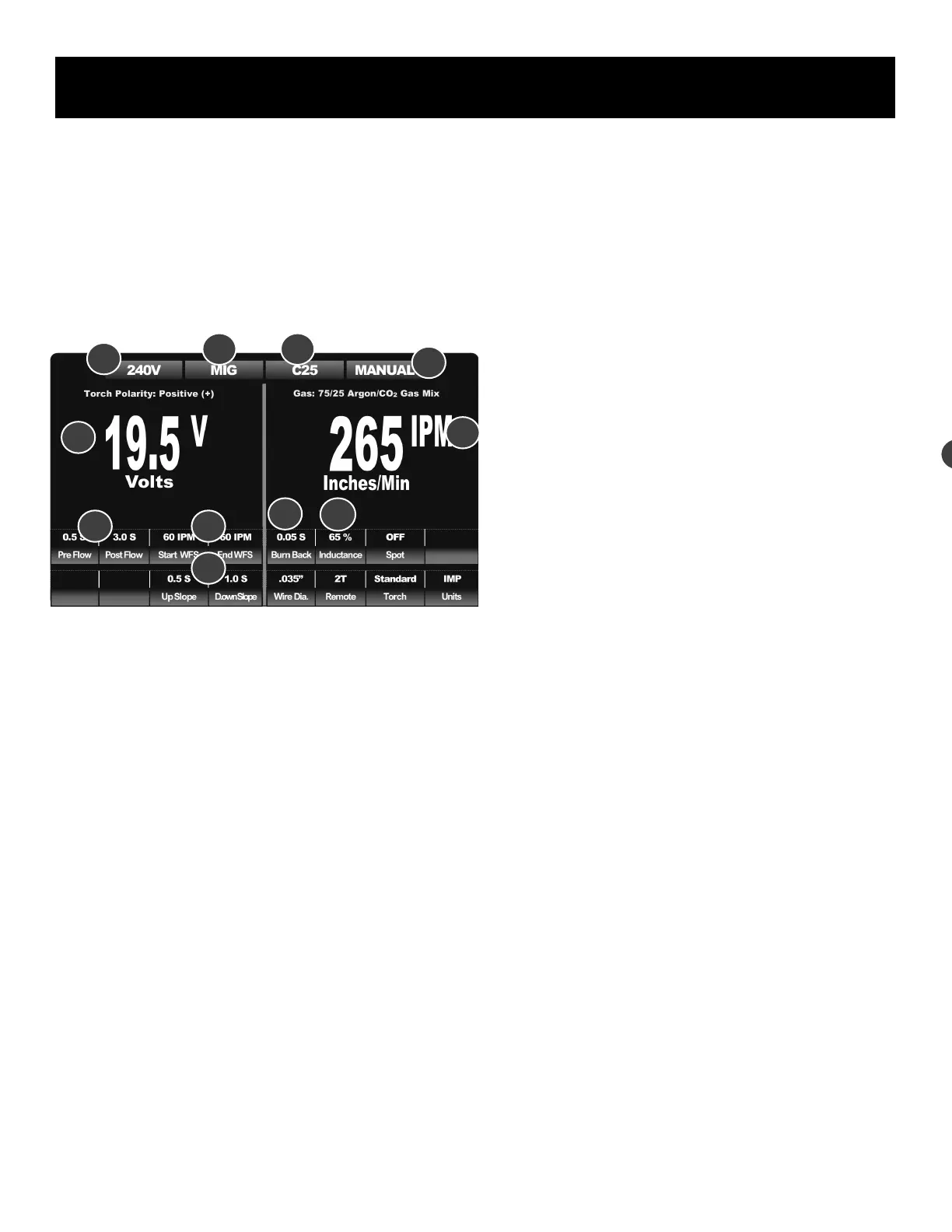
1. Main Left Display, Default Voltage Display. Adjust the voltage with left
adjustment knob. To adjust other parameters or functions, enter the
adjustment mode with left down arrow key to navigate to the desired
parameter to highlight and enable adjustment. When a parameter or
function is selected for adjustment, the numbers will turn from white
to red. Voltage is the default setting of the left side. After 5 seconds
of no input or adjustment of other parameters or functions, the select-
ed setting will default back to the Voltage setting and exit adjustment
mode.
2. Voltage Input Conrmation. This conrms which voltage the machine
is being supplied. This also serves as a diagnostic tool. If the ma-
chine shows 120V, while operating on 240V input, then the power
supply to the welder is likely faulty. With 120V output, the bar will
turn yellow to remind that the welding output is limited. NOTE: Maxi-
mum output of the machine is governed by the input voltage. Some
selections may not be possible on reduced input power.
3. Process and Gas Reminders. When viewed together, both 3 and 3a
reminds the user which process has been selected. In one of the
MIG process modes MIG will always display with either C25 (75/25
Ar/CO2 for Steel), C100 (100% CO2 for Steel), Mix Gas ( 98/2 Ar
CO2 for Stainless/Inox), Ar Gas (100% Argon for Aluminum), or No
Gas (For Flux-Cored on Steel) in wire feeding modes.
4. Manual/PowerSet Mode. This indicates which mode the machine is
operating in, whether in full manual mode or in PowerSet mode
which is a synergic, more automated mode. In PowerSet mode,
many functions may not be available for adjustment and will be pre-
set. (See the MIG PowerSet section).
5. Main Right Display, Default Wire Feed Speed Display. Adjust the
wire feed speed (WFS) with right adjustment knob. This display can
indicate the wire feed speed in either Inches Per Minute (IPM) or in
Meters Per Minute) M/Min. This is the default setting of the right
side. Other parameters and functions will be represented in the dis-
play when in adjustment mode. When the Wire Feed Speed or other
parameter is selected for adjustment the display will turn red in color.
After 5 seconds of no input or adjustment of any parameter or func-
tion, the selected setting will default back to the Wire Speed setting
and return to white. While actively welding, the display function will
change to read actual measured amperage output.
6. Pre-Flow/Post Flow Timers. Pre and Post Flow provide adjustable
shielding gas flow time before and after the weld. This is important to
reducing contamination in the weld. The arc start and wire feed will
be delayed slightly by the amount of pre-flow time used but helps
provide a gas envelope around the weld. Post flow helps cool the
torch and provides shielding around the weld after the arc is terminat-
ed. This helps prevent oxidation of the weld. NOTICE: In gasless Flux
-Cored mode, Pre and Post Flow will be unavailable for adjustment
and the space will be blank. Typically a setting of about 0.5 seconds
for Pre-flow and 3-5 seconds for Post Flow are used.
7. Start/End WFS. The starting wire feed speed helps the unit start
cleanly and smoothly. It can be used with up-slope to helps to im-
prove the quality of the start and transition into the welding amperage.
This provides a type of “soft start” which is similar to a hot start set-
ting. The end wire feed speed is used as nishing wire speed feed,
and is used to ll the crater left at the end of the weld at arc termina-
tion. To reduce the impact of this function, set to 60 IPM (.5 M/M)
and set up and down-slope to 0.0 Seconds.
8. Up/Downslope Timers. The slope is used to ramp wire speed up or
down, at the start of the weld or at weld termination. Up-slope is used
with Start Amps to increase wire speed (or decrease it, depending
upon the setting desired) from the starting wire feed speed. Down-
slope is used to decrease wire speed from welding wire feed speed to
the end wire speed. This provides the time necessary to complete the
crater ll process at the end of the weld. Either Up or Down Slope
can be set to “0.0” if the function is not desired.
9. Burn Back. This is the amount of time the arc stays on after the wire
stops feeding. It is used to help prevent the wire from sticking in the
weld and to reduce the need for constant trimming of the wire before
restarting. Use a setting of .1 to .3 seconds to begin with for most
applications. Smaller diameter wires need less burn back time
10. Inductance. This improves the wet-in of the weld. A low setting will
result in a very poor arc, with a high pitch. The result will be a raised
ridge in the middle and poor wet-in. Excess spatter may be observed.
The result of too high of a setting will result in a very fluid, flat pud-
Component Identification and Explanation
1
2
6
3
5
4
3a
7
8
9
10
1


 To Next Page