45
Component Identification and Explanation
Operating the 2T/4T Remote Function
The Remote Torch Trigger function works with both the MIG and TIG pro-
cesses. The Trigger function is designed to allow the user to program the
welder so that the stages of the weld cycle can be controlled via operation
of the torch switch. This should not be confused with a Remote Amp con-
trol like a Foot Pedal or a Spool Gun Amp control wheel. The switch itself
provides no adjustable control. It is only designed to cycle a stage or stag-
es of the weld cycle. Both TIG and MIG processes behave similarly in 2T
and 4T modes since there are very similar controls in both processes.
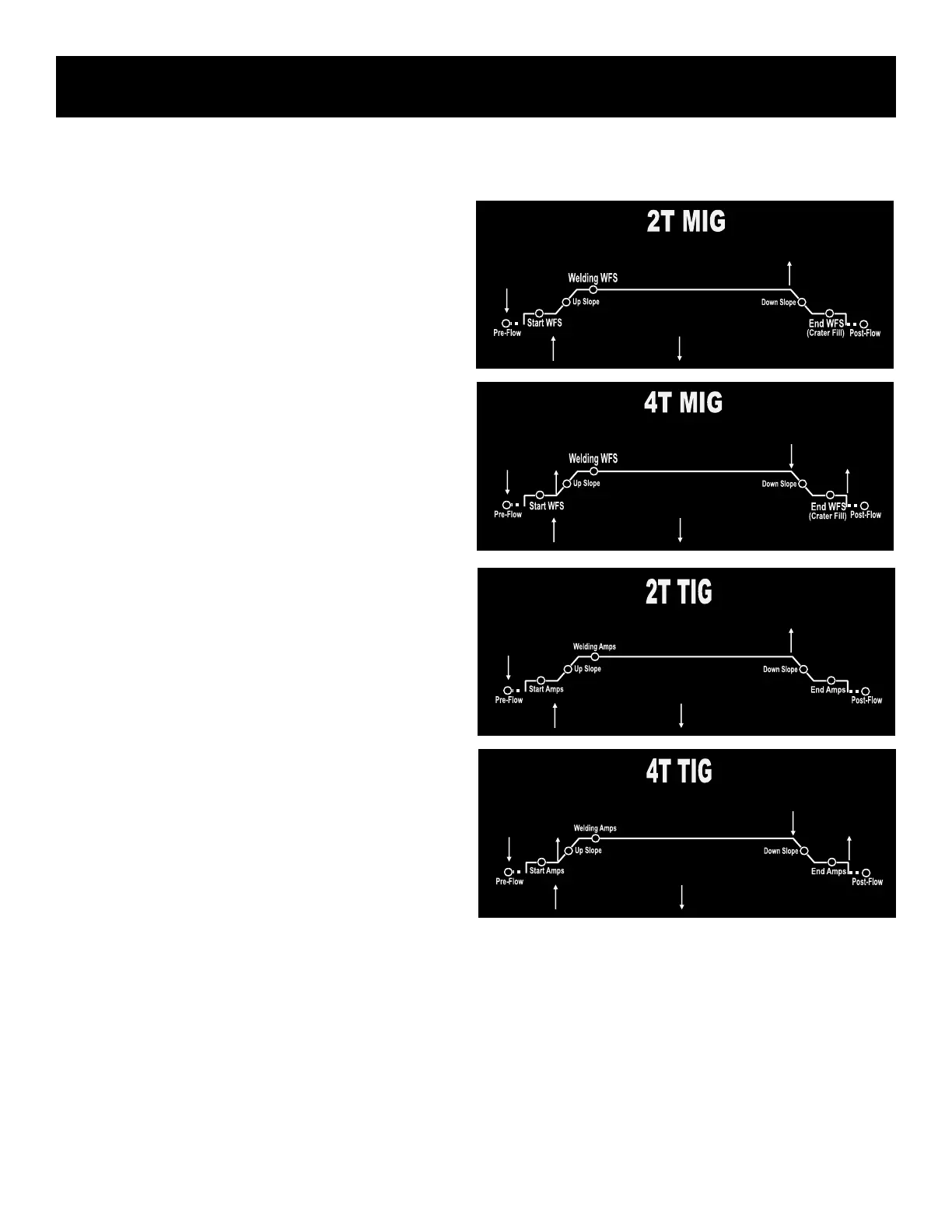
2T function controls all of the weld cycle with a simple press-and-hold and
release action. This is the conventional “pull the trigger” mode that is famil-
iar to most users, but it involves controlling more functions than a simple
“on and off” of the weld arc. This is also called a 2 step function. The torch
trigger moves in two directions, each change of direction signals the welder
to advance to another part of the weld cycle
4T function controls each stage of the weld cycle by multiple press and
hold actions of the torch trigger. This is used to retain manual control over
the slope stages and start and end portions of the weld cycle through each
movement of the torch trigger. Press the trigger and hold to start the Pre-
flow cycle and start the weld. Once the arc has started release the trigger to
upslope and weld at the normal set Amperages. Pull and hold the trigger to
allow the down slope cycle to occur. Once the down slope cycle has com-
pleted and the weld crater is adequately lled, release the trigger to end the
weld. The arc will terminate and the Post Flow cycle will begin. A common
error is to simply click the torch trigger rather than hold the trigger during
the down slope. The only time the trigger should be clicked is in the mid-
dle of the down slope cycle to toggle the weld back to the welding cycle
Amperage. If the cycle has fully reached the bottom of the down slope the
cycle cannot be restarted and the arc will terminate when the trigger is
released. This is useful for managing the weld heat once it begins to get
hot. This toggling feature can be repeated during the weld. It’s not meant
to be a adjustable amp substitute, but it is useful to help manage heat tem-
porarily when a weld gets too hot to manage.
When using the TIG foot pedal, the Up and Down Slope functions are irrel-
evant because the user’s foot is controlling the weld function manually. It’s
important to select only the “Pedal” function for the unit when the foot pedal
is plugged in.
For the Spool Gun in MIG mode, the selection of the torch type automati-
cally gives you control over the Amperage, but it still cycles all of the 2T/4T
programming through the separate trigger pulls. The Wire Speed/Welding
Amps are adjusted on the gun, while the max amperage is set on the
screen.
See the next column for a visual explanation of 2T and 4T function in TIG
and MIG. Notice that the arrow buttons indicate an up (in or press) or down
(out or release) movement of the torch trigger.
NOTE: The 2T+A and 4T+A settings allowed by this welder are special
functions that operate essentially the same way as 2T and 4T. These set-
tings are only meant for use with a TIG torch that has a separate torch
switch for starting the arc and triggering the programming and a separate
potentiometer/amptrol. The purpose of this type optional torch is to be able
to pre-program the slopes, start/end amps, but still retain a moderate
amount of control of welding amps without having to go to the machine to
readjust. This torch is not meant to “roll on or roll off” the Amperage during
welding. The tapering is done with the slope cycle. This type of torch con-
guration is only meant to be used to ne tune amperage before welding
and during welding. The maximum amperage is still set on the machine
which dictates the control the range of the torch amptrol.
= UP ON SWITCH
= DOWN ON SWITCH
= UP ON SWITCH
= DOWN ON SWITCH
= UP ON SWITCH
= DOWN ON SWITCH
= UP ON SWITCH
= DOWN ON SWITCH
Using The Trigger/Torch Switch Remote Functions


 To Next Page