7700FR/7800FR MultiFrame
7800TR-32x24 Modular Tally Router
Page -
8 Revision 1.2
3.3.2 Card Edge Serial Port
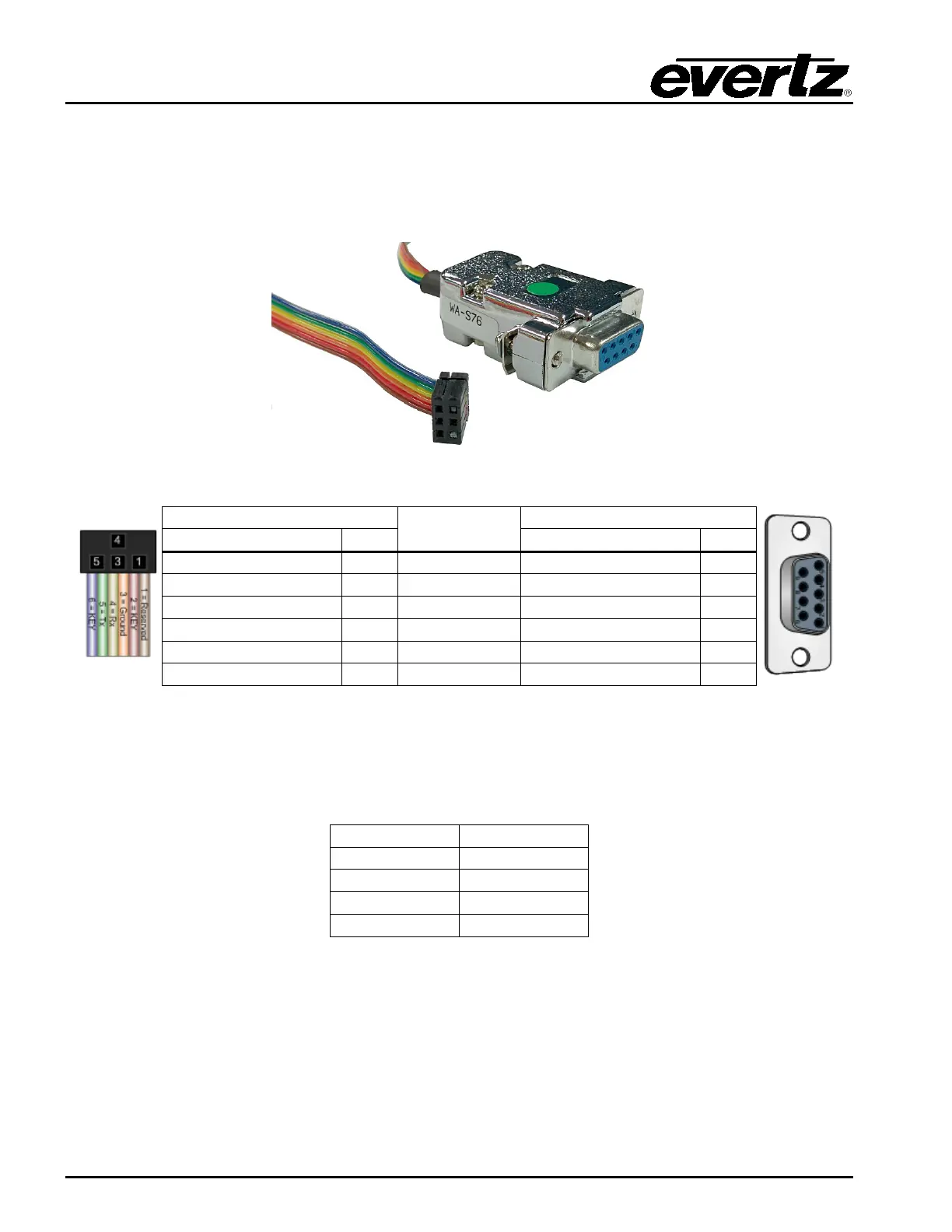
The 4-pin header at the card edge (J8) contains a serial port that must be used to set the IP address of
the card. This requires an Evertz WA-S76 rainbow cable, also known as a 7700 Upgrade Cable. This
cable is shipped with every Multiframe and is common to all 7700/7800 modular cards.
Figure 3-3: 7700 Upgrade Cable Picture (WA-S76)
Ribbon
Table 3-2: 7700 Upgrade Cable Wiring (WA-S76)
Connect the rectangular 3x2 pin connector of the WA-S76 cable to the card edge connector J8. The
connector is keyed so that it will only go on one way. Connect the 9-pin female D-Sub connector to a
COM port on a laptop or PC. You will need to start a terminal program such as Hyperterminal or
Teraterm, and open the respective COM port. Configure the COM port settings as follows:
Table 3-3: COM Port Settings


 To Next Page