7700FR/7800FR MultiFrame
7800TR-32x24 Modular Tally Router
Page - 22
Revision 1.2
4.2.1 Updating VistaLINK® with a New JAR File
The VistaLINK
®
Pro client provides an interactive and visual interface to configure and monitor the tally
router. This interface is stored in a JAR file. The JAR file for the 7800TR-32X24 is named
“VLProProd_7700TR.jar”. In order to recognize and display the graphical configuration for the tally
router, VistaLINK
®
Pro must first be updated with this JAR file. Future versions of VistaLINK
®
Pro will
have the 7800TR-32X24 JAR built-in, however newer versions of the JAR will occasionally be released
by Evertz, usually in conjunction with new versions of firmware.
To see which version of the JAR is being used, open the VistaLINK
®
Pro client and select the “Tools”
menu, go to “Products” and select the “V
ersion Information…” menu item.
It is critical that the JAR version used is matched to the firmware version of the unit,
otherwise some controls may not operate properly. All JAR updates are available on the
Evertz website (www.evertz.com
). The 7800TR-32X24 is listed under the “Routers”
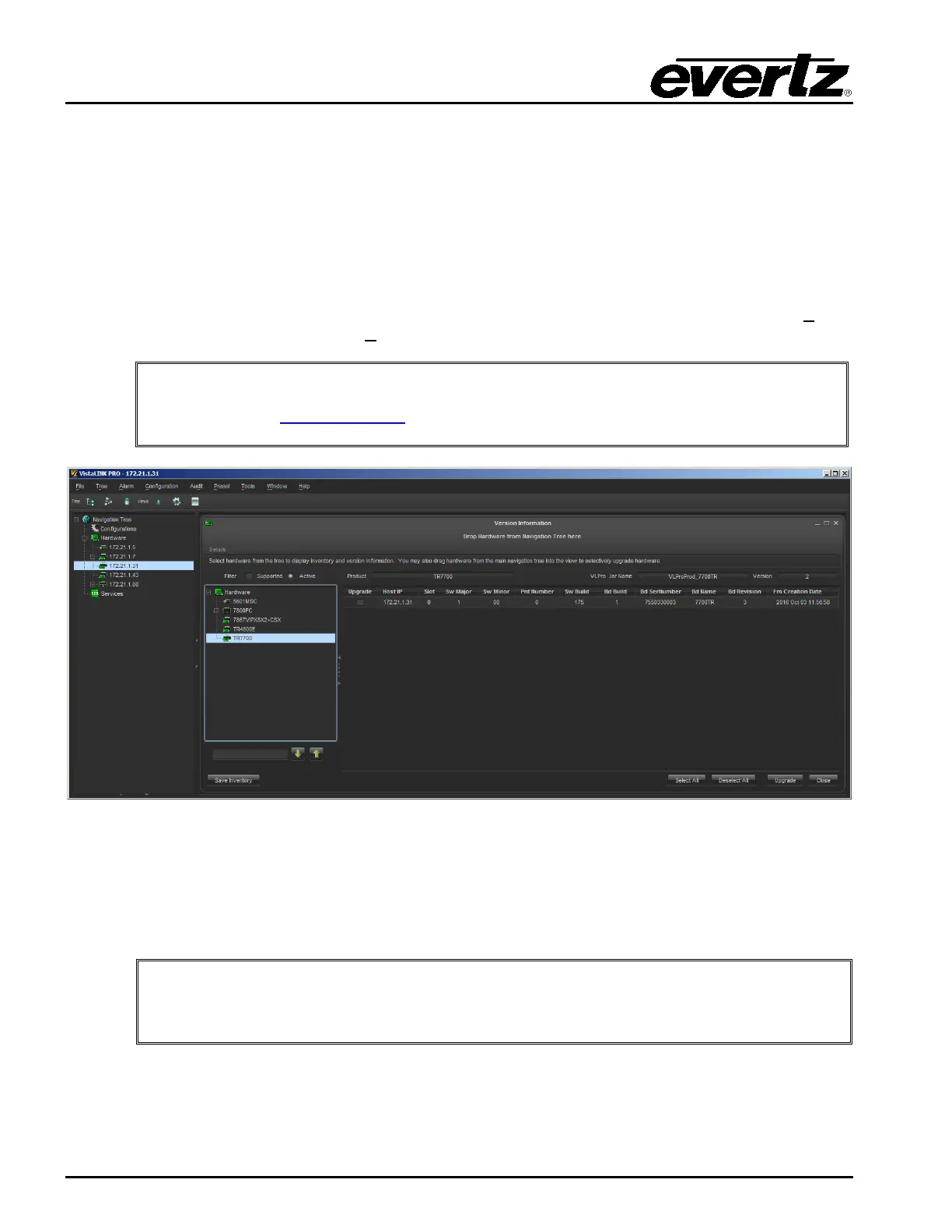
Figure 4-1: VistaLINK® Pro Version Information
In the Version Information dialog window, all of the JAR files that are contained within the VistaLINK
®
Pro client are listed on the left. Scroll down the list to the TR7700. Once selected, the product version
is displayed. In the example above, the JAR file version 2 is being used. If the TR7700 does not
appear in the list, then VistaLINK
®
will have to be updated.
The firmware version on the unit is shown in the Version Information dialog window.
The “Sw Build” number shows that the unit is running build 175 firmware.


 To Next Page