7700FR/7800FR MultiFrame
7800TR-32x24 Modular Tally Router
Revision 1.2 Page - 5
3 INSTALLATION
3.1 REAR PANEL
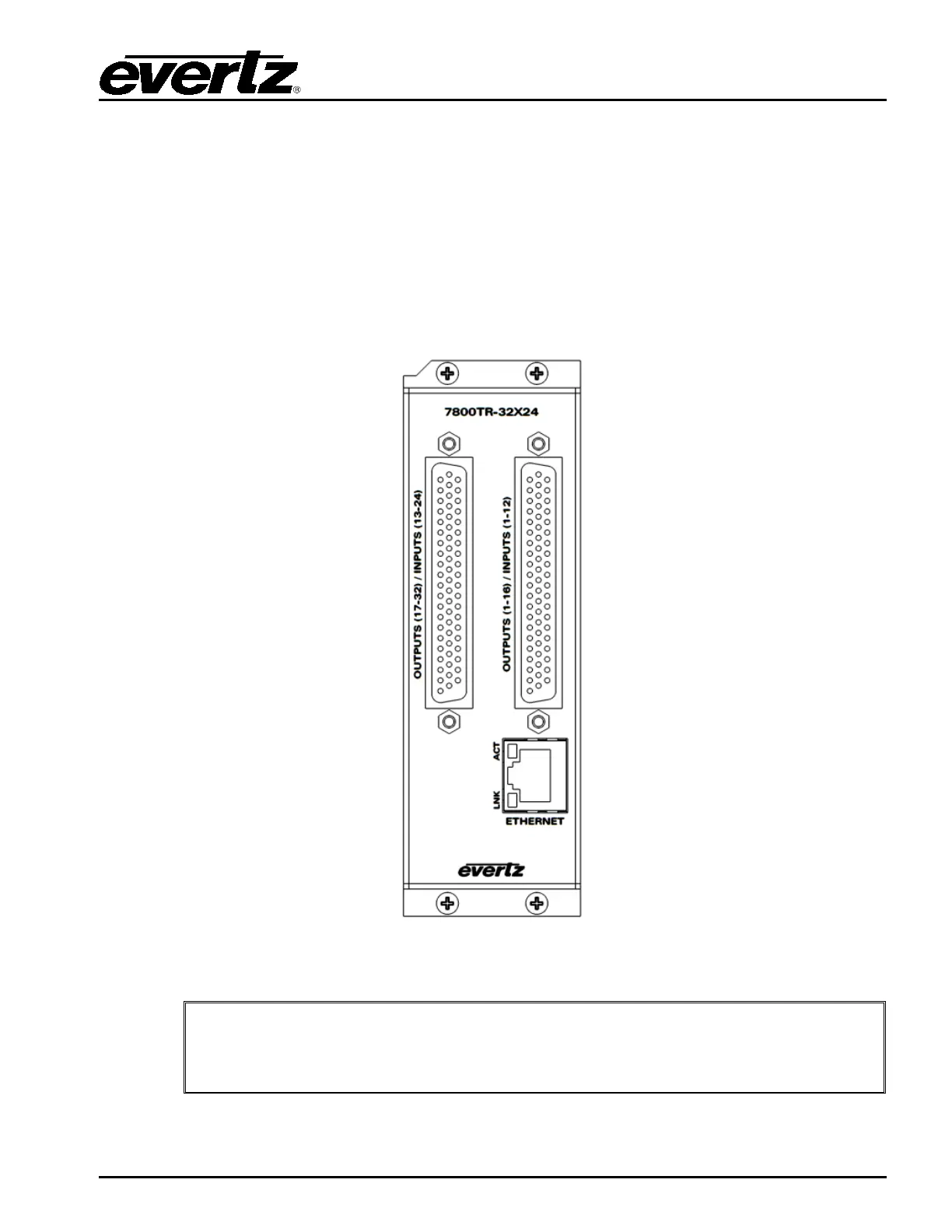
Figure 3-1 is an illustration of the rear plate I/O module that accompanies the 7800TR-32x24. The rear
plate occupies two slots in a 7700FR multiframe. There are two female high-density 62-pin D-Sub
connectors for the 32 general purpose outputs, 24 general purpose inputs, and wet voltage. There is
also a gigabit Ethernet jack for configuration and control. Install the rear plate onto the rear of the
multiframe in a free location of your choice. Secure the rear plate using the four provided M2.5 x 8mm
screws. Take note of the two slot numbers the rear plate occupies.
Figure 3-1: 7800TR-32x24 Rear Plate
A ribbon cable joins the two boards inside the rear plate. When installing the rear
plate into a frame, take care that this ribbon cable does not become dislodged at
either end or pinched against the frame metal.


 To Next Page