7700FR/7800FR MultiFrame
7800TR-32x24 Modular Tally Router
Page - 30
Revision 1.2
Once all devices are added, an Upload Required notice will appear in the top-right corner. Click on
this and then commit the configuration changes to the Magnum server.
5.2.3 Setting up the MAGNUM Tally Grid
Once all devices are configured, the GPI and GPO on the Tally Routers can be linked to actions on
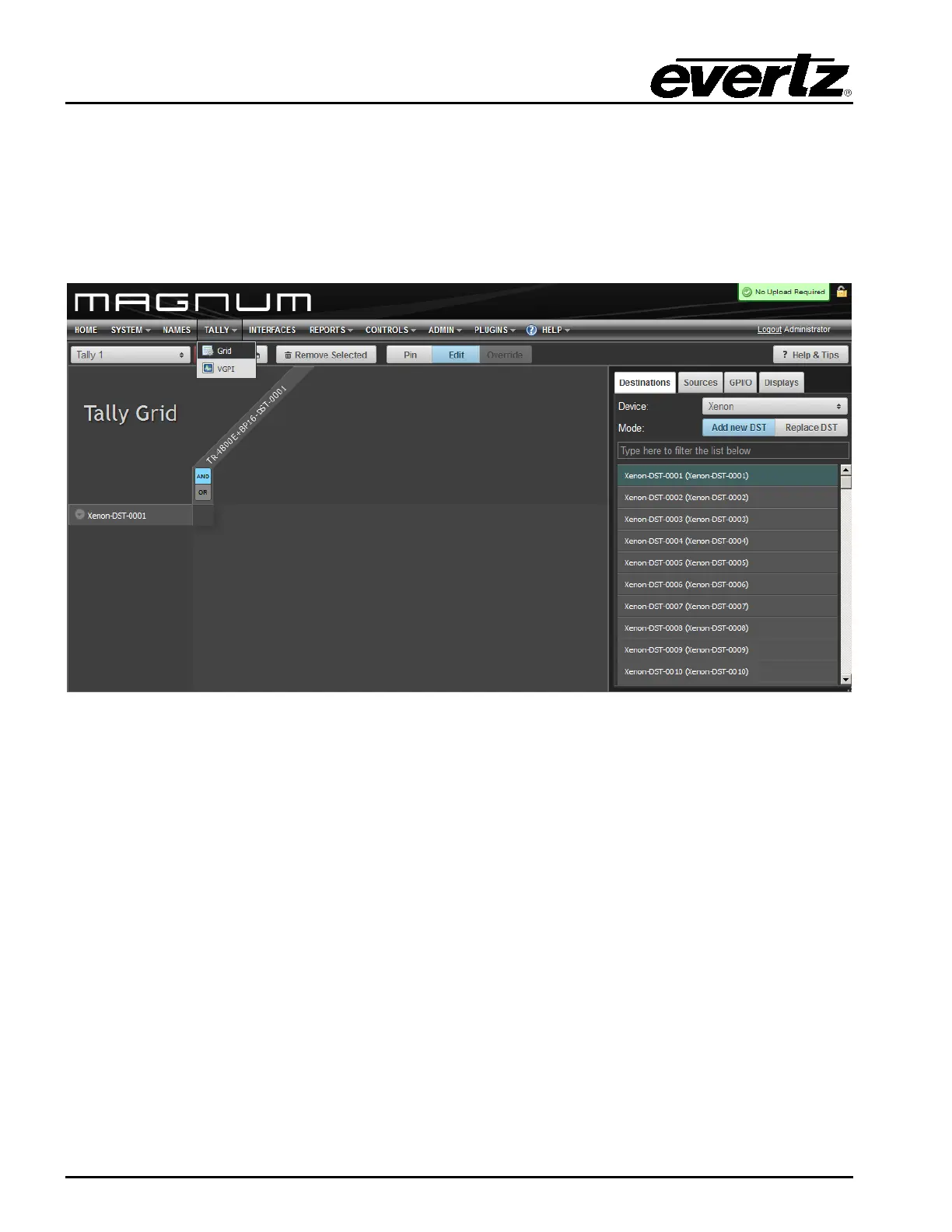
routers or GPIO on other Tally Routers. To configure this, go to the TALLY menu and select Grid.
Figure 5-4: Magnum Tally Grid Configuration View
Click on the EDIT button to make changes to the Tally Grid. The Tally Router devices will appear under
the GPI/O tab on the right side of the screen. The Tally Router sources (SRC) are GPIs, and the tally
router destinations (DST) are GPOs. All the configured router sources and destinations are shown as
well. It is easy to map a router source change to a tally router destination (GPO) activation. Once
changes have been made to the tally grid, the “Save Changes” button must be pressed.
Multiple tally grids can be configured. The drop-down box selects between the tally grids. Only one grid
can be active at a time. Click the “activate” button to make the current tally grid active. Once activated,
Magnum will monitor all triggers and activate the selected GPOs in response in real-time.


 To Next Page