12
Control Lever Friction Adjustment
Indicator LED Brightness and
Gauge Backlighting
The RPM switch also allows the operator to
adjust the brightness of indicator LEDs on the
control base and the backlighting of the
NMEA 2000/I-Command gauges.
IMPORTANT: The control lever MUST be in
the NEUTRAL position.
To change the brightness of indicator LEDs
and gauge backlighting, press:
• the + side of the RPM switch to brighten
• the
– side of the RPM switch to dim.
CONTROL LEVER FRICTION
ADJUSTMENT
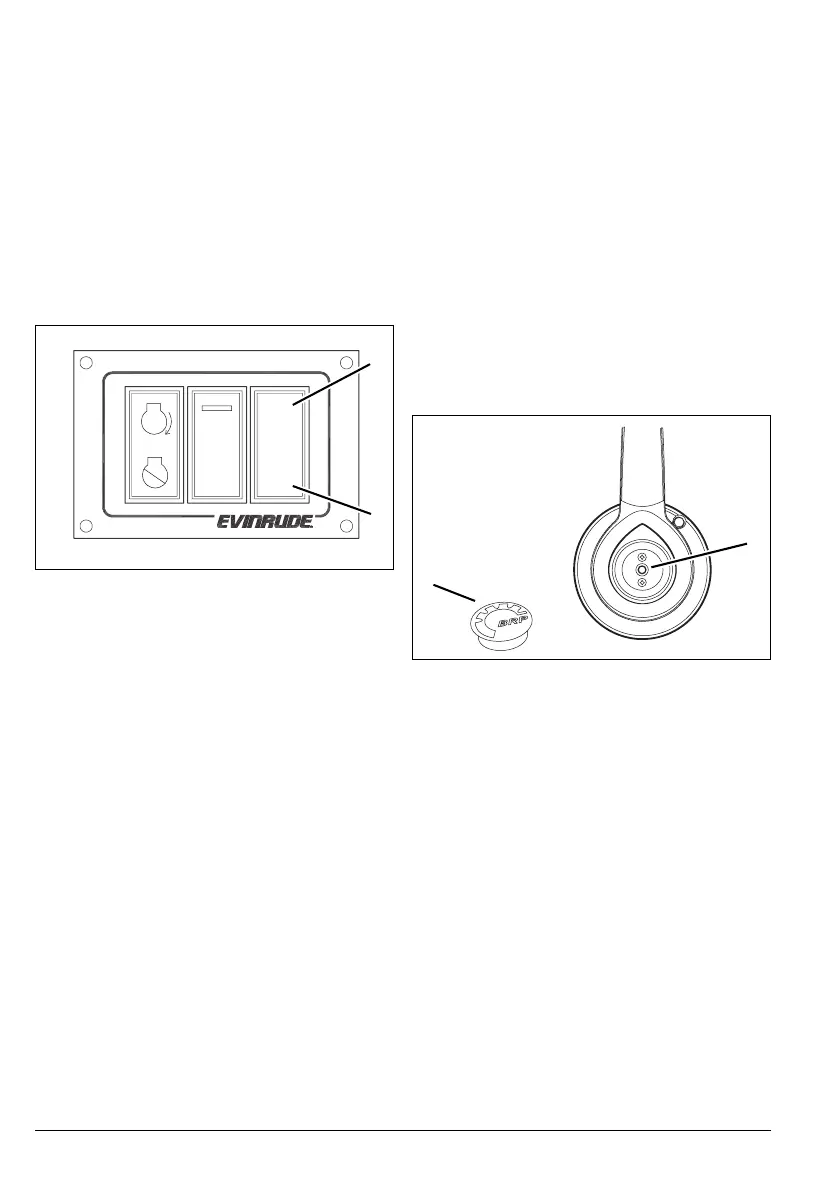
Check control lever friction adjustment. When
properly adjusted, the control lever should
have low friction to allow easy movement in
the throttle range, and not allow vibration to
change the throttle setting.
Remove cover from control lever. Use a 5/32
in (4 mm) hex tool to adjust friction adjustment
screw. Turn the adjustment screw clockwise
to increase the friction or counterclockwise to
reduce the friction.
Throttle Friction
This adjustment is used to increase or reduce
the force required to move the control lever
through the throttle range.
1. + side of RPM switch
2.
– side of RPM switch
008003
1
2
+
RPM
–
N
1. Cover
2. Throttle friction adjustment screw
008008
1
2



 To Next Page