9
X EVINRUDE® ICON™ CONCEALED SIDE MOUNT REMOTE CONTROL USER’S GUIDE
Shift and Throttle Control
IMPORTANT: Carefully check the function of
all control and engine systems before leaving
the dock. DO NOT shift the engine into FOR-
WARD or REVERSE while the engine is
stopped. Shift ONLY when the engine is run-
ning.
Control Lever
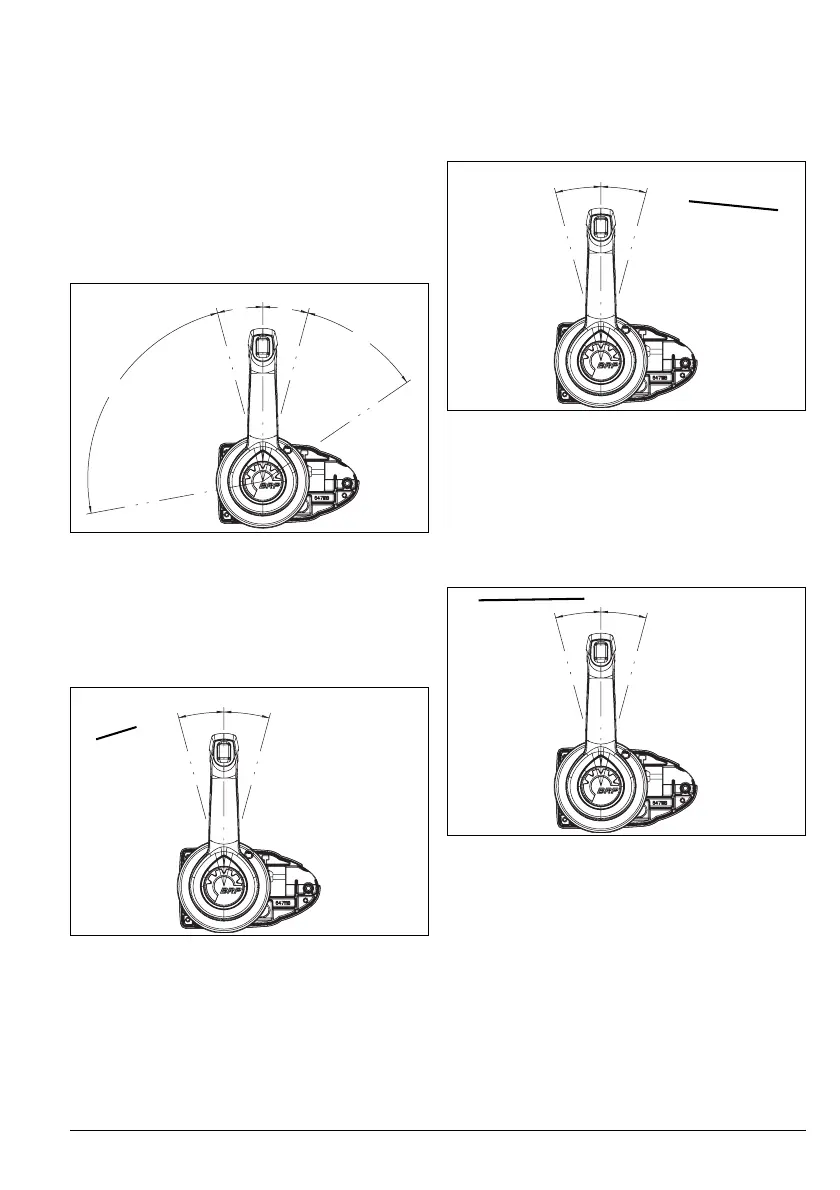
Control lever shift and throttle range is as
shown.
FORWARD Gear
Move the control lever to the forward position.
The NETRAL indicator LED turns OFF and
the outboard shifts into FORWARD (FWD)
gear.
Note: The ICON system delays gear changes
until engine speeds are below 1500 RPM.
REVERSE Gear
Move the control lever to the reverse position.
The NEUTRAL indicator LED turns OFF and
the outboard shifts into REVERSE (REV)
gear.
NEUTRAL
Move the control lever to the NEUTRAL (N)
position.
The NEUTRAL indicator LED turns ON and
the outboard shifts into NEUTRAL.
008004
1. FORWARD position
008005
15°
15°
40.5°
85.5°
F
u
l
l
T
h
r
o
t
t
l
e
R
E
V
F
u
l
l
T
h
ro
t
t
l
e
F
W
D
FORWARD
REVERSE
NEUTRAL
N
REV
FWD
1. REVERSE position
008005
1. NEUTRAL position
008005
N
REV
FWD
N
REV
FWD



 To Next Page