4
ICON REMOTE CONTROL FEATURES
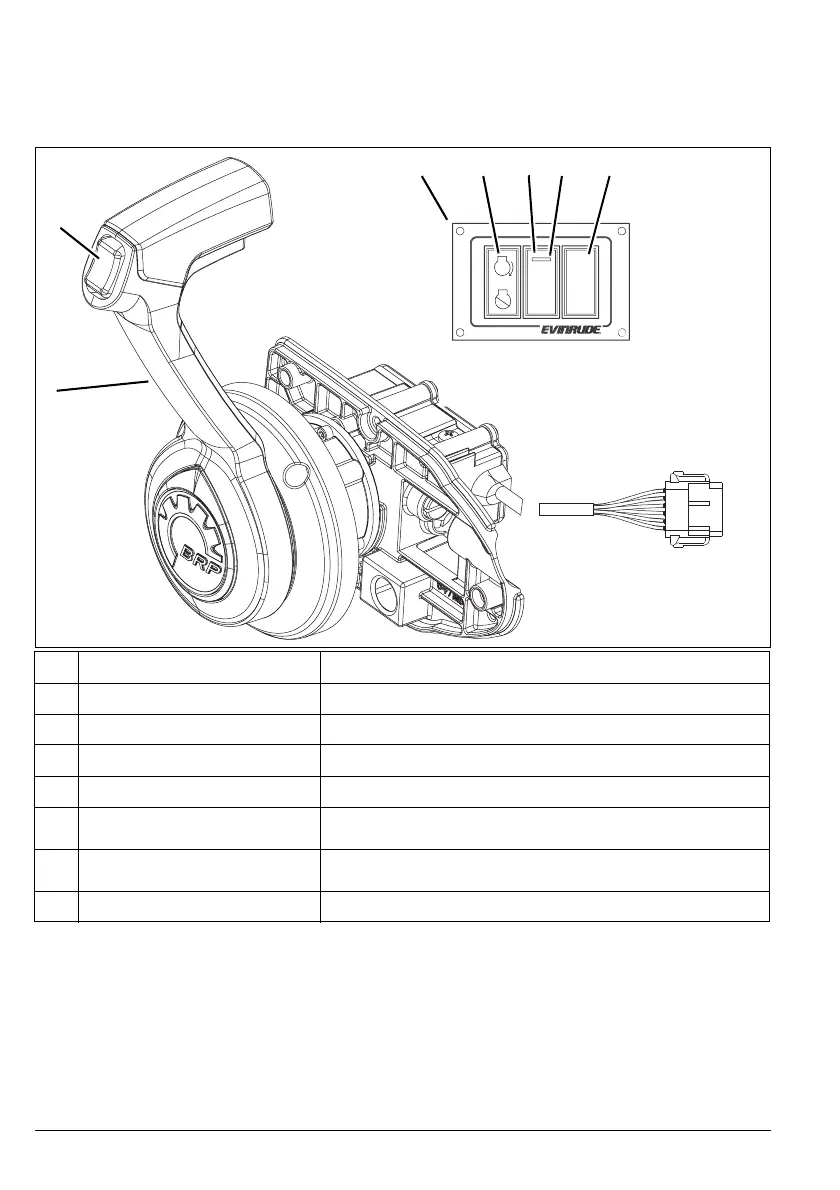
The ICON single lever concealed side mount remote control is used in single engine installa-
tions. Use the ICON single lever concealed side mount remote control for single station instal-
lations.
Feature Function
1
Control Lever Controls shift and throttle function for outboard.
2
Master Trim Switch Press to adjust trim setting of all outboards.
3
Switch Panel Contains Neutral Throttle, RPM and START /STOP switches.
4
START/STOP Switch Press to START or STOP the engine.
5
NEUTRAL Throttle Switch (N)
Press to disengage shift function. Allows for throttle only
function.
6
NEUTRAL Indicator LED
Turns yellow when control lever is shifted into NEUTRAL
position.
7
RPM Switch Press + or – to make slight adjustments to engine speed.
+
RPM
–
N
2
1
007967
3 4 5 6 7



 To Next Page