34
Français
FrançaisFrançais English
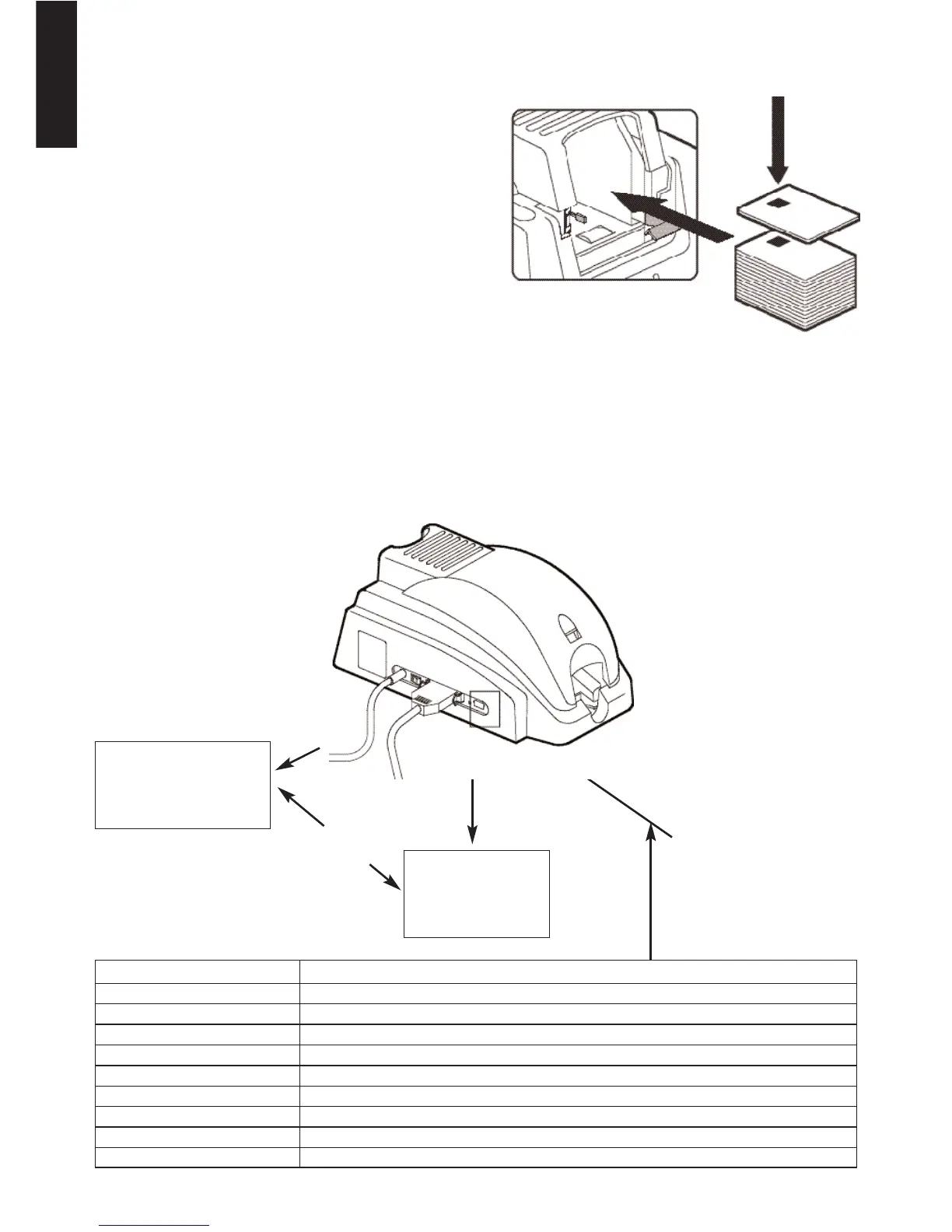
3. Smart Card Contact Station Interface
The New Pebble SMART Printer is equipped with a DB-9 connector at the back of the printer. This
connector, which is directly linked to the Smart Card Contact Station inside the printer, is to be lin-
ked to an external reader/encoder to program the chip.
Computer
External
Reader/Encoder
Printer
Interface
Serial
Interface
DB-9
Connector
DB-9 Pins Contacts on Smart Card
1 C1 (V c.c.)
2 C2 (reset 0)
3 C3 (clock)
4 C4 (reserved)
5 C5 (ground)
6 C6 (Vpp)
7 C7 ( E-S)
8 C8 (reserved)
9 C9
Ground when the chip is commutated to the station
2. Orientation of the cards
The Smart Cards must be installed in
the feeder with the chip on top with
the chip first (see opposite).
DB-9 Connector Pin Configuration:



 To Next Page