14
EVONIC - 104 INSTRUCTION MANUAL TEMPLATE ISS. 1EVONIC - 104 INSTRUCTION MANUAL TEMPLATE ISS. 1 INSETS. 1INSETS. 1
INSET REMOTE OPERATION
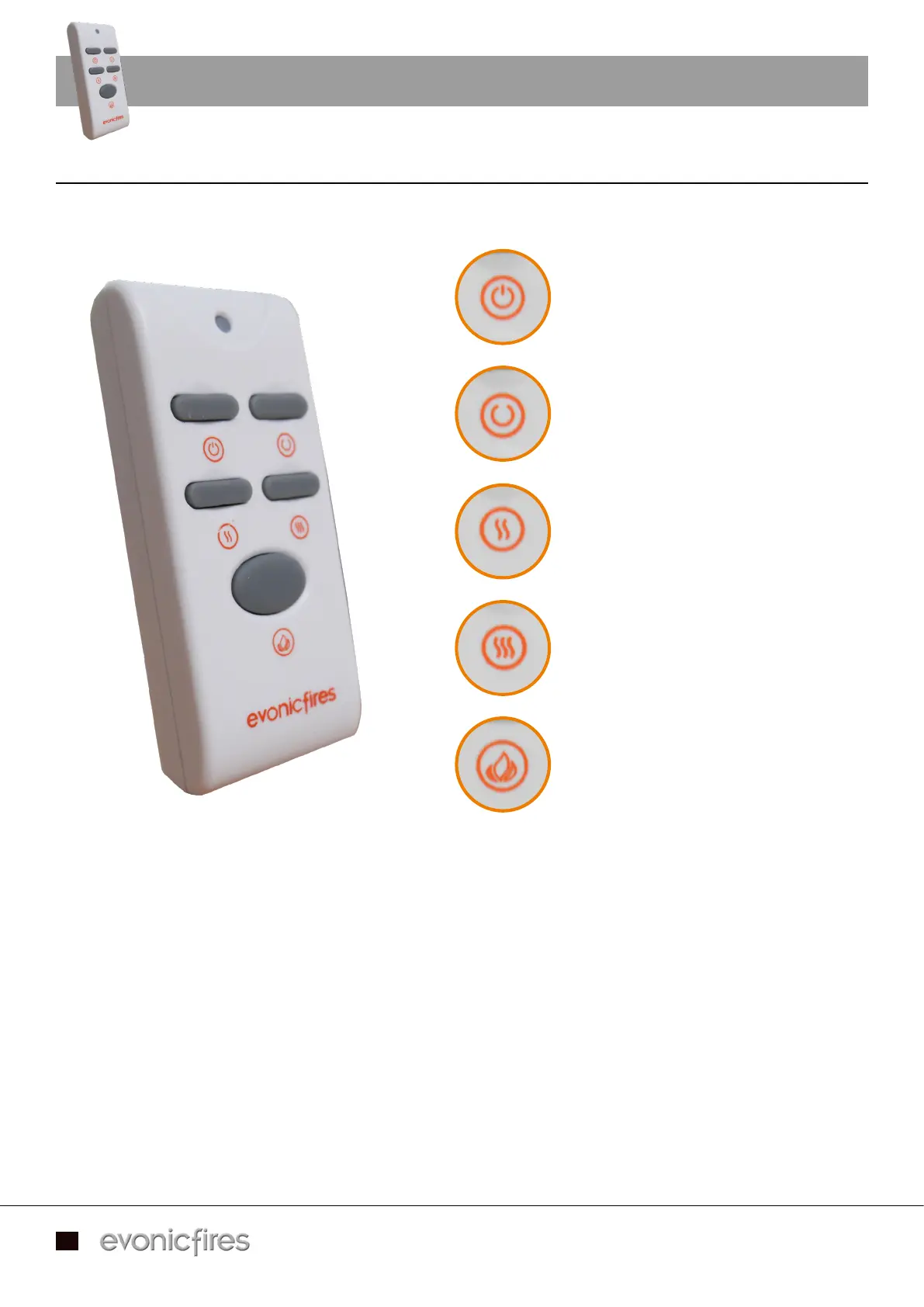
You can operate your appliance using the optional remote control. Ensure that the rocker switch on
the appliance is in the I/On position, then you can use the remote to control the appliance.
- To turn on the flame effect, press the top left button.
- To activate the heater at Low Heat, press the bottom left button.
- To activate the heater at High Heat, press the bottom right button.
- To turn off the heater and flame effect, press the top right button.
- To activate the dimmer function, press the large bottom button once to start, and then again to stop
at the desired dimmer setting.
- To turn off the appliance, press the rocker switch on the appliance to the On/Off position.
Top Left - Turn your flame effect ON
Top Right - Turn your appliance OFF
Middle Left - Low heat
Middle Right - High heat
Bottom - Dimmer switch
Applicable models - Oberon / Strellar / Kepler 22 / Colorado / Topaz / Argenta 16 / Argenta 22 / Sphera


 To Next Page