20
EVONIC - 104 INSTRUCTION MANUAL TEMPLATE ISS. 1EVONIC - 104 INSTRUCTION MANUAL TEMPLATE ISS. 1 INSETS. 1INSETS. 1
CONTROL OVERVIEW
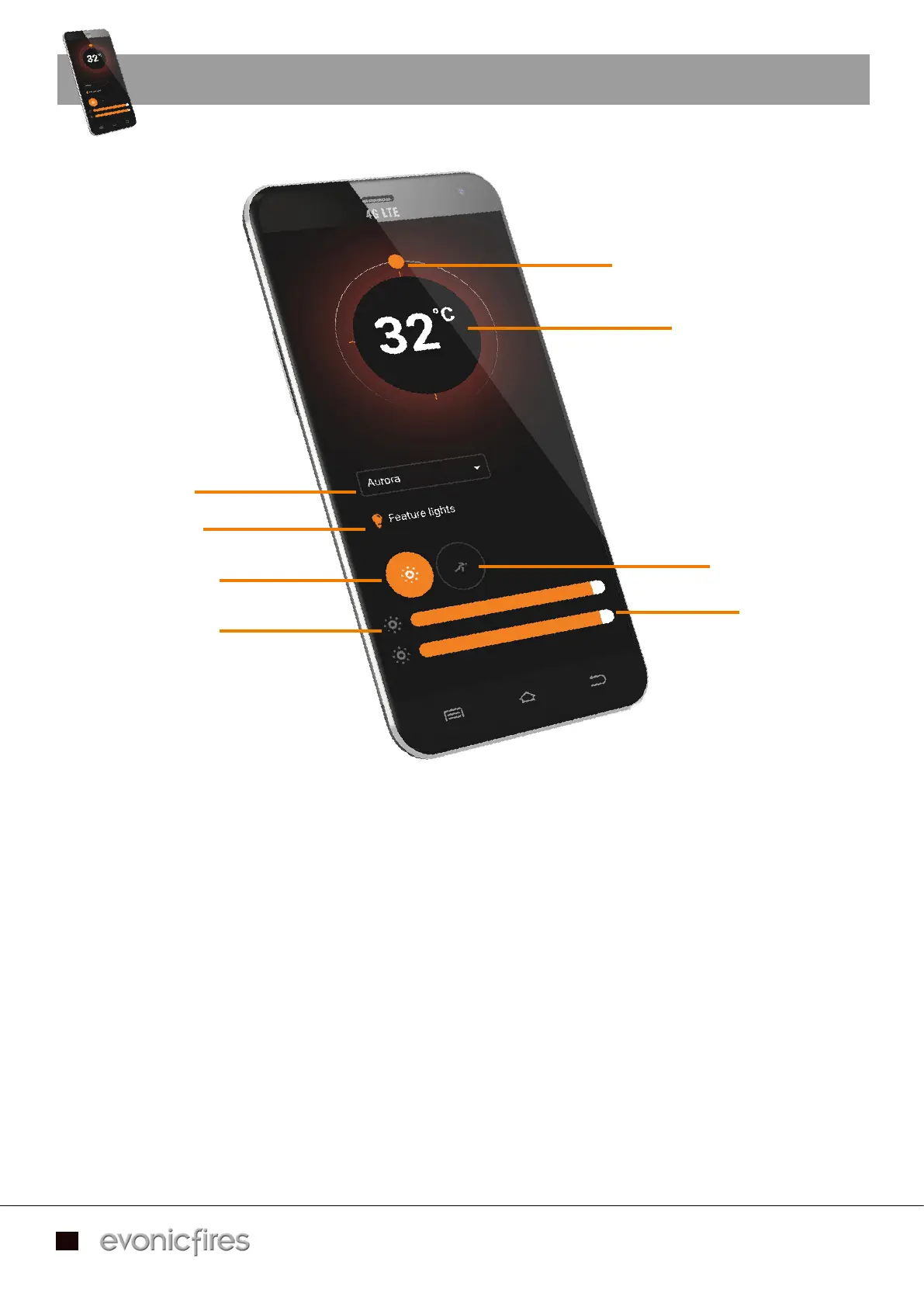
To adjust the desired temperature of your fire ensure that the heater is selected on the Home Page in To adjust the desired temperature of your fire ensure that the heater is selected on the Home Page in
the previous step. Then press, hold, and rotate the temperature dial to set the temperature.the previous step. Then press, hold, and rotate the temperature dial to set the temperature.
The animation drop down allows you to choose the flame effect for your fire, more flame effects are The animation drop down allows you to choose the flame effect for your fire, more flame effects are
available to download from our shop on the Home Page. available to download from our shop on the Home Page.
The ‘Feature lights’ button will activate the over fuel-bed lights, if you have a model with tile wings then The ‘Feature lights’ button will activate the over fuel-bed lights, if you have a model with tile wings then
this button will also turn on the side down-lighters.this button will also turn on the side down-lighters.
By clicking on lighting settings you can adjust the flame brightness by pressing, holding, and sliding the By clicking on lighting settings you can adjust the flame brightness by pressing, holding, and sliding the
tab at the bottom of the screen. Slide left to lower the brightness, and right to increase the brightness. tab at the bottom of the screen. Slide left to lower the brightness, and right to increase the brightness.
You can adjust the fuel bed brightness in the same way with the lower tab slider.You can adjust the fuel bed brightness in the same way with the lower tab slider.
To change the speed of the LED flame effect single press the speed setting option, and slide the top dial To change the speed of the LED flame effect single press the speed setting option, and slide the top dial
left to slow it down, and right to increase the speed. Likewise with the fuel bed speed, slide the lower tab left to slow it down, and right to increase the speed. Likewise with the fuel bed speed, slide the lower tab
left to slow it down and right to increase it.left to slow it down and right to increase it.
Animation choice
Turn your feature
lights ON or OFF
Lighting settings
Flame speed /
brightness bar
Temperature dial
Target temperature
Speed settings
Fuel bed speed /
brightness bar


 To Next Page