15
EVONIC - 104 INSTRUCTION MANUAL TEMPLATE ISS. 1EVONIC - 104 INSTRUCTION MANUAL TEMPLATE ISS. 1 INSETS. 1INSETS. 1
MANUAL OPERATION
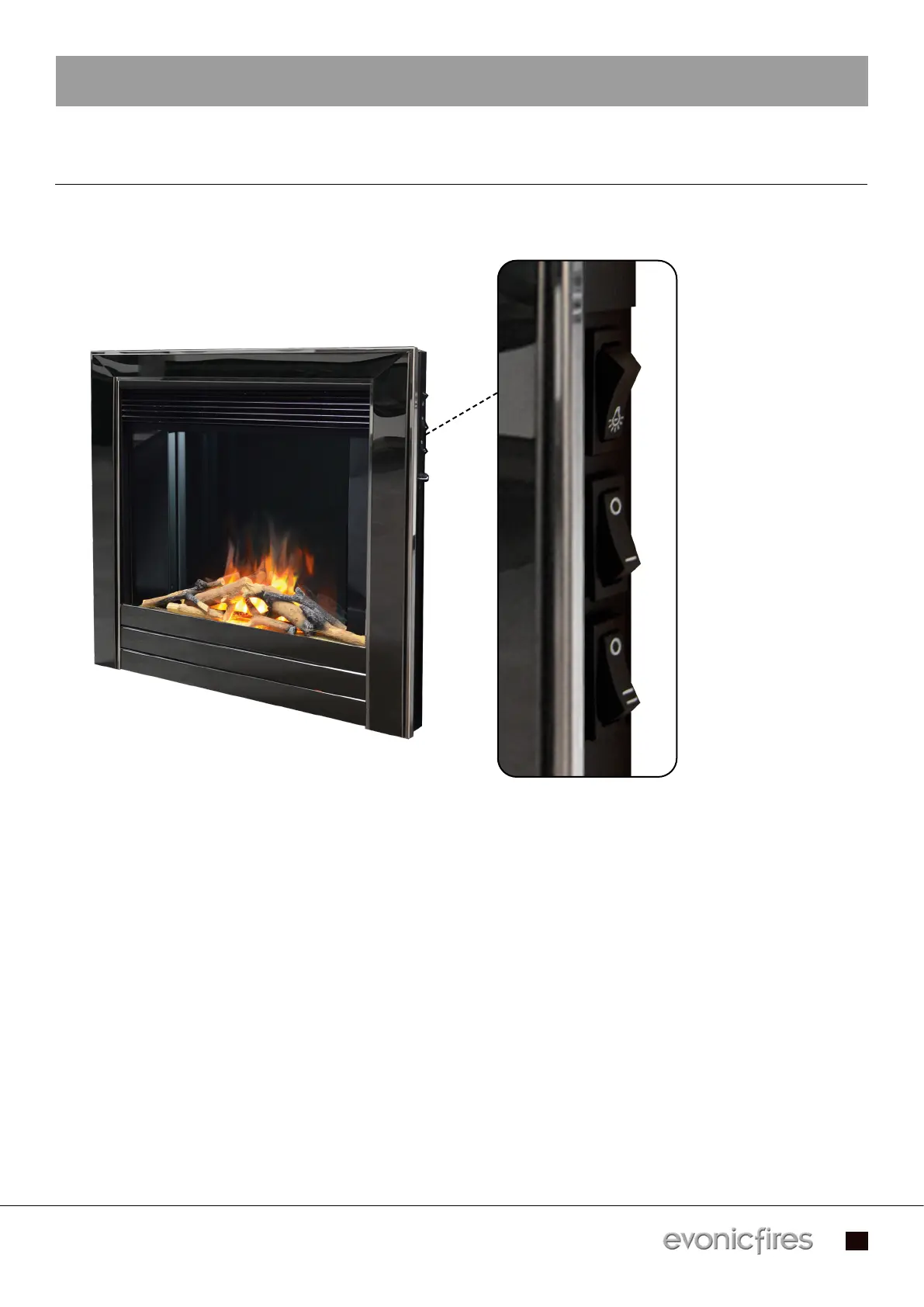
You can operate your appliance using the manual rocker switches located on the right hand side.
Please note there is no manual dimmer control.
- To turn on the appliance and activate the flame effect, press the top rocker switch to the I/On position.
- To activate the heater at Low Heat, press the middle rocker switch to the I position. To deactivate,
switch the rocker switch back.
- To activate the heater at High Heat, press the bottom rocker switch to the II position. To deactivate,
switch the rocker switch back.
- To turn off the heater and flame effect, press the top rocker switch to the Off position.
- If your appliance is fitted with a thermostat you can adjust the heat output by turning left to decrease
the heat, and right to increase the heat.
Applicable models - Oberon / Strellar / Kepler 22 / Colorado / Topaz
Flame effect ON
Low heat ON/OFF
High heat ON/OFF


 To Next Page