Connection Diagram With EVS XHub SDTI Hub
Example of XNet2 network with a SDTI hub:
5.6.3. Required Conditions to Set up and Run
XNet
1. All systems on the network shall belong to the XT3, XS3, XT4K, XS4K servers,
XHub3 devices.
2. The SDTI advanced option code (for network client, master, or server modes) shall be
validated in the options list.
3. They shall all be running compatible software versions. Otherwise, warning message
is displayed.
4. The SDTI speed parameter shall have the same value on all EVS servers (Network
page, SDTI section).
5. The EVS video servers shall operate the same multi-essence configuration.
44 5. Hardware Installation and Cabling
EVS Broadcast Equipment SA Issue 15.2.A- June 2017



 To Next Page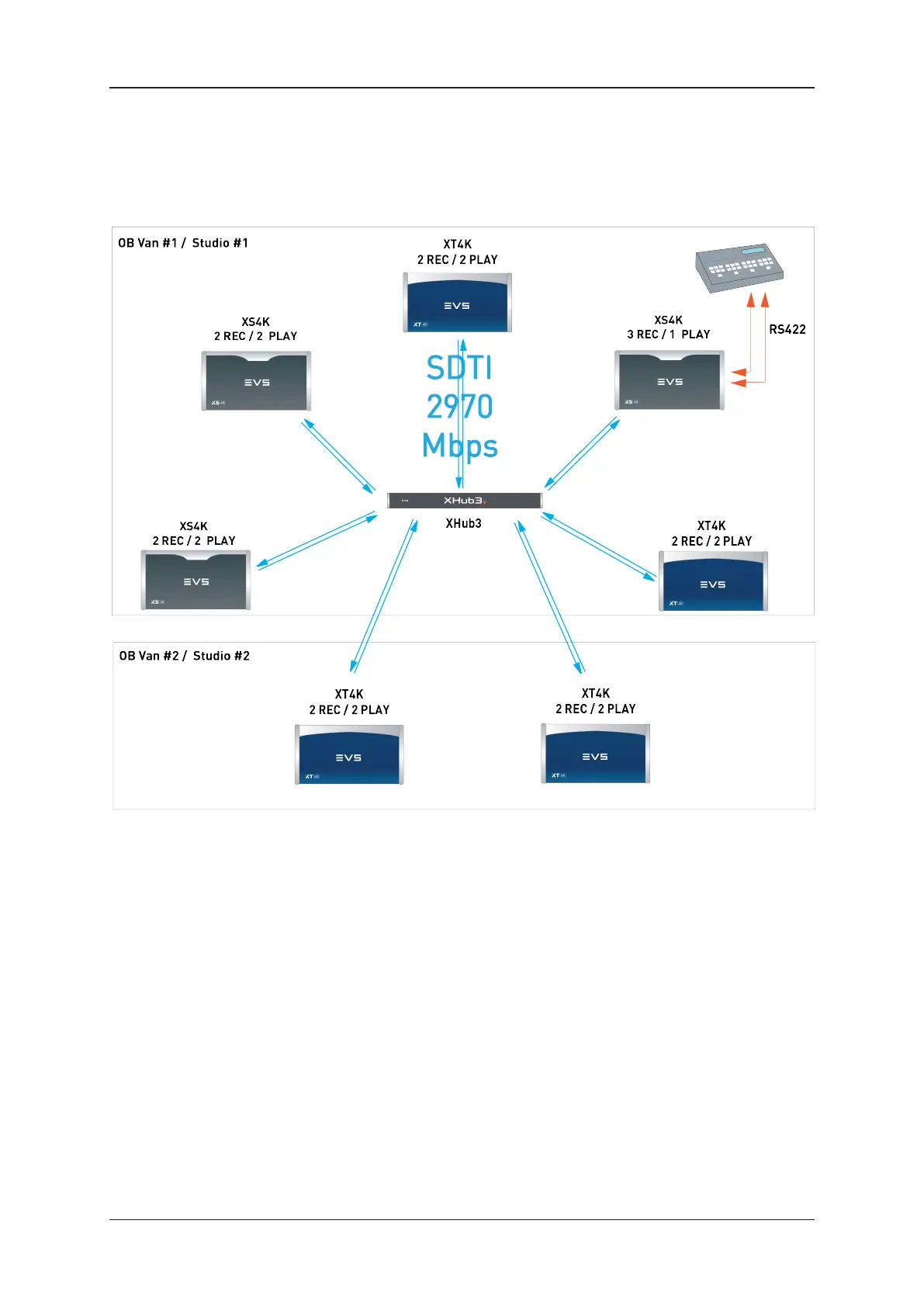


![Preview: EVS XT[2]](https://data.easymanua.ls/products/617905/200x200/evs-xt-2.webp)