Home
EXFO
Test Equipment
FTB-200
Page 102
EXFO FTB-200 - Page 102
222 pages
Manual
Save Page as PDF
To Next Page
To Next Page
To Previous Page
To Previous Page
Loading...
W
orking with Y
our Unit
92
FTB-200 v2
Setting Storage P
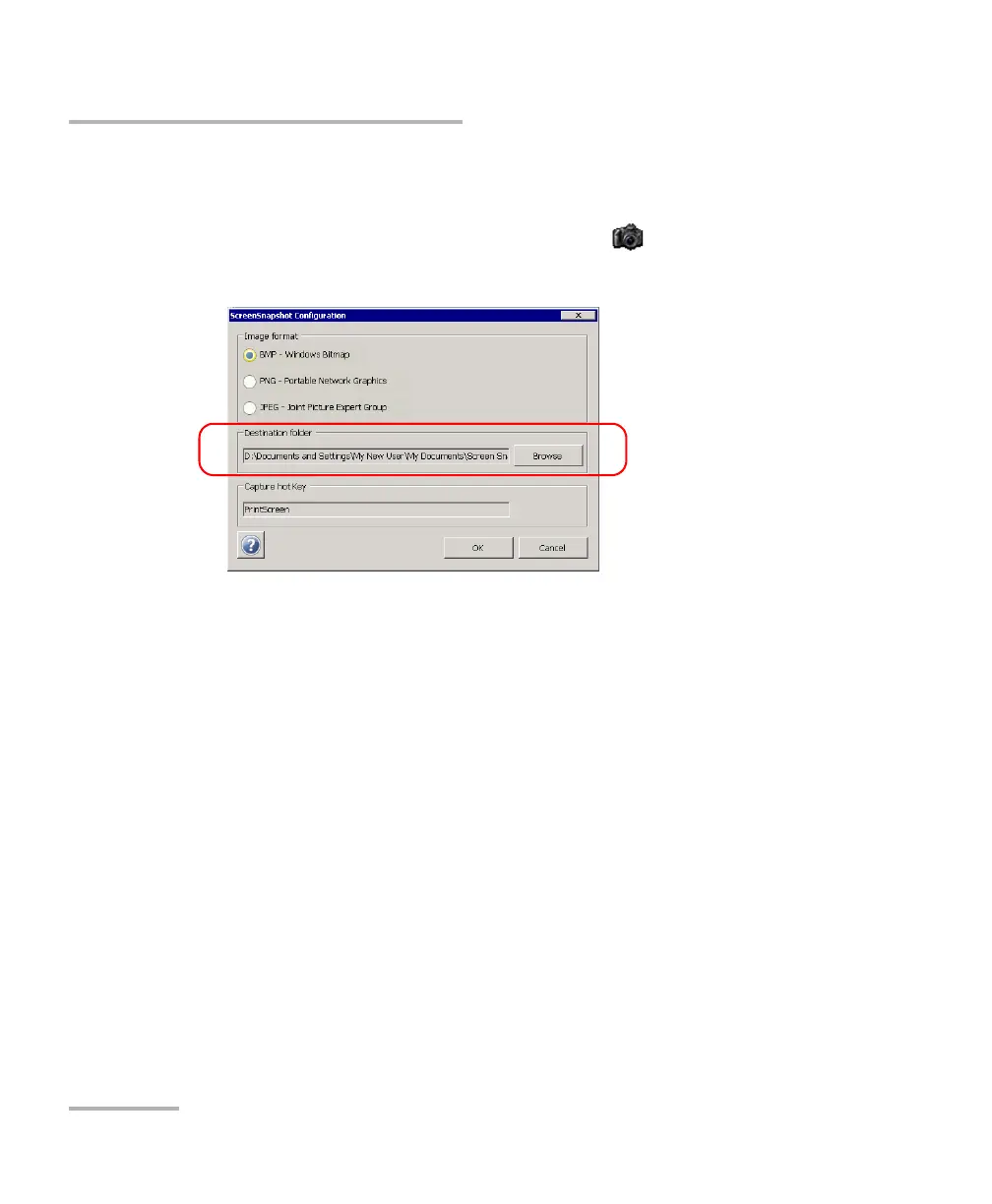
arameters for Screen Captures
T
o modify the destination folder:
1.
Minimize the Compact T
oolbox window
.
2.
F
rom the Windows taskbar
, double-tap the
icon.
3.
Under
Destination folder
, tap
Browse
.
101
103
Table of Contents
Main Page
Default Chapter
5
Table of Contents
5
Certification Information
8
1 Introducing the FTB-200 V2 Compact Modular Platform
11
Main Features
11
LED Panel Description
14
Keypad Description
16
Ports
17
Power Sources
18
Optional Software Package
18
Conventions
19
2 Safety Information
21
Other Safety Symbols on Your Unit
22
Laser Safety Information
23
Electrical Safety Information
24
3 Getting Started with Your Unit
29
Inserting and Removing Test Modules
29
Using a Keyboard, Mouse or Other USB Devices
35
Using the On-Screen (Virtual) Keyboard
37
Right-Clicking with the Touchscreen
37
Turning on or off the Unit
38
Installing or Upgrading the Applications
42
Activating Software Options
47
Starting Module Applications
52
4 Setting up Your Unit
53
Adjusting Brightness
53
Adjusting Microphone and Speaker Volume
54
Recalibrating the Touchscreen
58
Enabling or Disabling the Touchscreen Right-Click Feature
62
Customizing the On-Screen Keyboard
65
Enabling or Disabling the Automatic Logon
66
Configuring the Shortcut Buttons
69
Selecting the Startup Application
71
Selecting the FIP Startup Application
73
Configuring Network Printers
75
Selecting the Language of Operation
78
Setting Date and Time Formats
83
Adjusting the Date, Time and Time Zone
85
Configuring the Power Management Options
88
Configuring the Internet Options
92
Setting Other Parameters
92
5 Working with Your Unit
93
Printing Documents
93
Viewing PDF Files
96
Taking Screen Captures
97
Setting Storage Parameters for Screen Captures
100
Reading Audio and Video Files
104
Installing Adobe Flash Player on Your Unit
106
Browsing the Web
108
Accessing the Internet with a 3G USB Modem Key
110
Retrieving the GPS Location of Your Unit
116
Using the Calculator
120
Using the Text Editor
120
Accessing Other Tools
120
6 Using the Optional Built-In Power Meter and VFL
121
7 Inspecting Fibers with a Probe
123
8 Managing Data
125
Transferring Data Via Bluetooth
128
Connecting to a Wireless Network
136
Using the USB to RS-232 Adapter
141
Enabling or Disabling the Bluetooth and Wi-Fi Devices
147
Transferring Files with the USB Data Mover Application
149
Connecting to a VPN from Your Unit
155
9 Accessing Your Unit Remotely
163
Working with Remote Desktop
164
Working with Tightvnc
171
Adding Exceptions to the Firewall
177
10 Testing Network Connections
179
Performing a Ping Test
179
Performing a Trace Route Test
182
Exporting the Results
184
11 Maintenance
185
Cleaning Detector Ports
186
Cleaning the Touchscreen of Your FTB-200 V2 Unit
187
Recharging the Main Battery
187
Recalibrating the Battery
189
Replacing Batteries
192
Recalibrating the Unit
193
Recycling and Disposal (Applies to European Union Only)
194
12 Troubleshooting
195
Solving Common Problems
195
Restoring Your Unit to Normal Operation
201
Contacting the Technical Support Group
210
Transportation
210
13 Warranty
211
General Information
211
Liability
212
Exclusions
212
Certification
212
Service and Repairs
213
EXFO Service Centers Worldwide
214
A Technical Specifications
215
Index
217
Related product manuals
EXFO FTB-860
675 pages
EXFO FTB-880
675 pages
EXFO FTB-800 Series
675 pages
EXFO FTB-860 NetBlazer Series
409 pages
EXFO FTBx-88260
1071 pages
EXFO FTBx-88000 Series
1071 pages
EXFO FOT-12
63 pages
EXFO FOT-930
111 pages
EXFO FOT-10A
63 pages
EXFO FIP-400B
142 pages
EXFO FVA-3100
128 pages
EXFO Fiber Guardian FG-750
372 pages












 To Next Page