Introducing the Optical Switch
Optical Switch 11
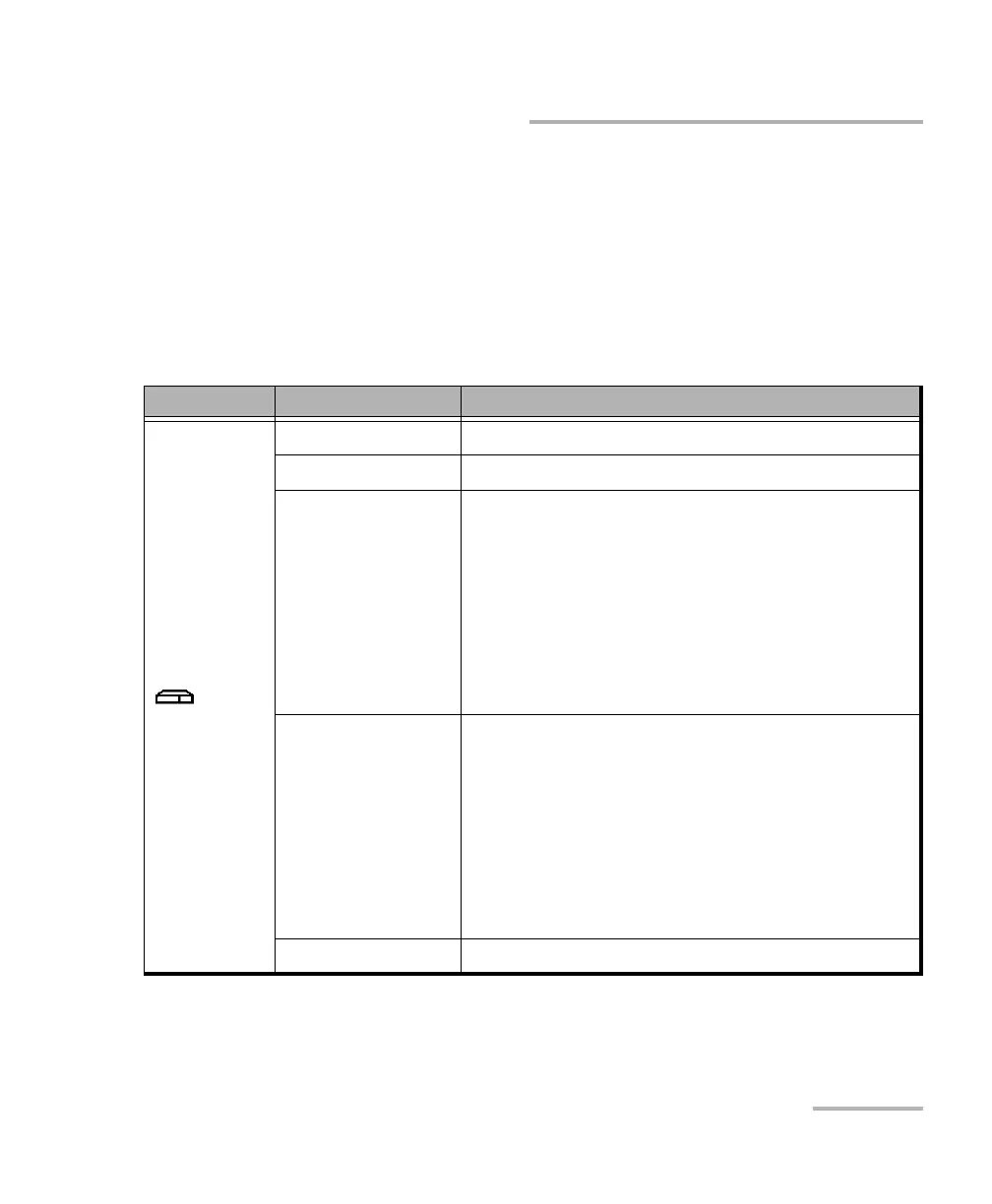
RTUe-9110/RTUe-9120 LED Indicator Description
RTUe-9110/RTUe-9120 LED Indicator
Description
There is one LED indicator on the front panel of the RTUe-9110/RTUe-9120
switch showing its status.
The table below presents the possible statuses once the initial startup
sequence is complete.
LED Status Meaning
a
a. If more than one error is detected at the same time, the color of the LED will be set according to the most
severe error (red as the most severe, followed by yellow).
Green The switch is working properly and is ready.
Green, blinking The initialization of the switch is underway.
Yellow Non-critical hardware error detected.
The temperature of the room where the switch is
located could be slightly too low or too high, or
there could be a hardware malfunction.
Ensure that the temperature falls within the
specified operating temperature range of the RTU-2
unit.
If the problem persists, contact EXFO.
Red Critical hardware error detected.
The temperature of the room where the switch is
located is critically too low or too high, or there
could be a hardware malfunction.
Ensure that the temperature falls within the
specified operating temperature range of the RTU-2
unit.
If the problem persists, contact EXFO.
Off Switch is off or not connected to an RTU-2 unit.



 To Next Page