Operating the Optical Switch
Optical Switch 35
Connecting RTUe-9110 External Switches to the RTU-2 Unit
Connecting RTUe-9110 External Switches to
the RTU-2 Unit
Depending on your testing needs, you may want to connect external
switches to your RTU-2 unit to increase the number of optical ports
available.
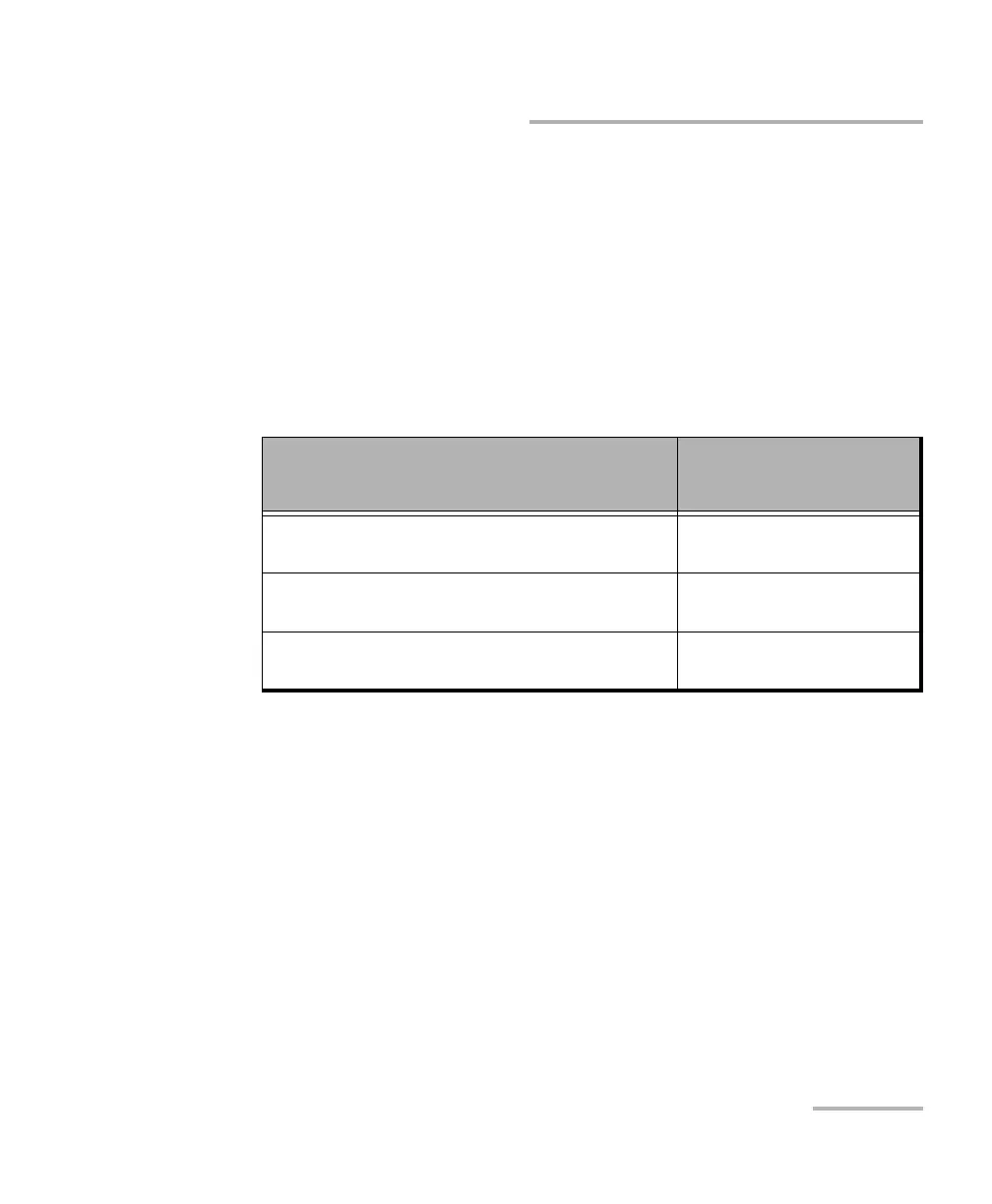
The recommended number of switches that you can connect (cascade) on
a single RTU-2 unit for a given optical link depends on the model of
RTUe-9110 switch that you are using.
Note: If you intend to work with a mix of 26-port and 52-port single-channel-width
switches, you may want to use a 52-port switch as your primary switch to
benefit from four upgrade ports instead of two.
Note: On all switch models, the group of upgrade ports is outlined with a rounded
rectangle for easier identification.
If you want to remove a switch from the system, ensure that no test is
underway, and then simply disconnect the optical fibers and the USB
cable.
Model
Maximum recommended
number of connected
switches
Single channel width – 26 ports
(2 upgrade ports)
3
Single channel width – 52 ports
(4 upgrade ports)
5
Double channel width – 2 links of 26 ports
(2 upgrade ports)
3



 To Next Page