38
Chapter 12
USER PARAMETERS
Press button 5 to con rm and go to the next parameter.
Press button 4 to go back to the previous one.
Parameter 4 (D2 = 5, D1 =”00”)
N.B. This parameter is reserved to the installer and must not be modi ed.
Parameter 5 (D2 = 5 (blinking), D1 =Ex. “15.00”)
Press button 2 or 3 to set “15.00”, which corresponds to the switch-on time of the 2nd period. Press button
5 to con rm and go to the next parameter.
Press button 4 to go back to the previous one.
Parameter 6 (D2 = 6 (blinking), D1 =Ex. “22.00” )
Press button 2 or 3 to set “22.00”, which corresponds to the switch-o time of the 2nd period. Press button
5 to con rm and go to the next parameter.
Press button 4 to go back to the previous one.
Parameter 7 (D2 = 7 (blinking), D1 = “OFF1” )
Enable the 2nd period for Saturday and Sunday only, using buttons 2 and 3 as follows:
a. button 3 – to scroll the days
b. button 2 – to enable/disenable (ON/OFF) the 2nd period for that day
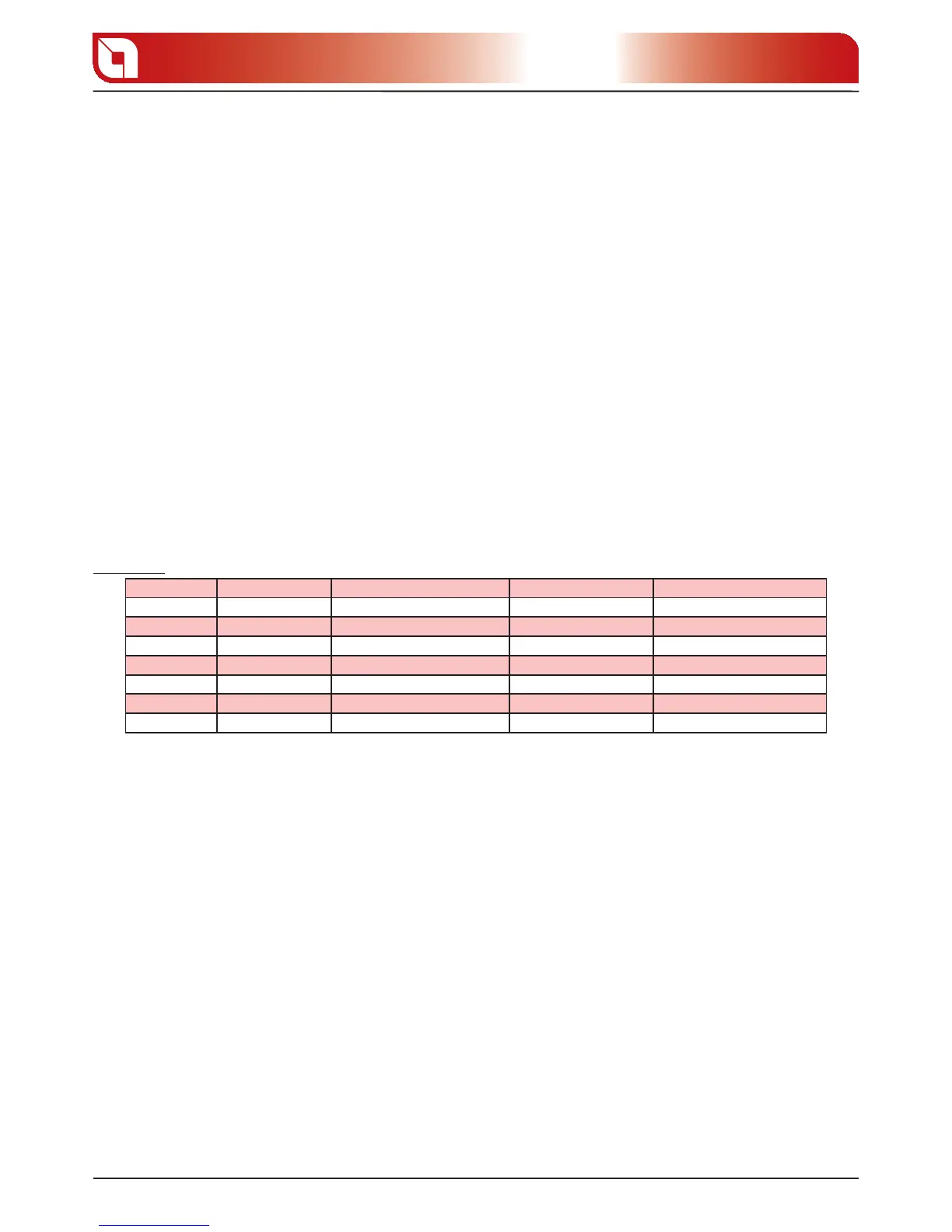
Example:
Day Initial data Function of button 2 Final data Function of button 3
MONDAY OFF 1 OFF 1 ON 1 and vice versa OFF 1(disable period) Go to following day
TUESDAY OFF 2 OFF 2 ON 2 and vice versa OFF 2(disable period) Go to following day
WEDNESDAY OFF 3 OFF 3 ON 3 and vice versa OFF 3(disable period) Go to following day
THURSDAY OFF 4 OFF 4 ON 4 and vice versa OFF 4(disable period) Go to following day
FRIDAY OFF 5 OFF 5 ON 5 and vice versa OFF 5(disable period) Go to following day
SATURDAY OFF 6 OFF 6 ON 6 and vice versa ON 6(enable period) Go to following day
SUNDAY OFF 7 OFF 7 ON 7 and vice versa ON 7(enable period) Go to following day
Press button 5 to con rm and go to the next parameter.
Press button 4 to go back to the previous one.
Parameter 8 (D2 = 8 (blinking), D1 =Ex. “OFF”)
Press button 2 or 3 to set “OFF”, which is situated before “00.00”, to disenable the third period.
Press button 5 to con rm and go to the next parameter.
Press button 4 to go back to the previous one.
Parameter 9 (D2 = 9 (blinking), D1 =Ex. “OFF” )
Press button 2 or 3 to set “OFF”, which is situated before “00.00” to disenable the third period.
Press button 5 to con rm and go to the next parameter.
Press button 4 to go back to the previous one.
Parameter A (D2 = A (blinking), D1 =Ex. “
OFF
1” )
At this point, the data in this parameter no longer has any value, as the switch-on/o of the third period
have been disenabled.
Press button 5 to con rm and go to the next parameter.
Press button 4 to go back to the previous one.
Press button 1 to con rm and exit.







 To Next Page