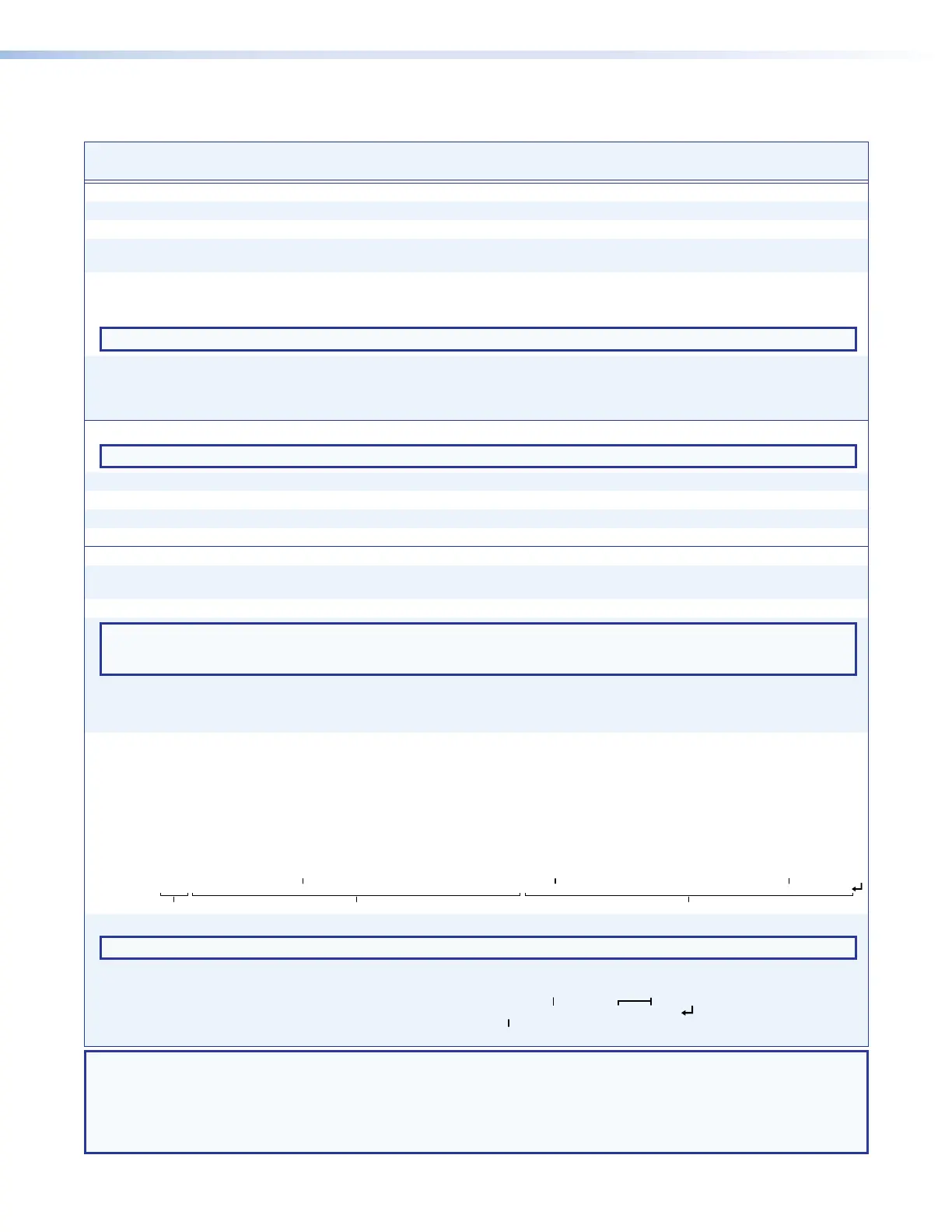
Command and Response Table for Matrix Switcher Commands (continued)
DTP CrossPoint 4K Series Matrix Switchers • Programming Guide 63
Command Function
SIS Command
(Host to Unit)
Response
(Unit to Host)
Additional description
Resets
Reset all global presets
E
ZG
}
Zpg
]
Clear all presets and names.
Reset one global preset
EX2$
ZG
}
Zpg
X2$]
Clear preset
X2$
and name.
System reset (factory default)
E
ZXXX
}
Zpx
]
Clear all ties and presets, restore group
masters 1 and 2.
Absolute reset, including IP settings
E
ZQQQ
}
Zpq
]
Similar to
E
ZXXX
}
, plus reset the
IP address to 192.168.254.254 and
subnet mask to 255.255.000.000.
NOTE: The absolute reset (
E
ZQQQ
}
) command resets only the switcher, not any connected DTP endpoints.
Absolute reset, excluding IP settings
E
ZY
}
Zpy
]
Similar to
E
ZQQQ
}
, but preserves IP
address, subnet mask, gateway address,
unit name, DHCP setting, and port map.
Recommended after a firmware update.
Executive modes
NOTE: See Setting the Front Panel Locks (Executive Modes) on page 43 for more information on the Lock modes.
Lock all front panel functions
1X
Exe1
]
Enable Lock mode 1.
Lock advanced front panel functions
2X
Exe2
]
Enable Lock mode 2.
Unlock all front panel functions
0X
Exe0
]
Enable Lock mode 0.
View lock status
X
X2%]
Information requests
Information request
I
DTPCP108
]
One sample response shown; different
models vary.
Request part number
N
60
-nnnn-nn
]
See the Extron website for numbers.
NOTE: There are up to three separate sets of Extron firmware on which the switcher can report: the Ethernet protocol firmware, which
handles the Ethernet interface; the switcher controller firmware, which is the overall control firmware; and the latest optional Extron
firmware update, which is available at www.extron.com.
Query controller firmware version
Q
X2^]
Example:
Q
1.23
]
The factory-installed controller firmware
version is 1.23 (sample value only).
Query controller firmware version
(verbose)
0Q
X2^
-
X2&
-
X2&]
Detailed status of the controller firmware
and any firmware upgrade. The active
firmware is marked by an asterisk (*).
A caret (^) indicates a bad checksum
or an invalid load. ?.?? indicates that
firmware is not loaded.
Response description: Ethernet protocol firmware version-switcher controller firmware version-updated firmware version
Example:
0q
See below
Ethernet protocol firmware
Description
DTP CrossPoint firmware version Updated firmware version
* indicates the version running Upload date and time
1.23-1.00(1.81LX-DTPCP108 -Fri, 31 Jul 2015 00:00:00 UTC)-1.00*(1.91LX-DTPCP108 -Fri, 25 Sep 2015 16:39:21 UTC)
Request system status
S
Sts00*
X2*
•
X2(
•750000•750000
]
NOTE: The “Sts00*” portion of the response appears only when the switcher is in Verbose mode 2 or 3.
Response description: Power supply
•Temperature Celsius•Future data field•Future data field
]
Example:
S
Power supply at 12.25V
Temperature is 54.0 °C
Future data fields
12.250
•54.000•750000•750000
NOTE: X2$ = Preset number 01 – 32
X2% =
Lock mode 0 = Mode 0 1 = Mode 1 2 = Mode 2 (default)
X2^ = Firmware version number to second decimal place (x.xx)
X2& = Verbose firmware version-description-upload date and time.
X2* = Voltage Positive or negative voltage and magnitude
X2( = Internal temperature Degrees Celsius


 To Next Page