ShareLink Pro 500 • Installation 6
HDMI Connection
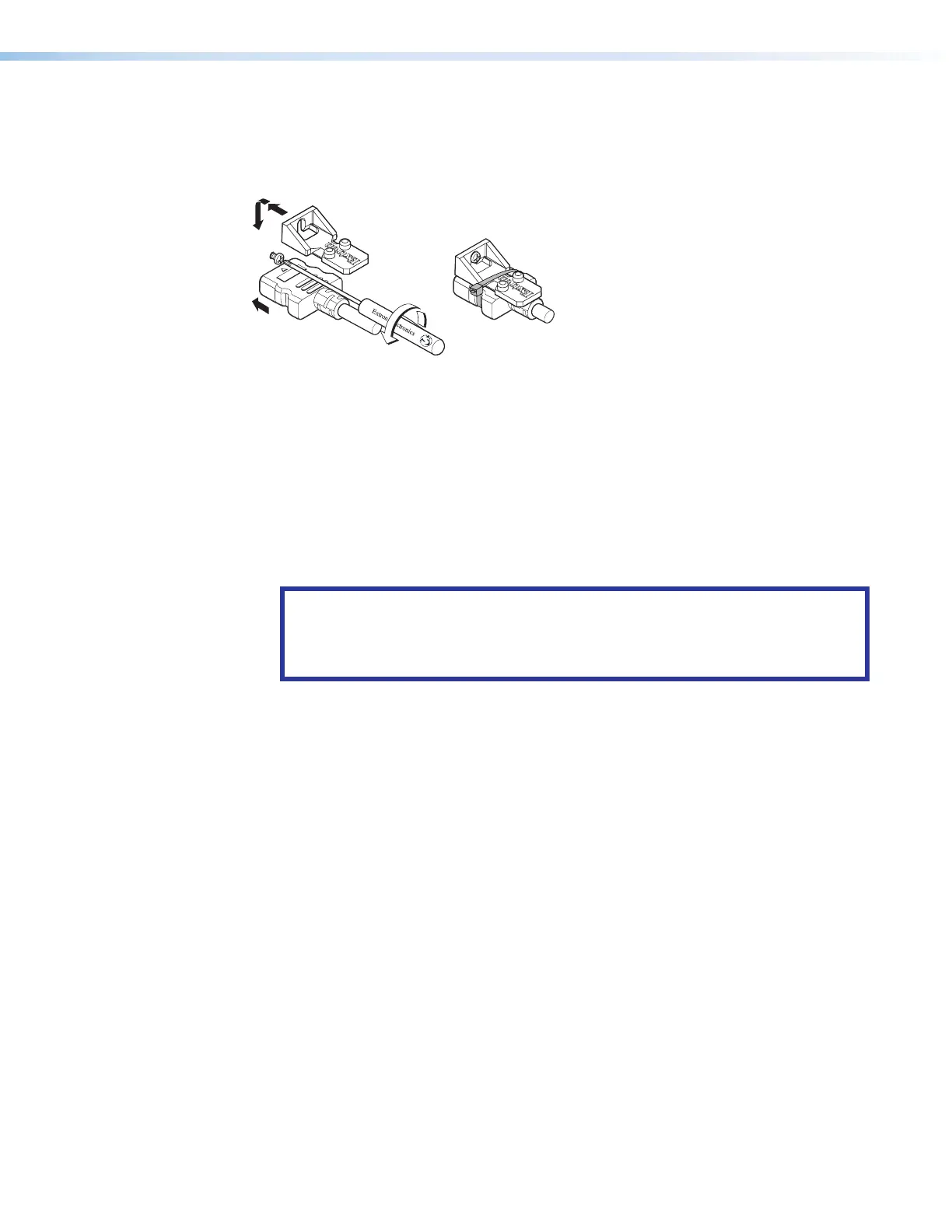
To secure the HDMI cable to the HDMI input connector, use an Extron LockIt Cable Lacing
Bracket and a tie wrap.
3
2
3
4
5
Figure 4. Installing the LockIt Cable Lacing Bracket
1. Plug the HDMI cable into the panel connection (see figure 4,
1
).
2. Loosen the HDMI connection mounting screw from the panel (
2
) enough to allow the
LockIt to be placed over it. The screw does not have to be removed.
3. Place the LockIt on the screw and against the HDMI connector (
3
), and then tighten
the screw to secure the bracket.
4. Loosely place the included tie wrap around the HDMI connector and the LockIt (
4
).
5. While holding the connector securely against the cable lacing bracket, use pliers or
similar tools to tighten the tie wrap, then remove any excess length (
5
).
ATTENTION:
• Connect and pull the tie wraps until they are secure. Do not overtighten.
• Connectez et tirez les serre-câbles jusqu’à ce qu’ils soient sécurisés. Ne pas
trop serrer.



 To Next Page