ShareLink Pro 500 • Operation Using a Mobile Device 24
Discovering a ShareLink Pro Device on a Different Subnet
for Apple Screen Mirroring
The ShareLink Pro for iOS mobile app automatically discovers ShareLink Pro devices that
are on the same subnet as the iOS device.
If your ShareLink Pro device is not on the same subnet, follow these steps to discover the
device using the app.
NOTE: The same steps apply to macOS devices using the ShareLink Pro macOS
software.
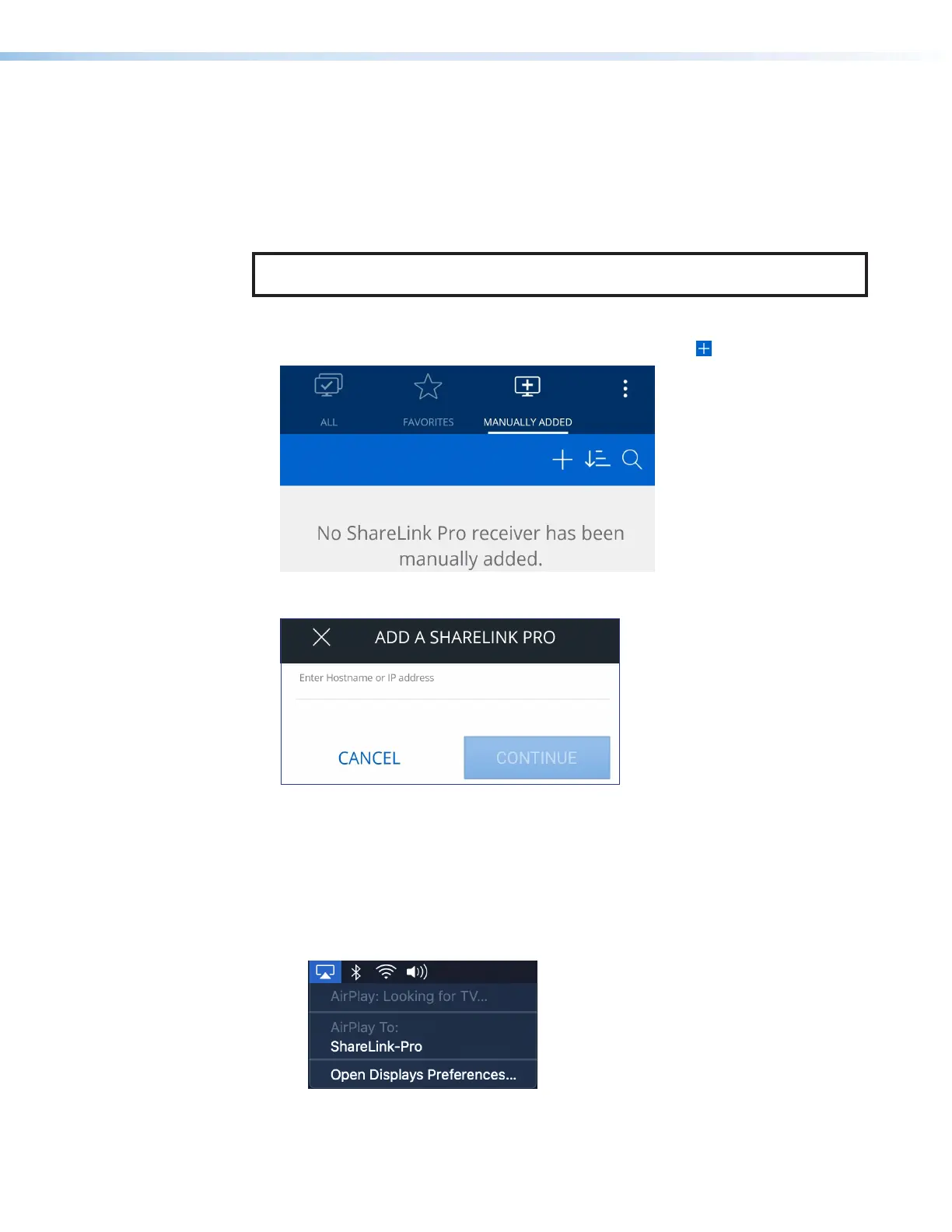
1. Open ShareLink Pro for iOS mobile app.
2. Go to the Manually Added tab (shown below) and select the icon (
1
).
11
3. Enter the IP address or hostname of the ShareLink Pro device that is outside the local
subnet.
4. Enter a password if prompted.
5. Enter confirmation if prompted.
6. Once the connection has been successfully established and the main sharing page is
shown:
• For iOS devices: Go to the Control Center and navigate to the Screen Mirroring
device discovery list (see step 3 on the previous page).
• For macOS devices: Click the AirPlay button in the menu bar as shown below.
7. Select the ShareLink Pro device from the device discovery list (see step 4 on the
previous page).



 To Next Page