ShareLink Pro 500 • Operation Using a Computer 15
Using the Embedded Web Page
To access the embedded web page, open your web browser and enter the ShareLink Pro
IP address into the browser.
NOTE: The IP address is shown on the standby screen (see figure 6,
1
on page 9).
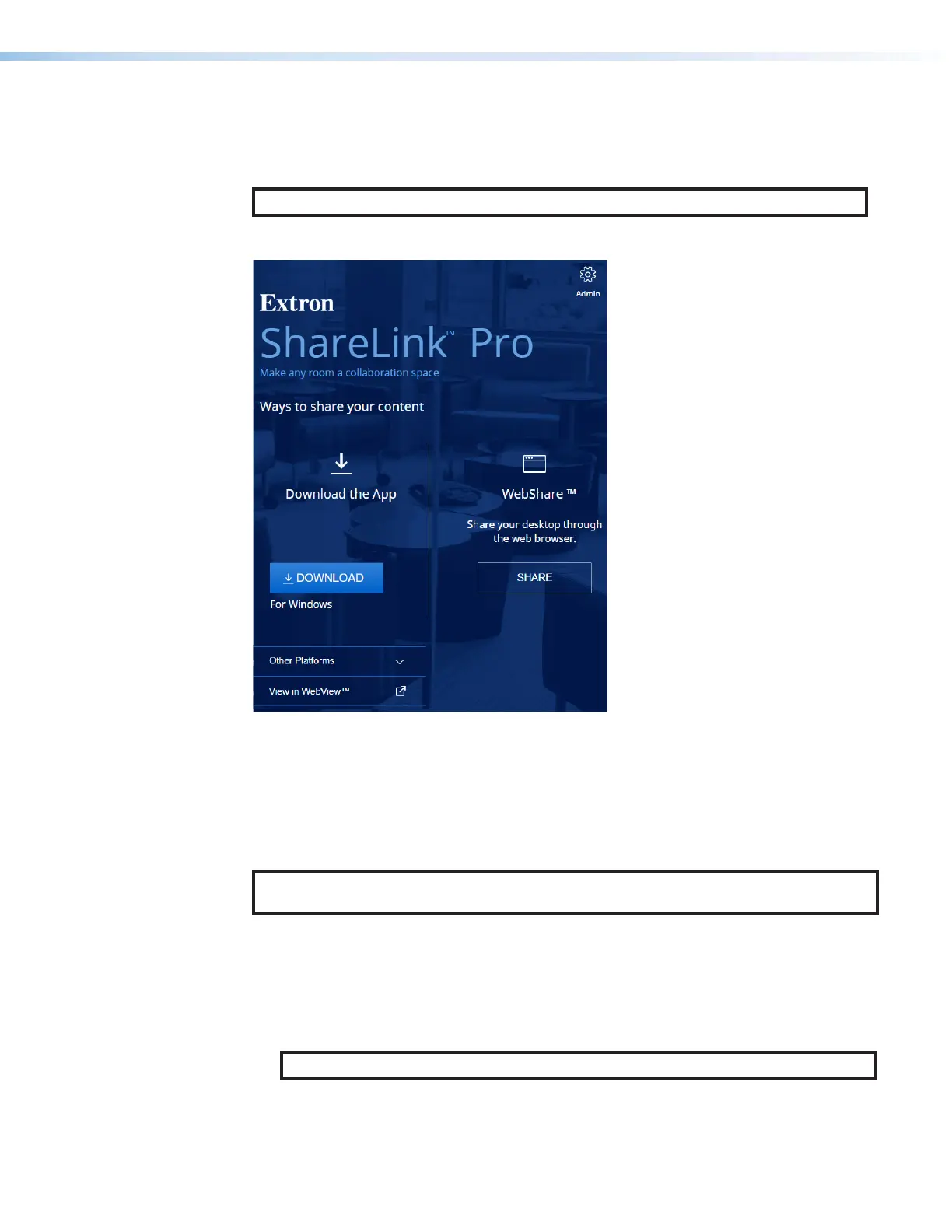
The embedded web page contains the following features:
11
22
33
1
View in WebView™ — See
Viewing a Presentation Using
WebView.
2
WebShare — See Presenting
a Desktop Using WebShare
on the next page.
3
Admin — See Using the
Admin Page on page 17.
Figure 14. ShareLink Pro Landing Page
Viewing a Presentation Using WebView
The WebView feature allows audience members to view a presentation on their computers
or mobile devices through a web browser. The presenter may broadcast the presentation so
that the image shown on the display can be viewed remotely.
NOTE: This feature can be disabled using PCS, or a password requirement can be set for
using this feature.
Audience members must follow these steps to watch the presentation:
1. Open a web browser on the computer or mobile device, and enter the IP address of the
ShareLink Pro 500. The landing page opens as shown in figure 14.
2. Click View in WebView (see figure 14,
1
). The presentation page opens in the web
browser.
NOTE: If necessary, enable WebView in the ShareLink Pro app (see
4
on page 22).



 To Next Page