41
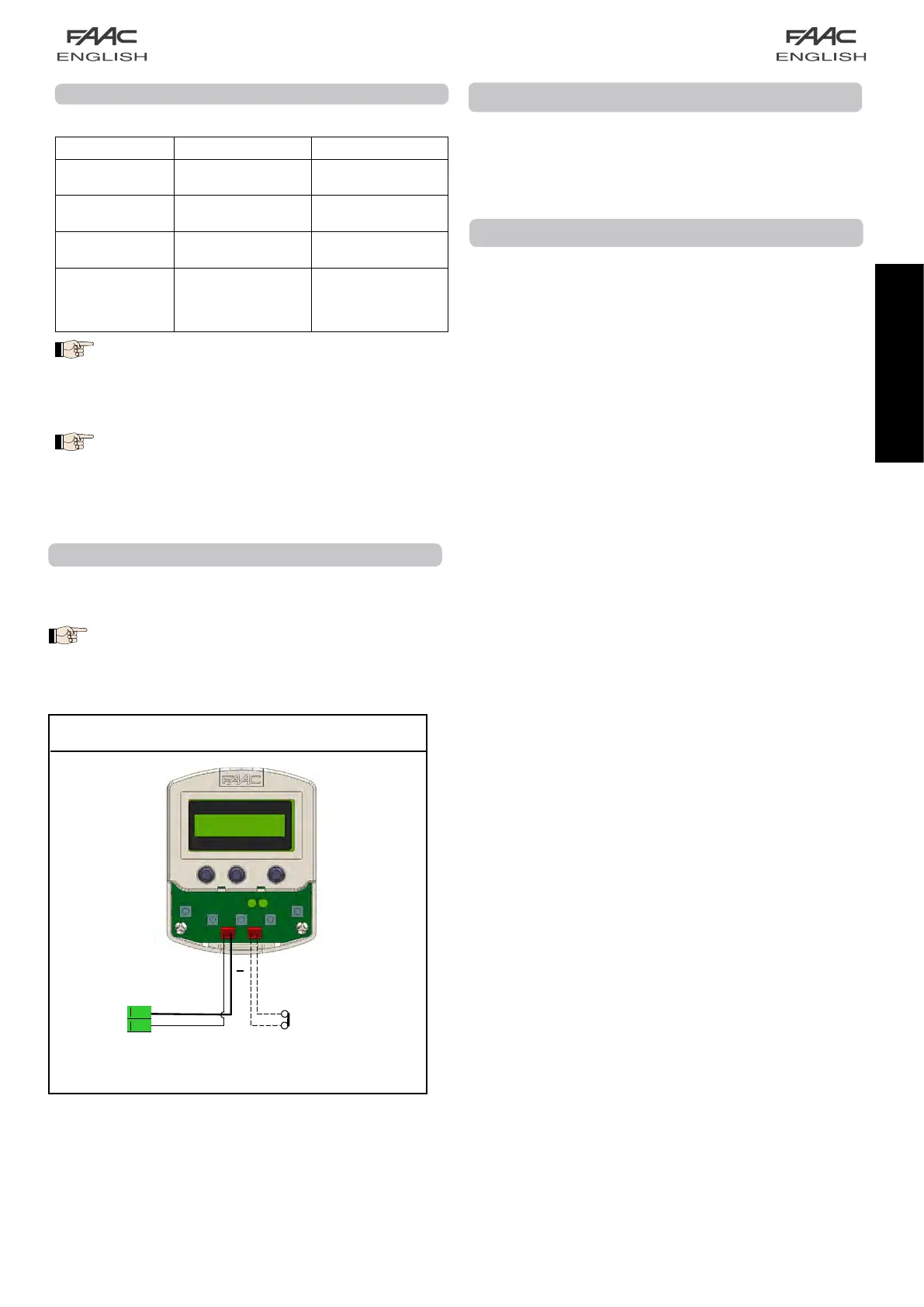
MORSETTIERA J6
2x0.5m
m
2
max 50m
DIP-SWITCH PROGRAMMING
SettheDS1dip-switchasfollows:
N° DIP-SWITCH ON OFF
1
Button photocell 1
active
Button photocell 1
disabled
2
Button photocell 2
active
Button photocell 2
disabled
3 EMERG2activates
NIGHTfunction
EMERG2standard
function
4
Single leaf door with
right opening
Doubleleafdoor
or
Single leaf door with
left opening
To find out the closing direction, look at the cross-beam
of the automated system from the front and:
- for the double leaf, the left leaf is connected to the low
branch of the belt;
- for the single leaf, the leaf is always connected to the
low branch of the belt.
Activating the dip-switch no. 3 the polarity of the
EMERG2 input is forced to NORMAL OPEN and the con-
tact closing activates the NIGHT function independently
of the SD-Keeper settings.
Terminal-board J6
1-2 SD-KEEPER
SD-Keeperconnectionterminals(cable2x0.5mm
2
max 50m).
Respect the indicated polarity:
Terminal 1 = positive Terminal 2 = negative
START-UP
The first time the door is powered, the control board automatically
executes a setup procedure and loads all the standard
configuration settings.
STANDARD CONFIGURATION
The standard configuration is as follows:
• AUTOMATIC”-“TOTAL”-“TWO-WAY”; operating function;
(maximum OPENINGSPEED (level 10));
• CLOSINGSPEED level 3;
• EMERG1emergencyinputconfiguredasa“nomemory”NO
contact, i.e. when activated, it causes the movement to stop
and the door remains open in stop status for as long as the
contact is maintained;
• EMERG2emergencyinputconfiguredasa“nomemory”NO
contact, i.e. when activated, it causes opening at normal
speed and the door remains open for as long as the contact
is maintained;
• Protection 1 and Protection 2 are configured in Cc
• sensor monitoring enabled
• pause time 2 sec.;
• NIGHTPAUSEtime8sec.;
• motor lock kit enabled for standard operation (tripped only
inNIGHTmode);
• Kit for supervising motor lock is not enabled;
• BATTERY KIT not enabled;
• OUT1 output with GONG function;
• partial opening set at 50%;
• LowDECELERATIONSPEED;
• StandardOBSTACLEDETECTION:ifanobstacleisrecognised
at opening or closing, the door reverses and continuously
attempts to move until the obstacle is removed, without
generating an alarm signal;
• two sensors with NO contact are provided (one internal, the
other external);
• NO type KEY contact;
• INTERLOCK function not activated;
• TIMERnotactivated.


 To Next Page