43
DESCRIPTION AND USE OF ENERGY SAVING
1) Function description:
An automated system that can operate in “Energy
Saving” mode. Thanks to this operating mode the system is able
to recognize the pedestrian direction (approaching, leaving or
side transit) and, as a consequence, to limit false opening
operationsandreduceopening/closingtimes.
2) Compulsory use mode:
The “Energy Saving“ function can only be enabled together
withtheXMA1ONdouble-technologypresenceandpulsedetectors.
Important : A detector only is not sufficient to activate the “ Energy Saving “ function.
The described function can only be activated with XMA1 ON internal and external sensor.
The passage width VP max. for an XMA1 ON sensor in order to use the Energy Saving function is 2mt.
For a passage width VP over 2mt., use 2 XMA1 ON side-by-side sensors with a different frequency
and configured as indicated in XMA1 ON manual
3) Use instructions
ToguaranteemaximumsafetytheuseinstructionsofXMA1ON
sensor must be carefully observed.
For any depth adjustment operations, use the Spotfinder detector.
This accessory device enables you to detect the position of the
infrared field curtains for spot so exactly that you can adjust both
the command-pulse area and the safety area on the passage
widthofourXMA1ONactiveinfraredsensorsinaprecisemanner.
Foranyfurtherexplanation,consulttheusemanualoftheXMA1ONsensor.
4) “ Energy Saving “ function activation mode.
To activate the “ Energy Saving “ function you need to reach
parameter PA on the board display and set it to NO or use
theSD-KEEPERwithDISPLAYand,wheninprogrammingmode,select:
Menu2SETUP---->2.2Pausetime---->Off
1
2
3
4
5
6
7
8
9
10
11
12
13
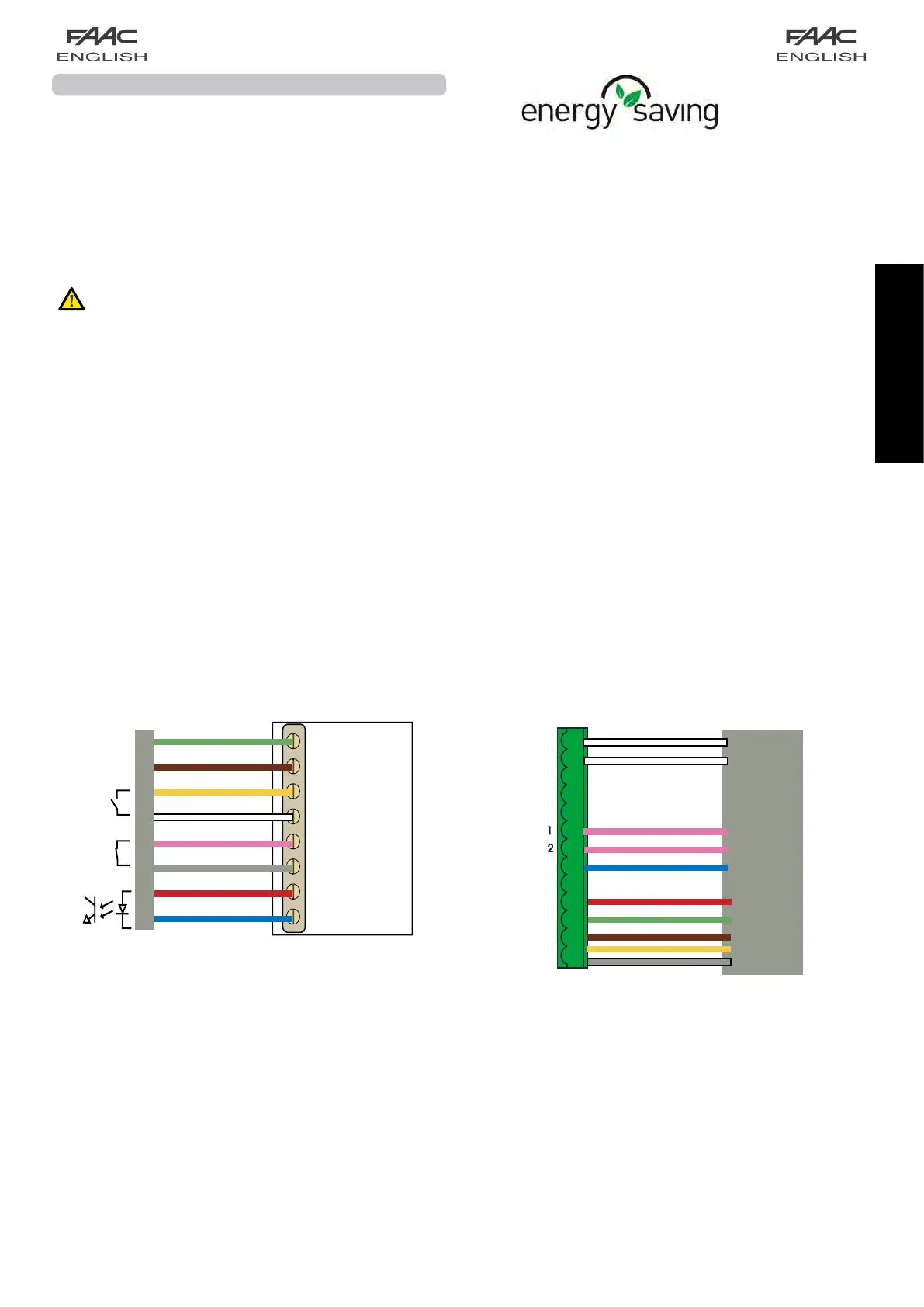
J7
I-DET
E-DET
KEY
EMERG1
EMERG2
-FAILSAFE
OUT1
+24V
+24V
GND
GND
P
P
12-24 V
AC-DC
Green
Brown
Yellow
White
Pink
Grey
Supply
Red
Blue
test output
entry
security
entry
opening
XMA1ON
XMA1 ON
White
White
Pink
Pink
Blue
Red
Green
Brown
Yellow
Grey


 To Next Page