FX15 Controller Technical Bulletin
Connecting Active Current Sensors
The FX15 controller analog inputs can accept a maximum of four active
current sensors, powered by the FX15 controller itself, in the range 0-20
mA or 4-20 mA. The AI has to be configured via software (and
hardware jumpers) to accept current signals. If a 4-20 mA sensor is
connected, the specific hardware jumpers must be closed
(see Figure 31) and the application can be configured through the FX
Builder, setting 0-20 mA, 20% suppression.
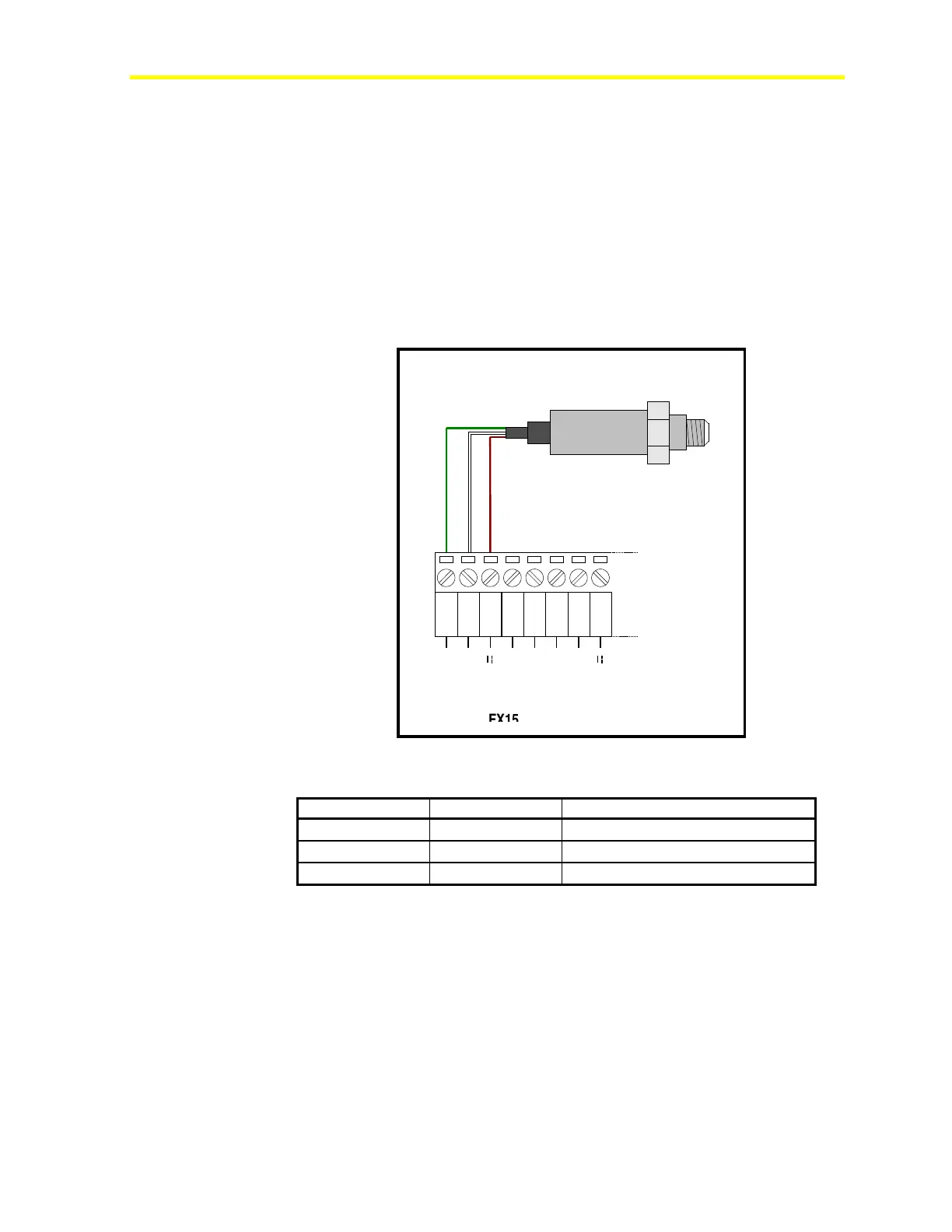
The FX15 controller can be connected to the P299xAx Series of
Johnson Controls pressure sensors which generate a 4-20 mA signal.
1 2 3
AGND
AI1
EXT V
4 5
AGND
AI2
6 7
AGND
AI3
8
EXT V
FX16
P299xAx
Active Pressure Sensor
Figure 34: Pressure Sensor Connection Diagram
Table 5: Active Current Sensors
AGND (1)
Green Common Reference
EXT V (3)
Brown Sensor Power Supply 16 V, 80 mA
AI1 (2)
White Pressure Output 4-20 mA
Note: The numbers inside the parentheses are the FX15 controller
terminal numbers.



 To Next Page