October 2000 Fadal/Sinumerik 810D CNC: Pendant Hard Keys Function Guide 17
SIEMENS CONTROL
Operator Manual
Fadal
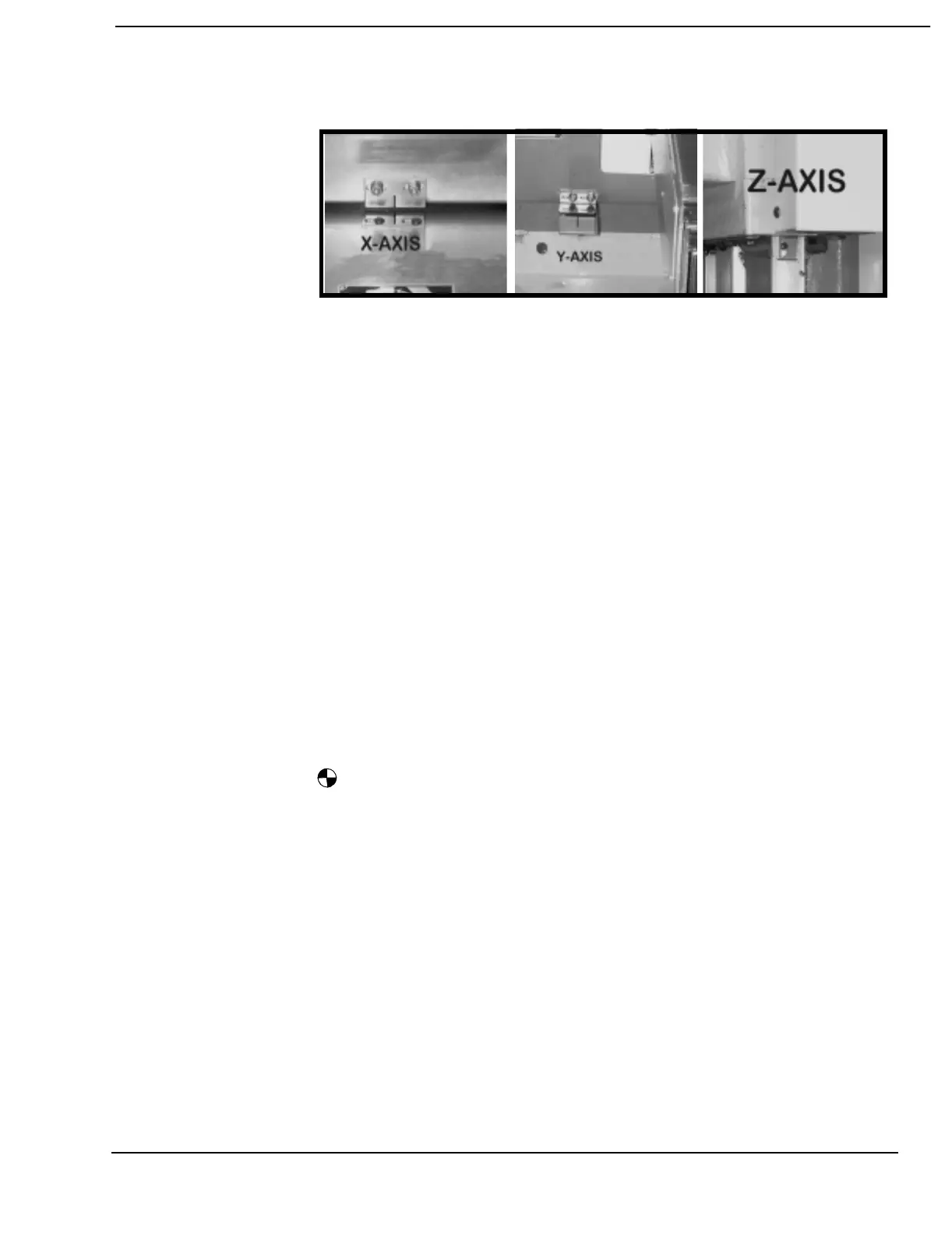
To align each axis, place the machine in JOG:
1) Press the MPG hard key until the LED above the key is lit.
2) Find the alignment marks for each axis using the axis selector
switch and the MPG.
3) Press the REF hard key button “reference point return”. Use the
Axis selector switch to select the desired axis.
Select the X axis then press + hard key button.
Select the Y axis then press + hard key button.
Select the Z axis then press + hard key button.
Select the A axis then press + hard key button.
Select the B axis then press + hard key button.
When each axis has completed finding the reference position this
symbol will appear to the left of the axis. Press the JOG, MPG or
AUTO hard keys to exit the Reference submode.
Note: In the reference mode the position display will indicate the actual position
in WCS (X, Y, Z) or MCS (X1, Y1, Z1). The ACT. VAL. MCS soft key can be
used to toggle between the WCS and MCS coordinate display.



 To Next Page