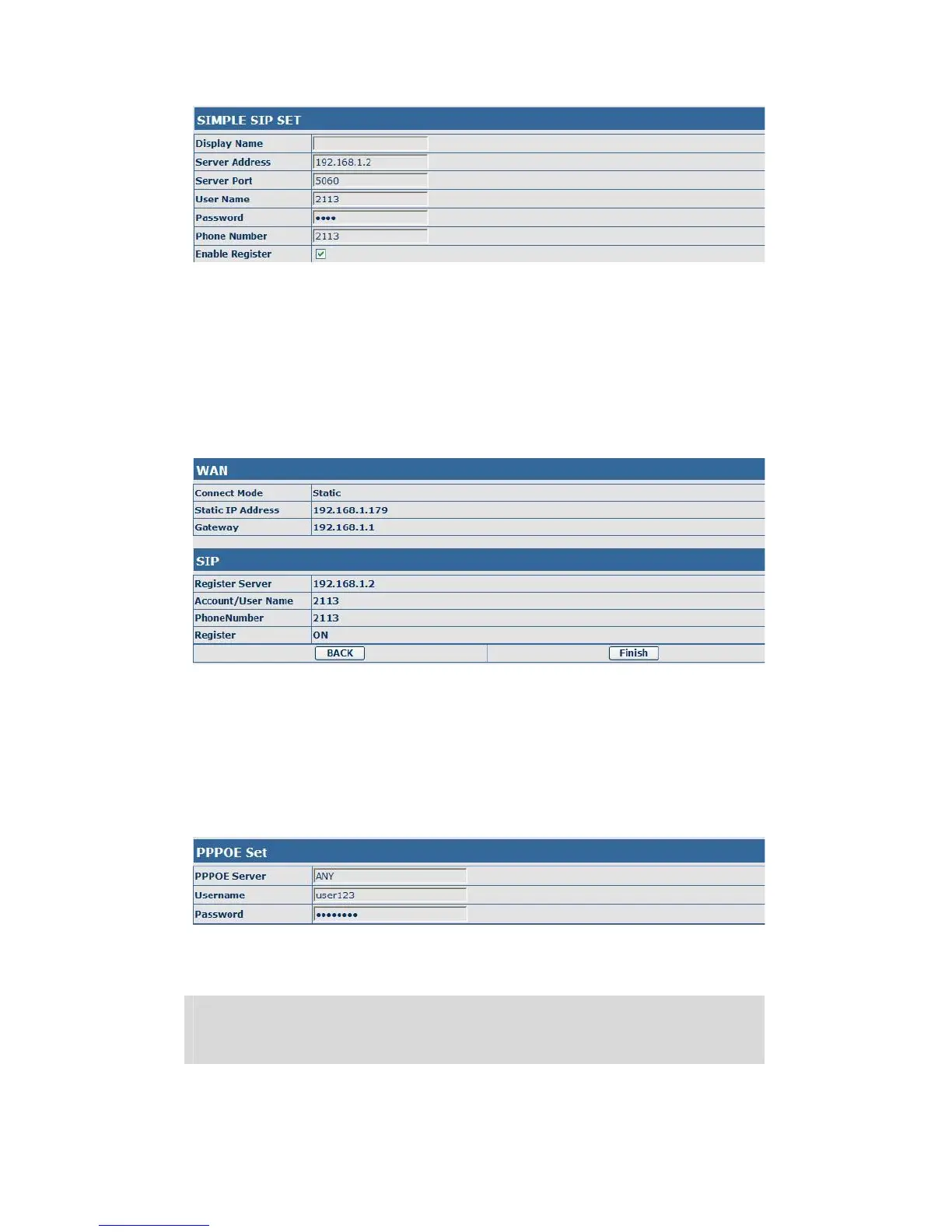
Display Name Set the display name.
Server Address Input your SIP server address.
Server Port Set your SIP server port.
User Name Input your SIP register account name.
Password Input your SIP register password.
Phone Number Input the phone number assigned by your VOIP service
provider.
Enable Register Start to register or not by selecting it or not.
Display detailed information that you manual config.
Choose DHCP MODE,click【NEXT】can config SIP(default SIP1)simply, also
can browse too. Click【BACK】can return to the last page. Like Static IP
MODE。
Choose PPPoE MODE,click【NEXT】can config the PPPoE account/password
and SIP(default SIP1)simply, also can browse too. Click【BACK】can return to
the last page. Like Static IP MODE。
PPPoE Server It will be provided by ISP.
Username Input your ADSL account.
Password Input your ADSL password.
Notice: Click【Finish】button after finished your setting, gateway will save the
setting automatically and reboot, After reboot, you can dial by the SIP
account.


 To Next Page