Update
Field name explanation
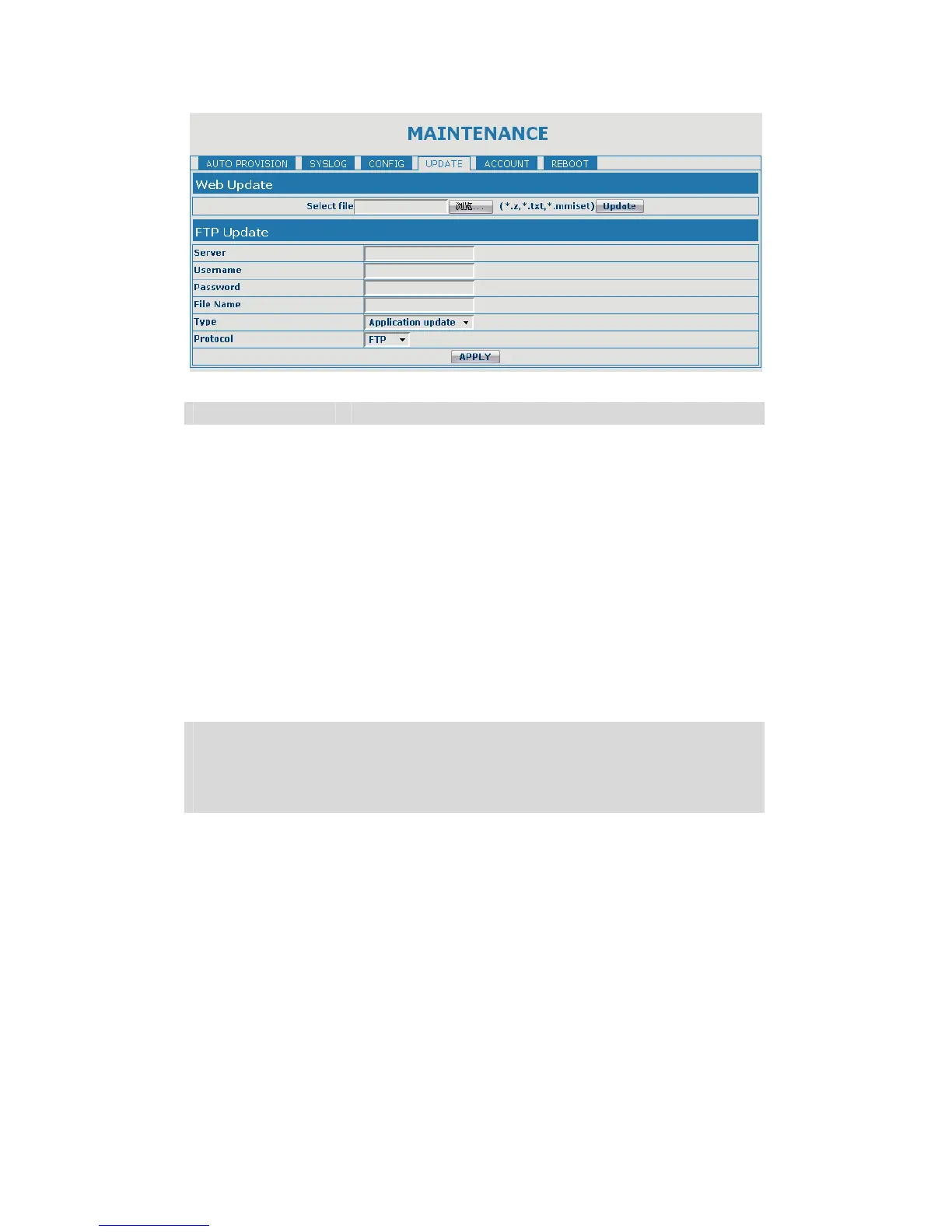
Web Update
Click the browse button, find out the config file saved
before or provided by manufacturer, download it to the
gateway directly, press “Update” to save. You can also
update downloaded update file, logo picture, ring,
mmiset file by web.
Server Set the FTP/TFTP server address for download/upload.
The address can be IP address or Domain name with
subdirectory.
Username Set the FTP server Username for download/upload.
Password Set the FTP server password for download/upload.
File name Set the name of update file or config file. The default
name is the MAC of the gateway, such as
000102030405.
Notice: You can modify the exported config file. And you can also download
config file which includes several modules that need to be imported. For
example, you can download a config file just keep with SIP module. After
reboot, other modules of system still use previous setting and are not lost.
Type
Action type that system want to execute:
1. Application update: download system update file
2. Config file export: Upload the config file to FTP/TFTP
server, name and save it.
3. Config fie import: Download the config file to
gateway from FTP/TFTP server. The configuration will
be effective after the gateway is reset.
Protocol Select FTP/TFTP server
5.3.5.5. Account Config
You can add or delete user account, and change the authority of each user account
in this web page


 To Next Page