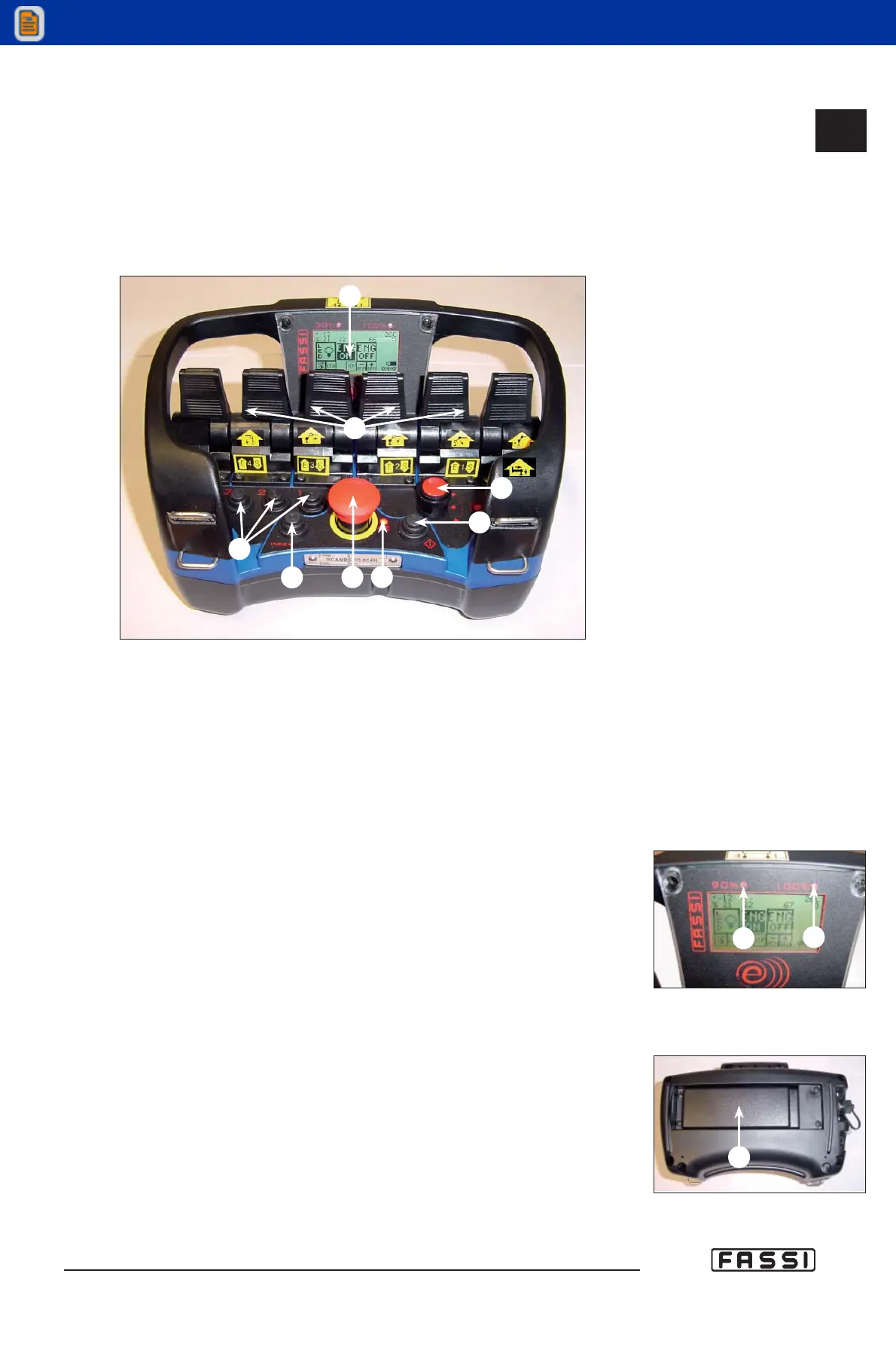
14.2.3 Push-button panel of the radio-remote control
"SCANRECO"
The push-button panel of the radio remote control "SCANRECO" in its standard
configuration, features 6 linear levers (but it can allocate up to 8) and a display
where it is possible to visualize information about the use of the crane.
- LINEAR PUSH-BUTTON PANEL
Each push-button panel element is identified with letters of the alphabet as shown
in figures 9 - 10 - 11 - 12 - 13 : check the list down below to get the meaning of
each element.
A) Display.
B) Linear levers to control the crane functions.
C) Short cut buttons 1, 2 and 3. These can be paired with any of the virtual
buttons (VB).
D) Rotary selector. Using this selector, icons in the program menu can be
selected. Clockwise rotation selects icons to the right, anti clockwise rota-
tion selects icons to the left.
E) Button “INDEX” used:
a) To start again to “Initial Menu”, getting out from the under menus.
b) To do the scroll of the alarms. At every pressure, it will be visualized the
following alarm, if fitted.
c) To move with the cursor towards right, if you are inserting a PIN.
d) To activate the retrolighting on the display (the retrolighting will switch off
automatically. The extinction time is planed out in the SW FX800).
F) Emergency push-button.
G) Light showing the battery status. Green permanent light means that the
battery is working correctly (charged). Red flashing light means that the
battery is discharged and needs to be replaced.
H) Activation button. Press once to start up the radio remote control.
I) Yellow light indicating that the crane exceeds 90% of its capacity.
J) Red light indicating that the crane exceeds 100% of its capacity, and the
activation of the lifting moment limiting device. It can signal too alarms,
warnings or particular conditions of the crane.
K) Battery.
14.2.3
CONTROLS TO
OPERATE THE CRANE
GR4_5-EVOLUTION
fig. 9
fig. 10
I
F
D
A
B
C
E
G
H
J
fig. 11
K



 To Next Page