
EasyManua.ls Logo

FeelTech FY6600 Series - User Manual

FeelTech FY6600 Series
50 pages
To Next Page IconTo Next Page
Loading...
FeelTech
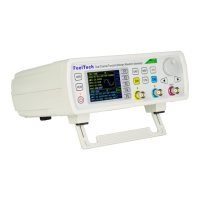
FY6600 Series Fully Numerical Control
Dual Channel Function/Arbitrary Waveform Generator
Users Manual
Rev2.2 July,2017

Questions and Answers

FeelTech FY6600 Series Specifications

General IconGeneral
BrandFeelTech
ModelFY6600 Series
CategoryControl Unit
LanguageEnglish

Summary

Main Features

Front Panel Operations

Waveform Output

How to output waveforms from the channels.

Select Output Channel

Steps to select CH1 or CH2 for output.

Select Waveform

Set Frequency

Set Amplitude

Set Offset

Set Duty Cycle (Square)

Set Pulse Wave Pulse Width (Adj-Pulse)

How to set pulse width for adjustable pulse waveforms.

Set Phase

Enable Output

Burst Function

Enable Burst Function

How to enable and configure the burst output function.

Frequency Meter;Counter

Enable the Counter

Steps to enable and use the frequency meter/counter.

Sweep Function

Sweep Object Selection

Describes the parameters that can be swept (Freq, Ampl, Offset, Duty Cycle).

Sweep Start Position

Sweep End Position

Enable Sweep Function

Save and Load Parameters

Uplink Configuration

Synchronization Function

Troubleshooting

Technical Specification

Appendix

Safety Notes

Important safety precautions for using the instrument.

Warning and Personal Injury

Warning about potential personal injury and liability.

Appendix D: Warranty