Page. 26
8
.䎃 Maintenance and Checking䎃
䦟䎃 8-2-3.
Zero-point compensation 䯴Zero Adjust press Enter䯵
Ɣ When a high oil concentration value is displayed after a Zero-point check using mineral water, this function is displayed oil concentration value
(less than 5 ppm) to 0 ppm.
%#76+10
Ɣ Do not implement the Zero-Point Compensation function just after "Stain warning" or "Error" is displayed.
The oil concentration detector may not work normally.
Ɣ The Zero-Point Compensation function is not used when a warning, error, or trouble state occurs.
Moreover, the function is not used frequently.
Ɣ The Zero-Point Compensation function is enabled only when the oil concentration is less than 5 ppm.
If the function is implemented while the oil concentration is 5 ppm or higher or any other water than the mineral water
isused, warning and error states may occur frequently and the oil concentration detector cannot work normally.
Ɣ This oil concentration detector is a ultra-high sensitivity measuring instrument capable of detecting the oil concentration of
15 ppm. Therefore, mineral water should be used as reference water for zero-point compensation.
(One 500-mL bottle of mineral water is sufficient for the compensation.)
Ɣ This function has no effect to clean the inside of the detection tube. This function compensates the influence by the
contamination of the inside of the detection tube.
(Reference: Contamination Check function measures the quantity of physical contaminants in the detection tube.)
Ɣ Be sure to execute manual washing (see "8-2-1 Manual washing") and sensor cleaning with brush (see "8-4 Cleaning the
sensor (brush washing)") before starting the zero-point compensation.
Ɣ The upper lid and drain valves are opened and closed for compensation. Firmly close them when closing them.
5VCPFD[
ZZZZZZZZZZZZ
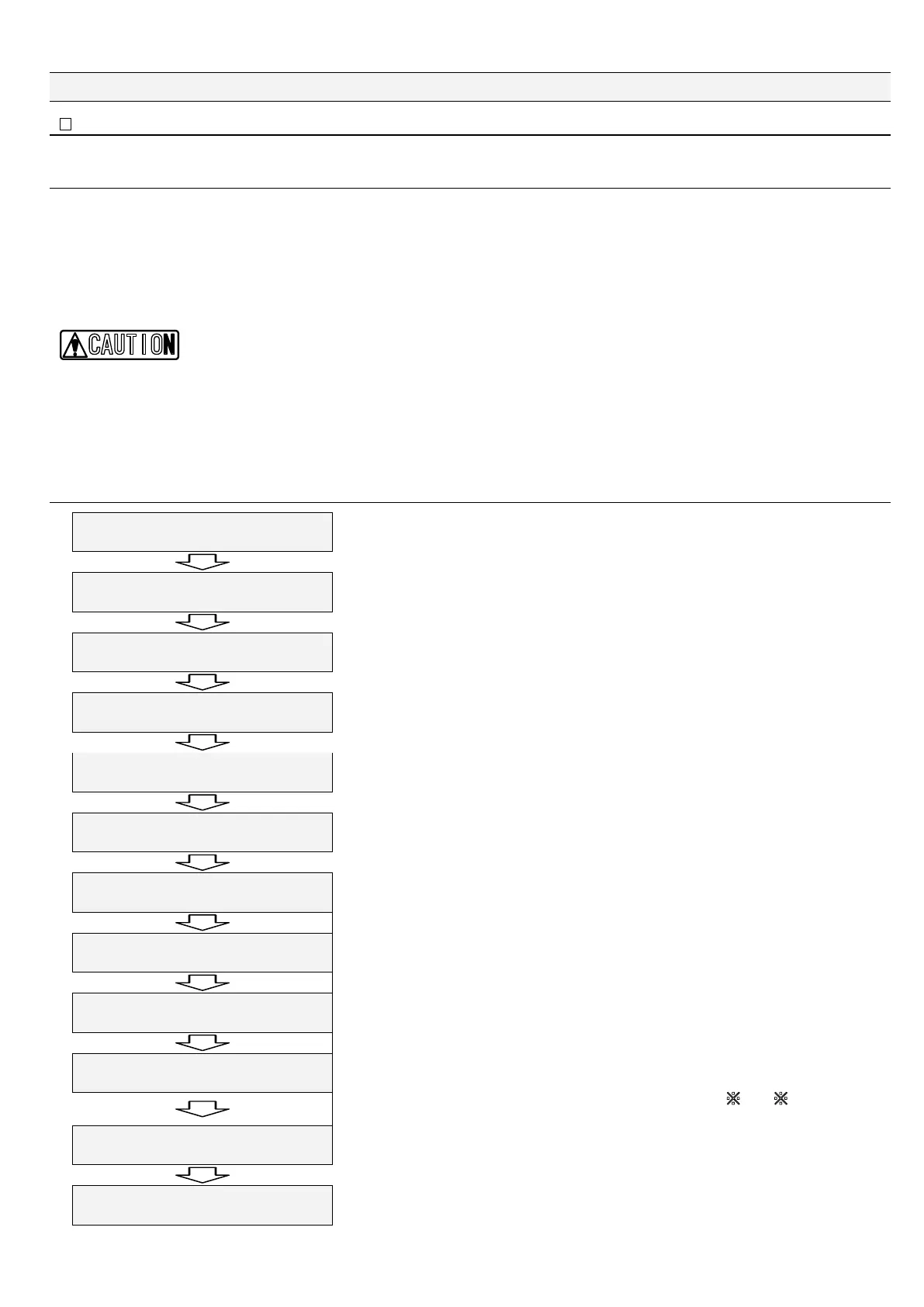
Keep on pressing "Esc" for two seconds or longer.
㧷CKP/GPW
%NQEM#FLWUVOGPV
Press "Ÿ" three times.
㧷CKP/GPW
/CKPVGPCPEG/QFG
"Maintenance Mode" is set.
/CKPVGPCPEG/QFG
9CUJKPIRTGUU'PVGT
Press "Ÿ."
/CKPVGPCPEG/QFG
<GTQCFLWUVRTGUU'PVGT
Press "Enter."
9CUJVJGKPPGTEGNN
2TGUUGPVGTVQEQPVKPWG
Open the upper lid and the sensor drain port and drain liquid from the inside of the sensor unit.
Feed mineral water into the sensor unit and drain once more.
Press "Enter."
(KNNAOKPGTCNAYCVGTAKPVQA
VJGAEGNNACPFARTGUUAGPVGT
Repeat a set of feeding and draining mineral water twice or more.
Feed mineral water again into the detection tube to about 80% of the tube and close the upper lid.
Press "Enter."
<GTQACFLWUVAAAAA'UESWKV
AAAAAAAAAAAAAAAAAAAAAAZZ
Wait until the supplied mineral water becomes stable and the oil concentration detector is ready for
measurement of oil concentration.
The remaining wait time is displayed on the lower right part of the screen.
<GTQACFLWUVAAAAA'UESWKV
/GCUWTGAAAAARROAAAAAZZ
Shows the current oil concentration and that the compensation is in progress.
(This example shows the current oil concentration is 1 ppm.)
The remaining time is displayed on the lower right part of the screen.
<GTQEQOR
2TGUUGPVGTVQEQPVKPWG
Shows the current oil concentration and asks whether the compensation is required.
In this example, "Press enter to continue" is displayed when the oil concentration is compensated
from 1 ppm to 0 ppm.For operation after the compensation fails, see
䚚A or 䚚B on the next
page. Press "Enter."
/CKPVGPCPEG/QFG
<GTQCFWUV1-RTU'UE
The zero-point compensation is completed. Press "Esc."
㧷CKP/GPW
/CKPVGPCPEG/QFG
"Main Menu" is displayed back.
With this, the zero-point compensation is completed.


 To Next Page