Page. 27
8
.䎃 Maintenance and Checking䎃
䦟䎃 8-2-3.
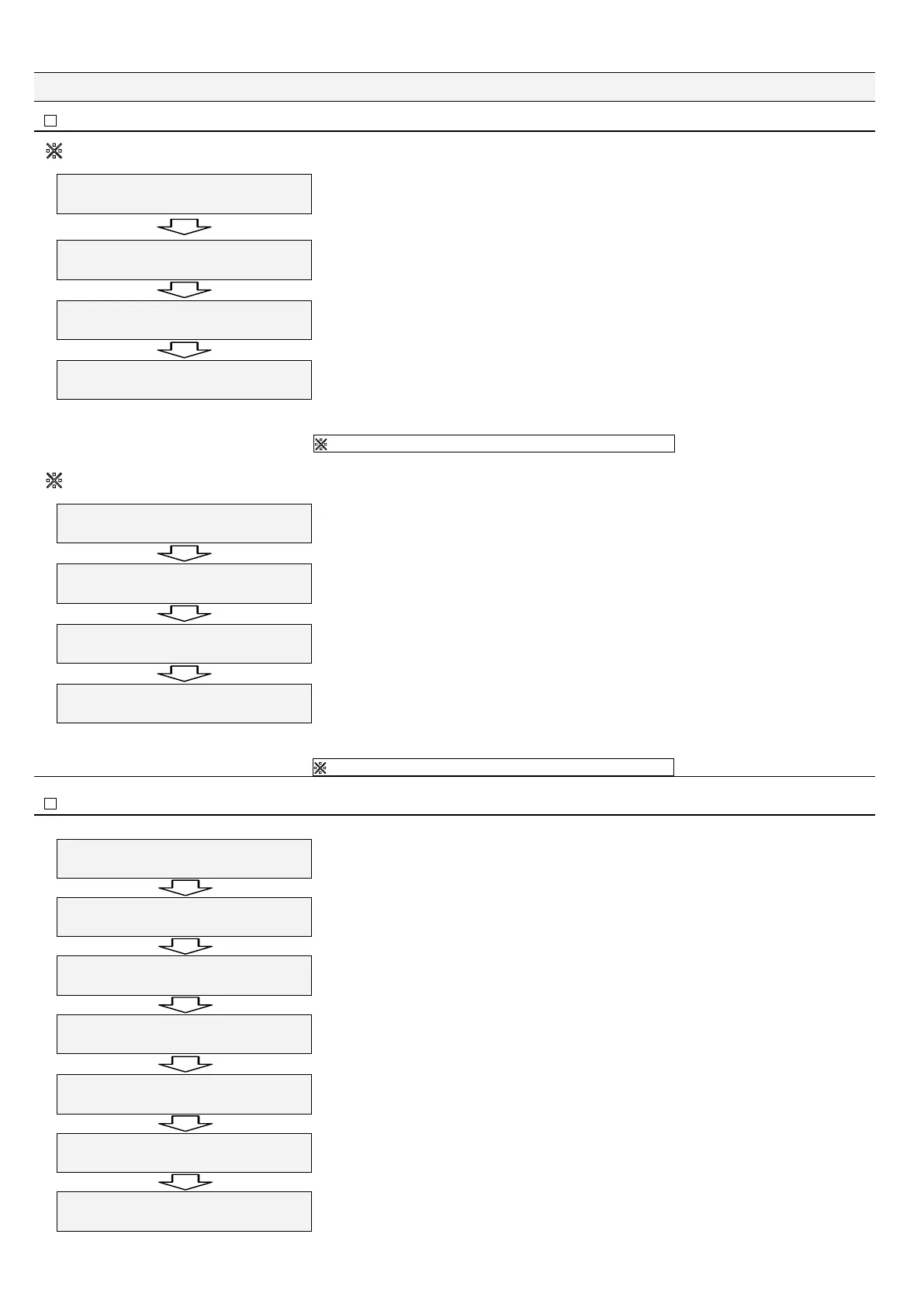
Zero-point compensation (Zero Adjust press Enter)
䚚A
The zero-point compensation is disabled when oil concentration over 5 ppm is detected in the zero-point compensation after sensor
cleaning because of oil or residue of contaminant in the detection tube.
<GTQEQORA
(CKN\GTQEQORGPUCVKQP
This example shows a case that an oil concentration over 5 ppm is detected.
Shows an oil concentration outside the compensation range.
This example shows compensation of oil concentration from 5 ppm to 0 ppm.
Press "Enter."
9CUJKPI'UESWKV
ZZZ
Opens the fresh water valve to flush fresh water into the detection tube to keep the performance of
the tube. The remaining flushing time is displayed on the lower right part of the screen.
/CKPVGPCPEG/QFG
2TGUUGPVGTVQEQPVKPWG
Press "Enter."
On the next screen, you can select one of two methods.
/CKPVGPCPEG/QFG
<GTQCFLWUV0)QPGOQTG
Press "Esc" to go back to "Main Menu" or press "Enter" to retry the zero-point compensation. (It
is recommended to turn off the oil concentration detector and clean the sensor before retrying the
zero-point compensation function.)
With this, the explanation is completed about the failure of the zero-point compensation when an oil concentration over
5 ppm is detected.
䚚
In this case, the zero-point compensation is not implemented.
䚚B
The zero-point compensation is disabled when the detection tube is judged to be dirty (because oil or contaminant on the inside wall of the
detection tube cannot be flushed away by sensor cleaning) or when oil concentration over 5 ppm is detected in the zero-point compensation.
<GTQEQOR
9CTPKPIEGNN VQQ &KTV[
Displayed when the inside of the detection tube is dirty.
(In this display example, 10 ppm o 10 ppm)
To warn that the detection tube is dirty. Press "Enter.”
9CUJKPI'UESWKV
ZZZ
Opens the fresh water valve to flush fresh water into the detection tube to keep the performance of
the tube. The remaining flushing time is displayed on the lower right part of the screen.
/CKPVGPCPEG/QFG
2TGUUGPVGTVQEQPVKPWG
Press "Enter.”
/CKPVGPCPEG/QFG
<GTQCFLWUV0)QPGOQTG
On the next screen, you can select one of two methods. Press "Esc" to go back to "Main Menu"
or press "Enter" to retry the zero-point compensation. (It is recommended to turn off the oil
concentration detector and clean the sensor before retrying the zero-point compensation function.)
With this, the explanation is completed about the failure of the zero-point compensation when an oil concentration over
5 ppm is detected.
䚚
In this case, the zero-point compensation is not implemented.
䦟䎃 8-2-4.
Function for recovery after zero-point compensation (Recover press Enter)
Ɣ This function is used to reset the compensated value (compensated by "8-2-2 Zero-point compensation") to the initial value (not compensated).
5VCPFD[
ZZZZZZZZZZZZ
Keep on pressing "Esc" for two seconds or longer
㧷CKP/GPW
%NQEM#FLWUVOGPV
Press "Ÿ" three times.
㧷CKP/GPW
/CKPVGPCPEG/QFG
"Maintenance Mode" is set.
Press "Enter.”
/CKPVGPCPEG/QFG
9CUJKPIRTGUU'PVGT
Press "Ÿ" four times.
/CKPVGPCPEG/QFG
4GEQXGTRTGUUA'PVGT
Press "Enter.”
Resets the zero-point-compensated value to the previous value (before compensation).
/CKPVGPCPEG/QFG
4GEQXGTRTGUU'UE
Press "Esc.”
㧷CKP/GPW
/CKPVGPCPEG/QFG
"Main Menu" is displayed back.
With this, resetting to the uncompensated value is completed.


 To Next Page