Page. 29
8.䎃 Maintenance and Checking
䦟䎃 8-3-2. Outlined and detailed displays of the operational log䎃
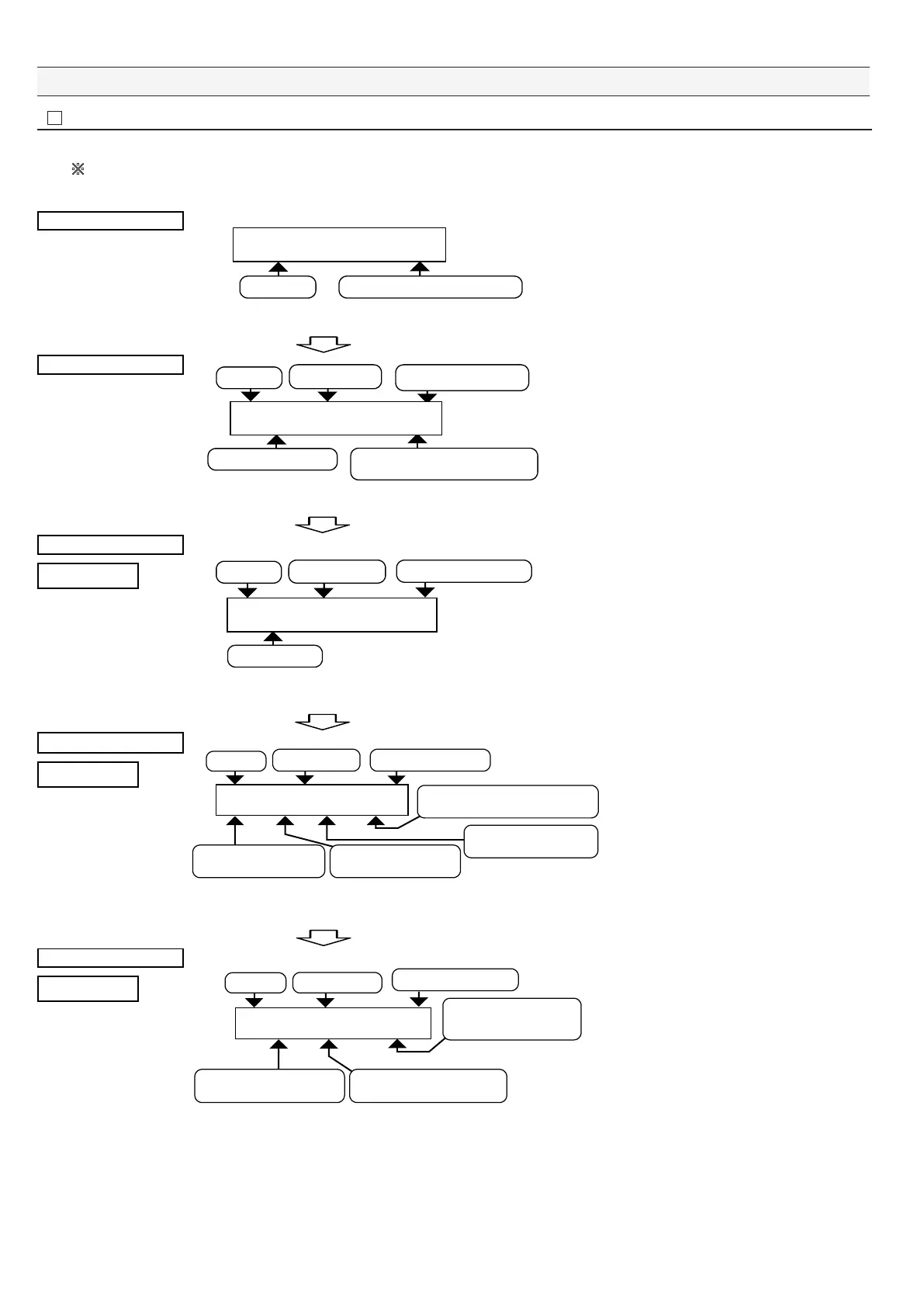
Ɣ Here we'll explain how to view details of the operational log from the outlined display and also explain their screens.
䚚The oil alarm point (Alarm Setting) record will be explained on the next page"8-3-3 Oil alarm point (Alarm Setting) record display screen)"
since their screens are different.
Outlined display
1RGTCVKQPCNA.QI
#NNA5VCVWUAAAAAAAAAZZZZZ
Item & sorting
Total number of data elements written
This example shows how to view an Alarm1
ON operational log group in the All Status
mode.
The left screen is displayed after "Enter" is
pressed.
Press "Enter." The selected group item of "All Status" is displayed.
䎃
Display of a group item
Code No.
Year / Month / Day Hours : Minutes : Seconds
Displays each group item
Location of displayed data /
Total number of data elements written
=ZZ?AZZZZZZAZZZZZZ
1KNA5VCVWUAAAAAZZZZZZZZ
The left display example is displayed when
the "All Status" group item is selected.
Press "Enter." Page 1 of details is displayed.
䎃
Detailed display
Page 1
Written data
=?AZZZZZZAZZZZZZ
#NCTOA10㨉㨉㨉㨉㨉AAAAAAAAAA
Code No.
Year / Month / Day Hours : Minutes : Seconds
You can check the details of the operational
log group item.
The left display example is displayed when
"Alarm1 ON" is selected.
You can also view old records by pressing
"ź" on this screen.
Press "Enter." Page 2 of details is displayed.
䎃
Detailed display
Page 2
=?AZZZZZZAZZZZZZ
8ZZA964ZZA5/2.ZZA2ZZ
Fresh water valve state
xx: OFF = Close / ON = Open
Valve state
xx: OFF = Close / ON = Open
Pressure switch state
xx: OFF = No pressure / ON = Pressure
Sample water valve state
xx: OFF = Close / ON = Open
Code No.
Year / Month / Day
Hours : Minutes : Seconds
On the left screen, you can confirm the
states of the three-way valve, fresh water
valve, sample water valve, and pressure
switch when "Alarm1 ON" is written.
You can also view old records by pressing
"ź" on this screen.
Press "Enter." Page 3 of details is displayed.
䎃
Detailed display
Page 3
=?AZZZZZZAZZZZZZ
AA#ZZZA#ZZZZZRRO
Alarm2 state
xxx: OFF = Normal / ON = Alarm
Alarm1 state
xxx: OFF = Normal / ON = Alarm
xxppm =
Oil concentration value when
"Alarm1 ON" is written
Code No.
Year / Month / Day
Hours : Minutes : Seconds
On the left screen, you can confirm the alarm
operation state and the oil concentration
value when "Alarm1 ON" is written.
You can also view old records by pressing
"ź" on this screen.
Press "Enter." "All Status" group item is displayed back.
Press "Esc" to end viewing.䎃


 To Next Page