Page. 30
8.䎃 Maintenance and Checking䎃
䦟䎃 8-3-3. Oil alarm point (Alarm Setting) record display screen䎃
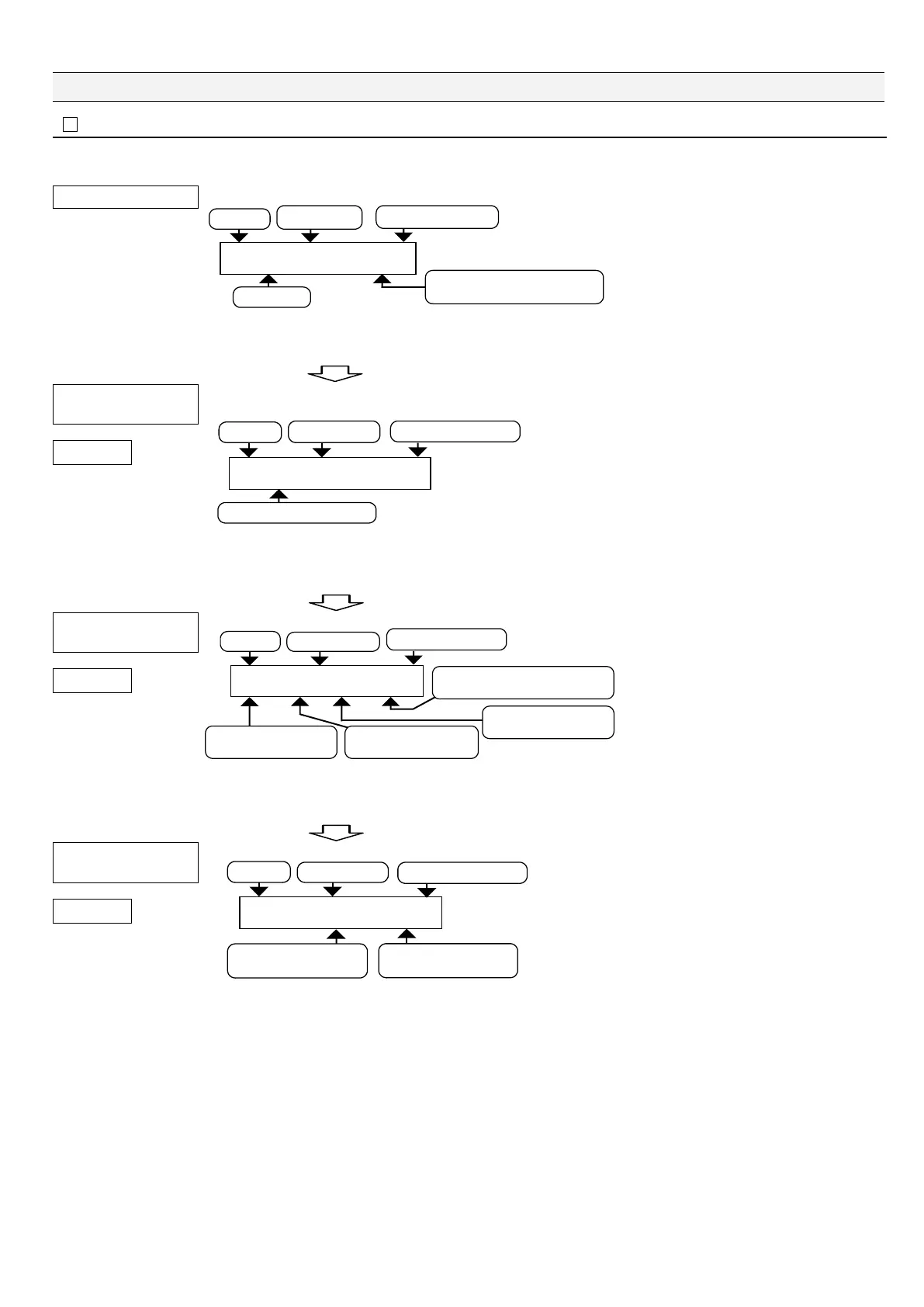
Ɣ Here we'll explain display screens on which you can check oil alarm point set values.
Display of a group item
=?AZZZZZZAZZZZZZ
#NNA5VC㨞WUAAAZZZZZZZZZZ
Location of displayed data /
Total number of data elements written
Written data
Code No.
Year / Month / Day
Hours : Minutes : Seconds
This display example explains how to view
the Alarm1 Setting operational log from the
"All Status" group item.
The left screen is displayed when "All Status"
group item is selected.
You can also view old records by pressing
"ź" on this screen.
Press "Enter." Page 1 of details is displayed.
䎃
Detailed display of
Alarm Setting
Page 1
=?AZZZZZZAZZZZZZ
#NCTOA5GVVKPIAAAAAAAAAAA
Content of oil alarm point record
Code No.
Year / Month / Day
Hours : Minutes : Seconds
This screen is displayed when the Alarm
Setting item is found on the All Status group
item screen.
(The "Alarm Setting" screen has a code [66]
on the upper right part of the screen.)
You can also view old records by pressing
"ź" on this screen.
Press "Enter." Page 2 of Alarm Setting (Details) is displayed.
䎃
Detailed display of
Alarm Setting
Page 2
=?AZZZZZZAZZZZZZ
8ZZA964ZZA5/2.ZZA2ZZ
Fresh water valve state
xx: OFF = Close / ON = Open
Valve state
xx: OFF = Close / ON = Open
Pressure switch state
xx: OFF = No pressure / ON = Pressure
Sample water valve state
xx: OFF = Close / ON = Open
Code No.
Year / Month / Day
Hours : Minutes : Seconds
On the left screen, you can confirm the states
of the three-way valve, fresh water valve,
sample water valve, and pressure switch
when "Alarm Setting" is written.
You can also view old records by pressing
"ź" on this screen.
Press "Enter." Page 3 of Alarm Setting (Details) is displayed.
䎃
Detailed display of
Alarm Setting
Page 3
=?AZZZZZZAZZZZZZ
AAAA5'6A#ZZAA#ZZRRO
Alarm1 setting state
xx: Value of oil alarm point 1
Alarm2 setting state
xx: Value of oil alarm point 1
Code No.
Year / Month / Day
Hours : Minutes : Seconds
On the left screen, you can confirm Alarm1
and Alarm2 oil alarm point set values.
You can also view old records by pressing
"ź" on this screen.
Press "Enter." "All Status" group item is displayed back.䎃
Press "Esc" to end viewing.䎃


 To Next Page