9.4.6.1 FReset – Reset parameters to factory setting
This function resets all parameters and user-defined configurations (SafeCF) to factory settings.
9.4.6.2 LoadCf - Loading the last saved user-defined configuration
This function can be used to load the last saved user-defined configuration.
9.4.6.3 SafeCf - Saving the user-defined configuration
This parameter can be used to save the user defined configuration.
9.4.6.4 BLight - Configuring the backlight of the digital display
This parameter is used to set when the backlight of the display is on.
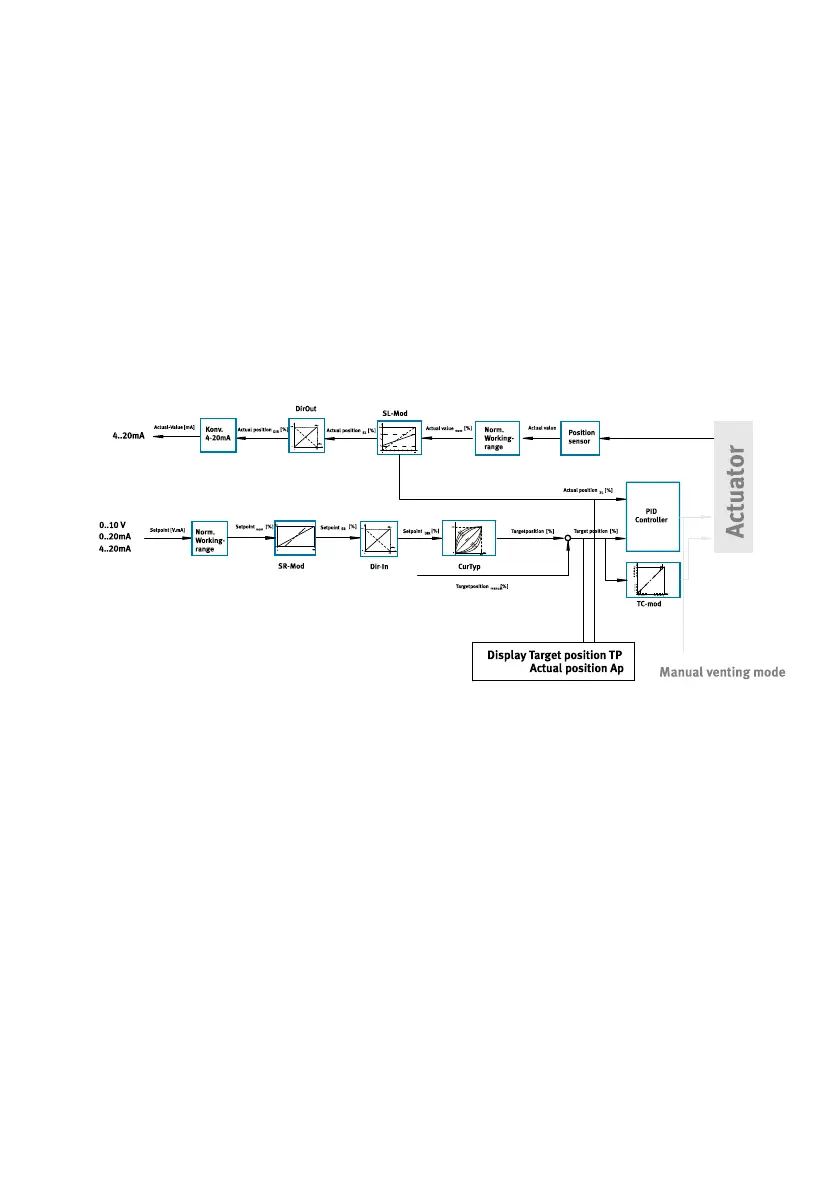
9.5 Schematic view of the mode of action of the parameters
Fig. 29 Signal processing
9.6 Commissioning positioner
Requirements:
– The positioner is fully mounted and connected.
– Familiarize yourself with the menu system, the functions of the keys and the parameters prior to
commissioning.
– Ensure there is a stable compressed air supply, particularly during the commissioning phase.
1. Check operating conditions and critical limits è 14 Technical data.
2. Check that the connection points are tight.
3. Switch on the operating voltage supply.
4. Switch on the setpoint specification.
Commissioning
49Festo — CMSX-...-C-U-F1-... — 2019-09d


 To Next Page