35
7. STEP THROUGH GUIDES
7.1 Reduced Power Mode (RPM)
Under steady state operation, the PowerWizard controllers on 12V generating sets have less than 1A current draw (not including
any relay loads). This value will be lower for controllers on 24V generating sets.
This can be reduced by approximately a factor of 7 by using the Reduced Power Mode (RPM). However it is recommended that
generating sets at rest or in storage for prolonged periods should either have the battery charger or isolator switch option tted.
When in reduced power mode the generating set control will appear powered down. It will also systematically pulse the control
panel lamps. In Reduced Power Mode the control disables all communications.
If Reduced Power Mode is enabled and the generating set is stopped the control will enter reduced power mode a preset
time (normally 30 minutes) after the last key press. The Control will awaken from Reduced Power Mode upon a key press, an
Emergency-Stop or a remote start signal.
Enabling Reduced Power Mode on Using EST
Open EST1.
Ensure that the service tool is using RP1210 (under “Utilities” -> “preferences” -> “communications”)2.
Ensure that the communications adapter is connected to the correct port of the PC.3.
Connect to the PowerWizard control (Press F8).4.
Select Configuration (Service -> Configuration) or (press F5).5.
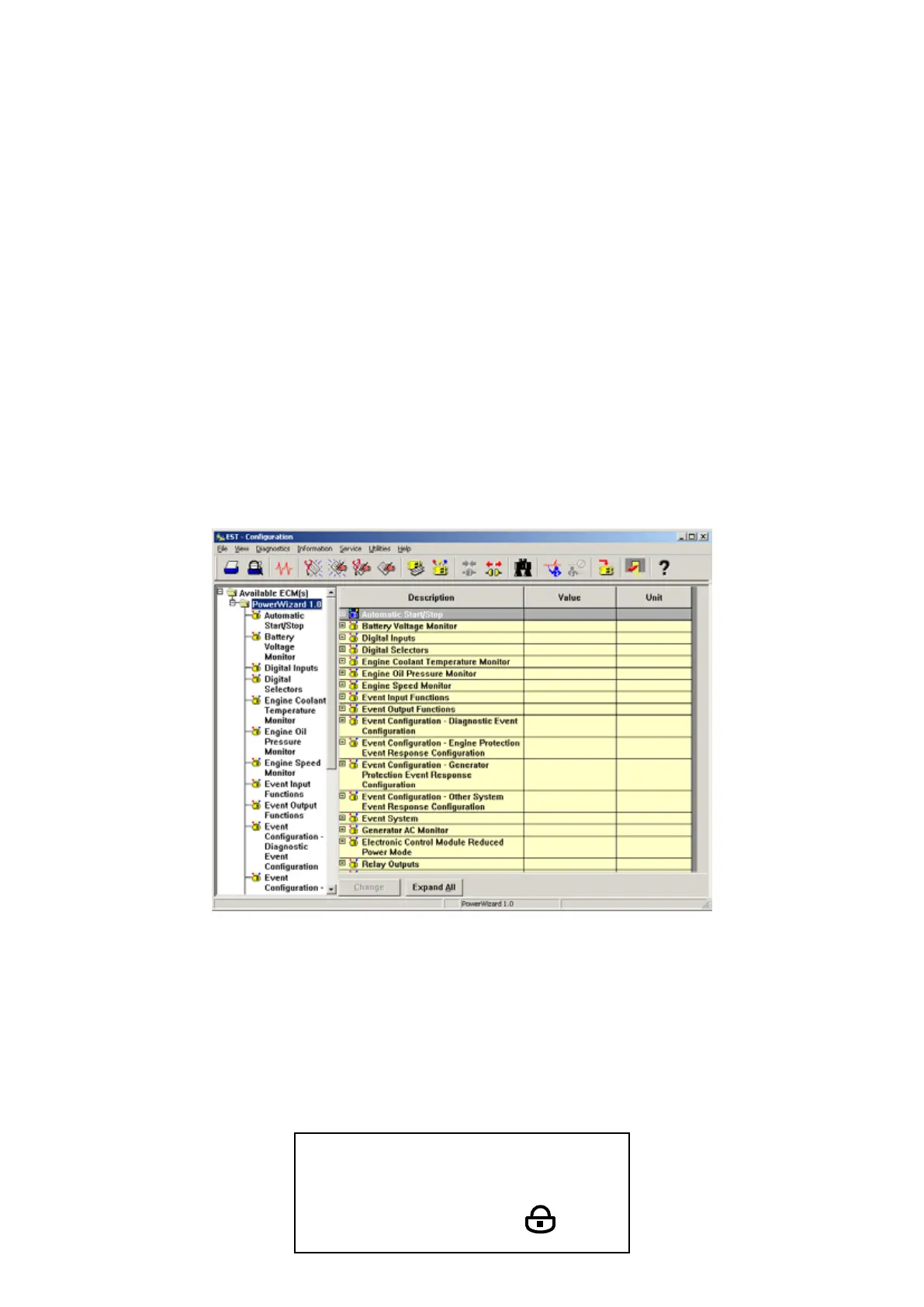
It will take some tome for the service tool to check which blocks are installed. After about 30 seconds the screen will look like 6.
this:
Select “Electronic Control Module Reduced Power Mode”.7.
At the setpoint “Electronic Control Module Reduced Power Mode Enable Status” Click on “Disabled” and change it to “Enabled”.8.
Ensure the “Electronic Control Module Reduced Power Mode delay time” is set to an appropriate time (such as 30 minutes).9.
You’re finished. Disconnect EST from the PowerWizard.10.
Enabling Reduced Power Mode Using Keypad
To enable the Reduced Power Mode on the PowerWizard by using the keypad go to the Reduced Power Mode screen as shown
below.
MAIN MENU > CONFIGURE > SETPOINTS > REDUCED POWER MODE
Enter the following screen:
REDUCED POWER MODE
ENABLE STATUS
DISABLED



 To Next Page