29
Chapter 7 Maintenance Menu
The splicer has a function to perform routine maintenance. This section describes
how to use the maintenance menu.
① Press Menu button, and select [Maintenance menu].
② Select a function to perform.
7.1 Replace Electrodes
As electrodes are worn out during the splicing process, oxide generated on the tips
of electrodes should be regularly eliminated. It is recommended that the electrodes
should be replaced after 4500 arc discharges. When the number of arc discharges
reaches a count of 4500, a message prompting to replace the electrodes is
displayed immediately after turning on the power. Using the electrodes without a
replacement will result in greater splice loss and reduced splice strength.
Replacement Procedure
① Select [Replace electrodes] in [Maintenance Menu].
② Instruction messages will appear on the screen to turn o the power. Click on OK
until LCD shuts down to continue.
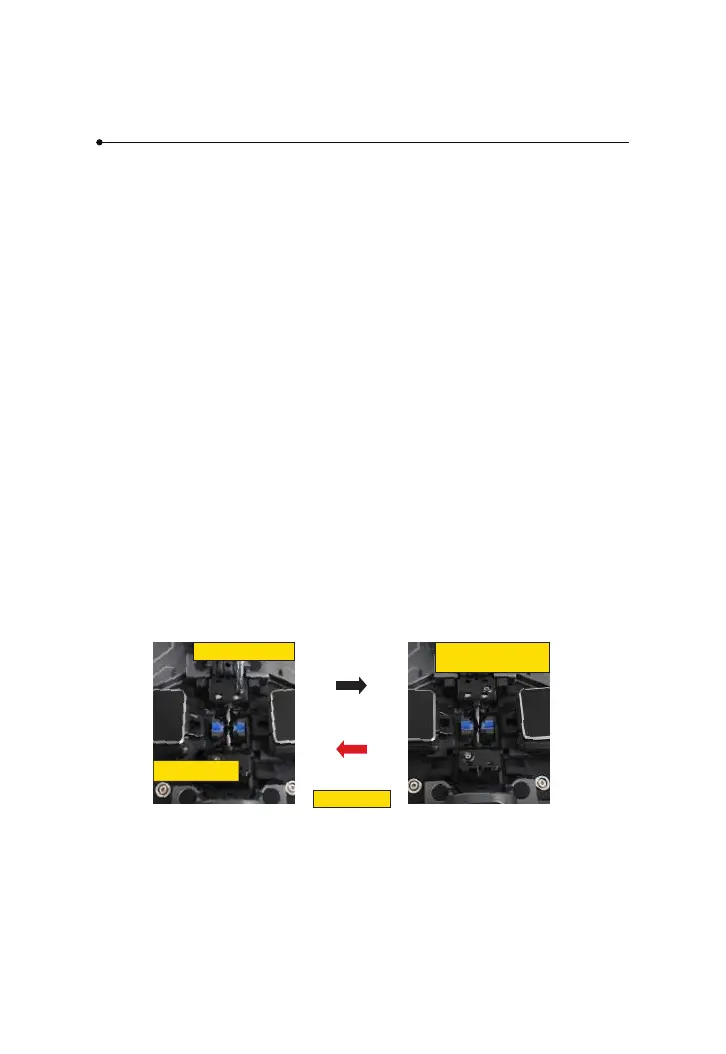
③ Remove the old electrodes.
ⅰ ) Loosen screw located on electrode cover.
ⅱ ) Take electrodes out of the electrode covers. (Electrodes are xed in electrode
cover)
④ Clean the new electrodes with alcohol-impregnated clean gauze or lint-free
tissue, and install them in the splicer.
ⅰ)Insert the electrodes in the electrode covers.
ⅱ)Place the electrode covers on the splicer, and tighten the screws.
loosen screw
electrode cover
Tighten screw
Remove old electrode
Install new electrode



 To Next Page