QuickServer Start-up Guide Page 34 of 43
FieldServer Technologies 1991 Tarob Court Milpitas, California 95035 USA Web: www.fieldserver.com
Tel: (408) 262 2299 Fax: (408) 262 2269 Toll Free: (888) 509 1970 email: support@fieldserver.com
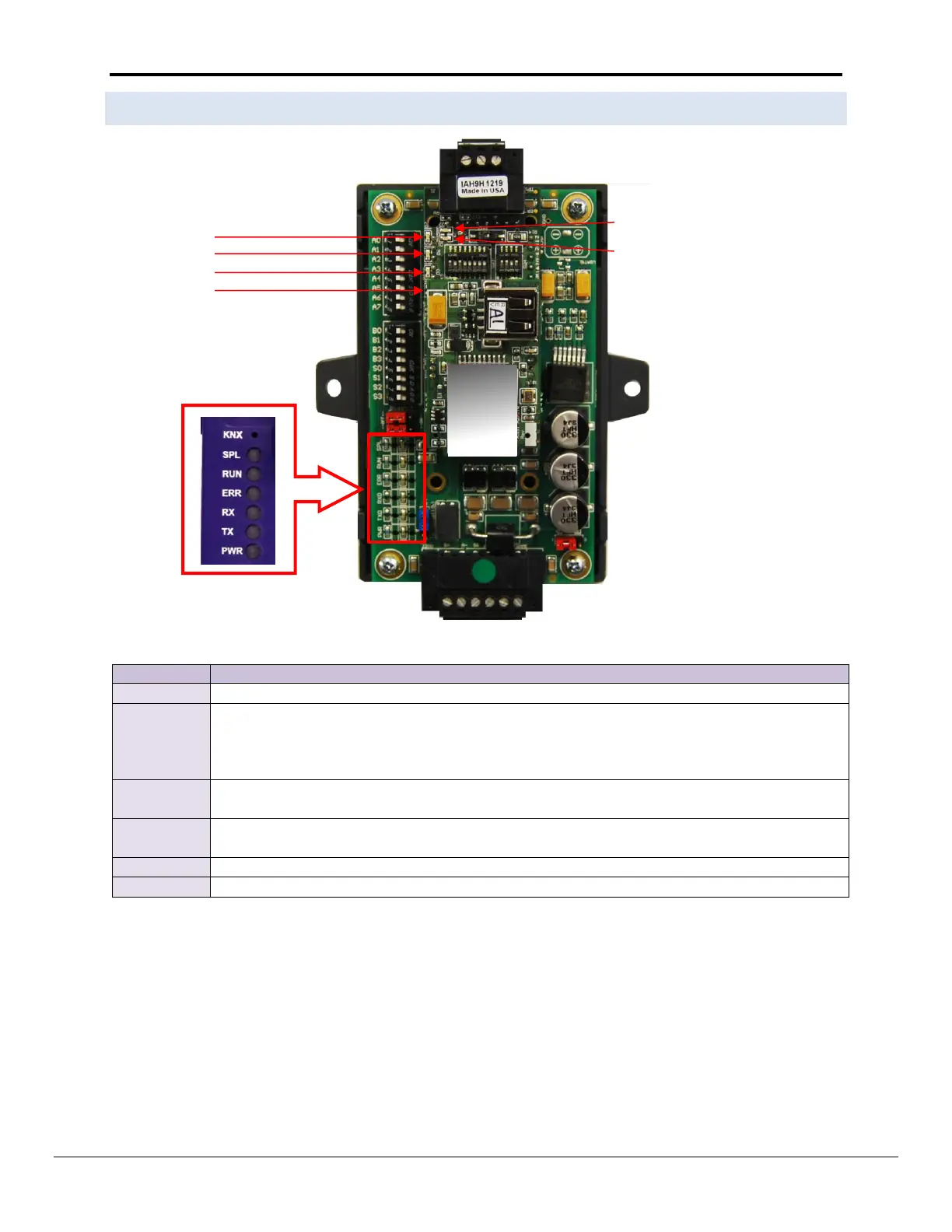
Appendix D.2. FS-QS-1010-XXXX LED’s
The system indicator LED as indication that the operating system is running
The ERROR LED will flash once on power up and flash once 15 seconds after power up. A steady
red light will indicate there is a system error on the FS-QS-1010-XXXX. If this occurs, immediately
report the related “system error” shown in the error screen of the FS_GUI interface to FieldServer
Technologies for evaluation.
The Node Offline LED will flash once on power up and flash once 15 seconds after power up. If the
Node Offline LED stays on solid, a Node Offline condition has occurred.
The RUN LED will start flashing 20 seconds after power indicating normal operation. The FS-QS-
1010-XXXX will be able to access FS-GUI once this LED starts flashing.
RS-485 indicator LED when a message is sent through the port
RS-485 indicator LED when a message is received by the port


 To Next Page