Monday has not been colored in the schedule table, then no action will
be triggered even the camera detects motion during 11:00~12:00 on
Monday.
b. Record File
When an event happens, the IP camera can record a video clip or
take snapshot, and then send to mail/ FTP/ Samba. Select what format
you
want to save.
• AVI File (with Record Time Setting): Save AVI video file. The video
length is according to the value you set in Record Time Setting.
• JPEG File (Single File with Interval Setting): Save single JPEG picture
file when event happens.
• JPEG Files (with Record Time Setting): Only when you select "JPEG" in
streaming 1 video format of Video Setting, this option can be enabled.
Select this option to save several JPEG picture files, and the successive
picture files cover a period of time according to the value you set in
Record Time Setting.
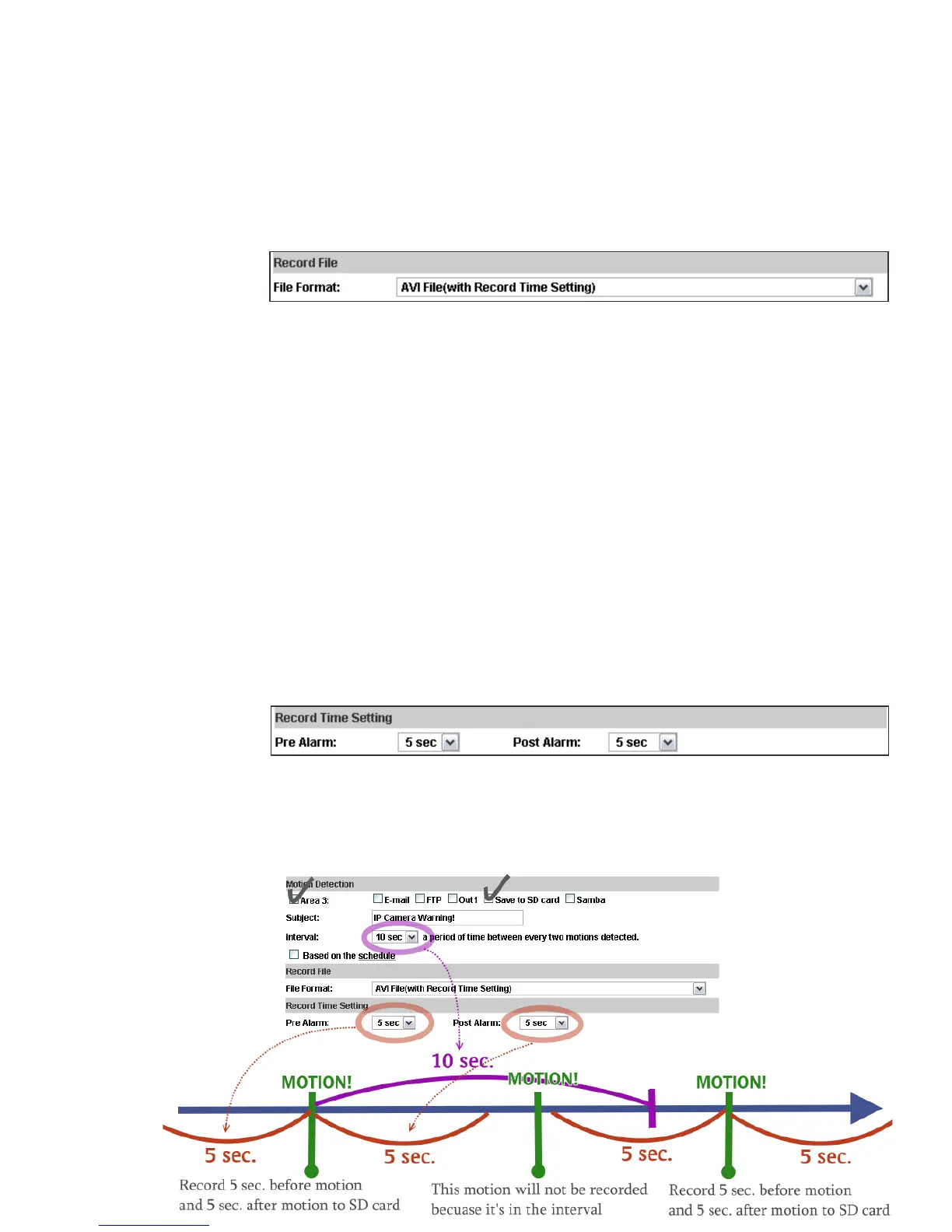
c. Record Time Setting
When an event happens, the IP camera can record a video clip or take
snapshot, and then send to mail/ FTP/ Samba. Select the video recording
length before and after event happens.
• Diagram example of "Interval" and "Pre/ Post Alarm":



 To Next Page