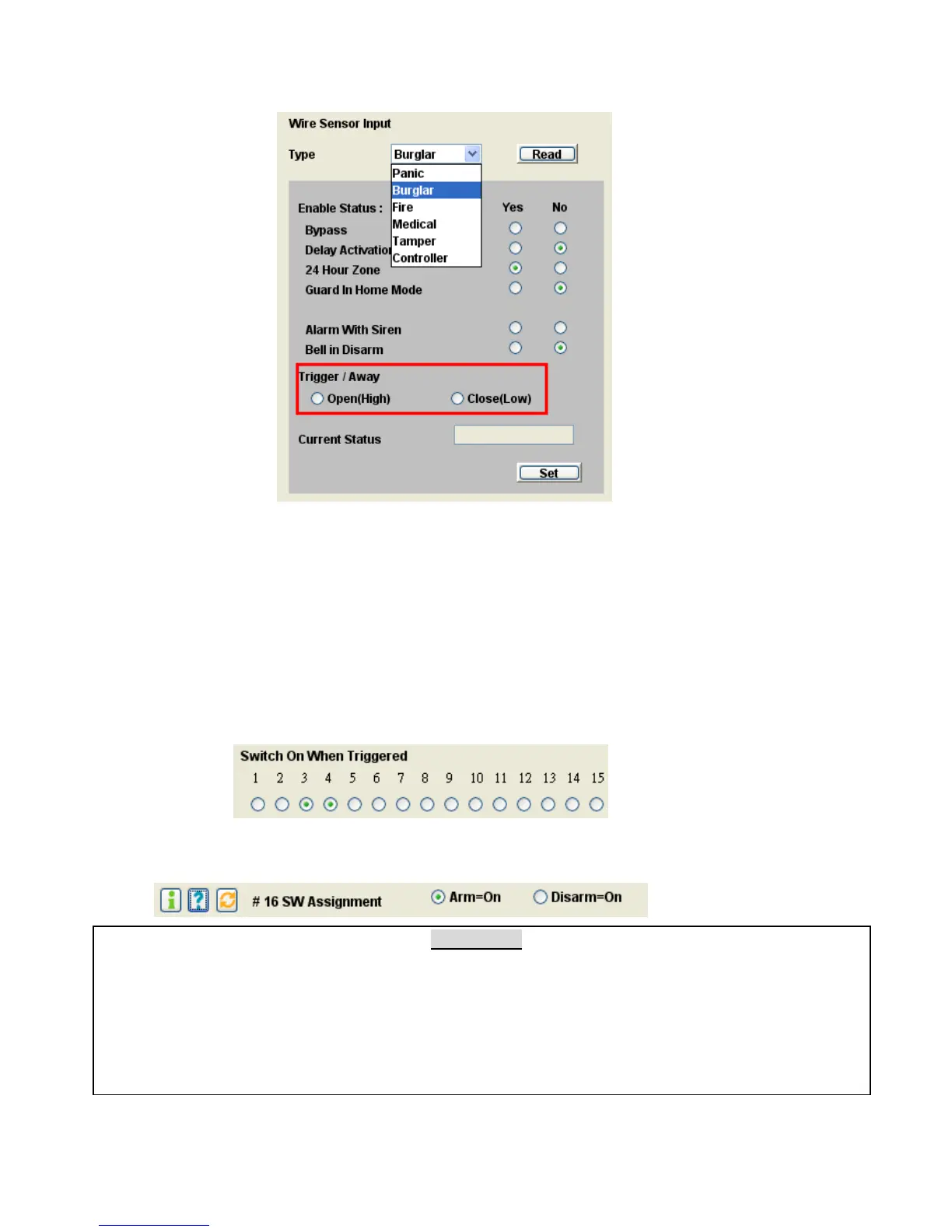
8.6 Wire Sensor Input Settings
Trigger Open/Close (default, Trigger = Close):
Alarm will be triggered by close (grounded) or open (>3V) the sensor input contact (or
voltage).
Away Open/Close (default, Away = Close): (For Wire Sensor input assigned as a Controller only)
System will enter Away or Disarm Mode by close (grounded) or open (>3V) the sensor input
contact (or voltage).
8.7 Switch On When Triggered: Select the switches that will be activated when this sensor is triggered.
Note: Switch #16 is not allowed for this purpose as this switch has been assigned as the indicator of
the Arm/ Disarm Status. (refer to 8.9, #16 SW Assignment.)
X-10 Switch
As many as 15 X-10 switches and 8 RF smart sockets can be controlled by each system. For settings
of the X-10 switches, refer to the instructions of the X-10 device manual. Only switch 1 to switch 8
can be assigned as RF switches.
Note: For a Remote Controller, if you press the DISARM button in DISARM Mode, the switches
that have been assigned as active switches will be turned ON or OFF alternatively.


 To Next Page