3, Working Scenario:
LS-20 can work standalone with Free HyperSecureLink software, third party’s Mobile App
(MyHome) or connect to a cloud server to enjoy much more service from the provider.
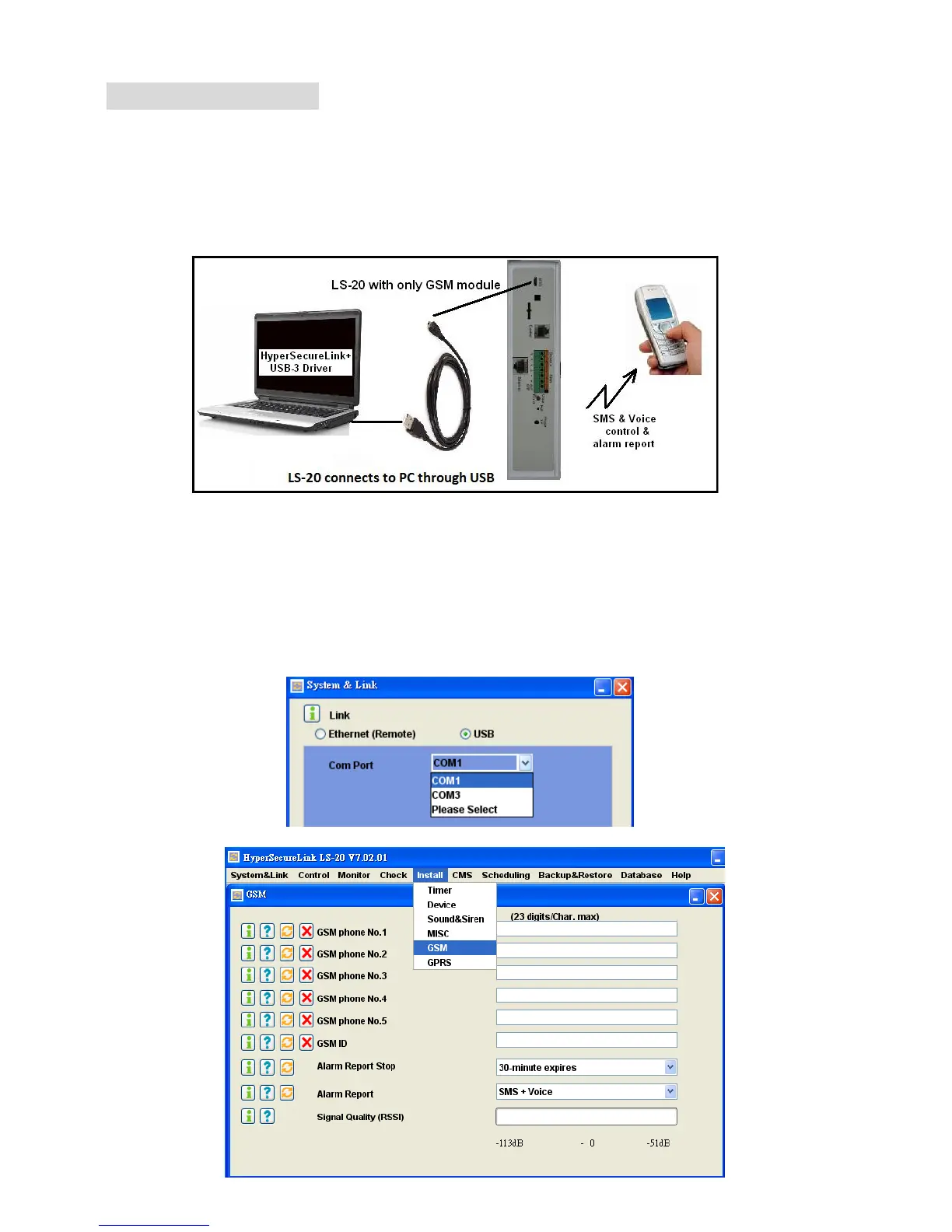
3.1 Programming the LS-20 through USB to connecting to GSM network.
Note: For the LS-20 with only GSM communication module, please use USB and
HyperSecureLink software to set the operation parameters.
Note: When the USB interface is connected to PC, the Base Unit can’t be controlled
through Ethernet but data sends out from Ethernet interface is still available.
Please refer to HyperSecureLink user guide also.
3.1.1 Install the USB driver on PC.
3.1.2 Connect the USB port to PC.
3.1.3 A new COM port (Ex. COM4) shows on the HyperSecureLink software.
3.1.4 Select the new COM port then work with HyperSecureLink software.


 To Next Page