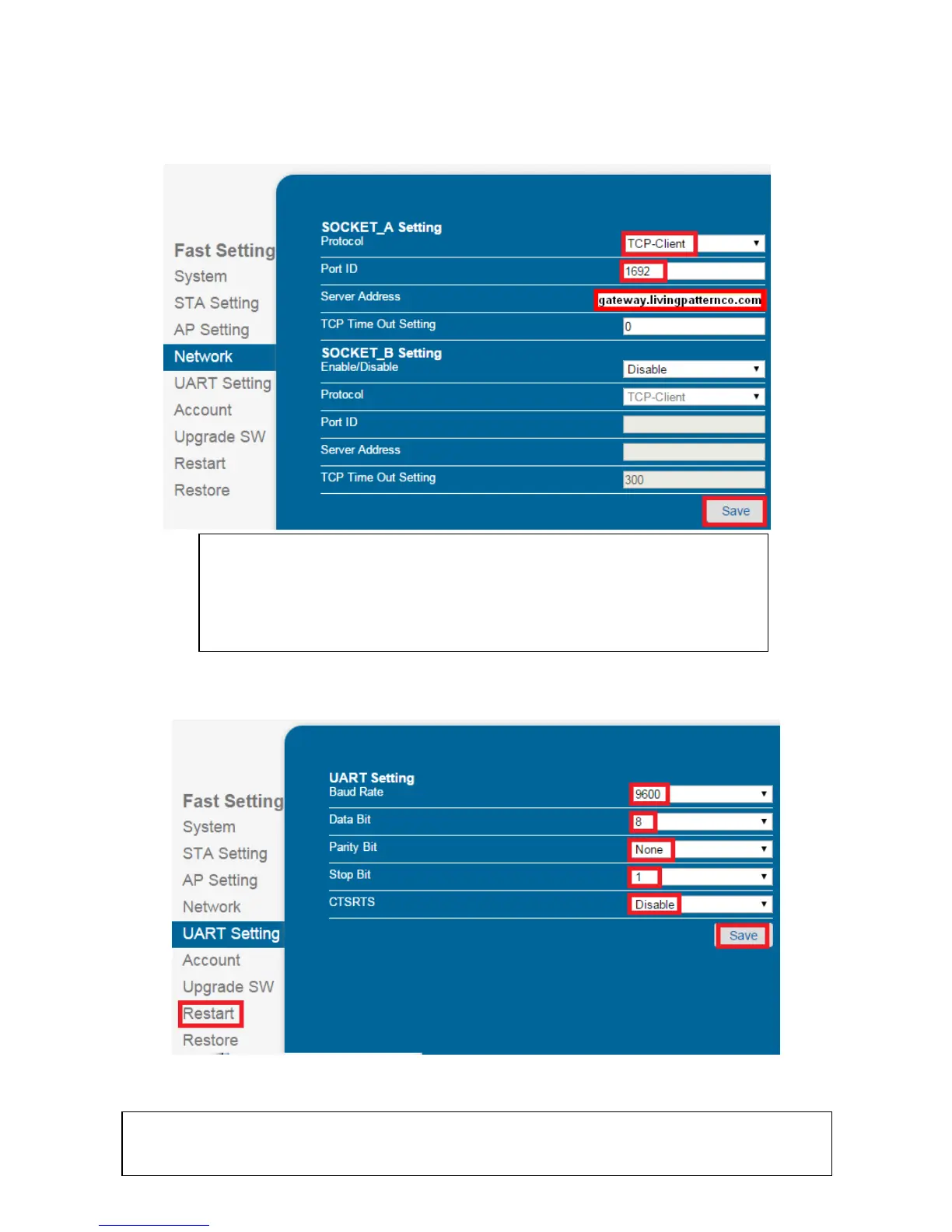
B8, Click “Network”, select the protocol and set the Port ID number and Server Address as required then
click “Save”.
Below example is for the linking to “Livingpattern” cloud services.
B9, Click “UART” Setting, it should be the same as the screenshot below, otherwise change the setting as
below then click “save” and then click “Restart”.
B10, After successfully restart the wifi Adaptor don’t forget to restore the wifi setting on your PC or tablet
back to your router.
TCP-Server: To work with HyperSecureLink software or MyHome App,
only port ID is needed.
TCP-Client: To link to Cloud server like Livingpattern or Webehome, both
Port ID and Server Address are needed.
If you can’t access the system from cloud after changing any parameter, please wait for
about 10 minutes for the server to locate the new connection socket from the system again.


 To Next Page