Camera Link
T
he Camera Link
®
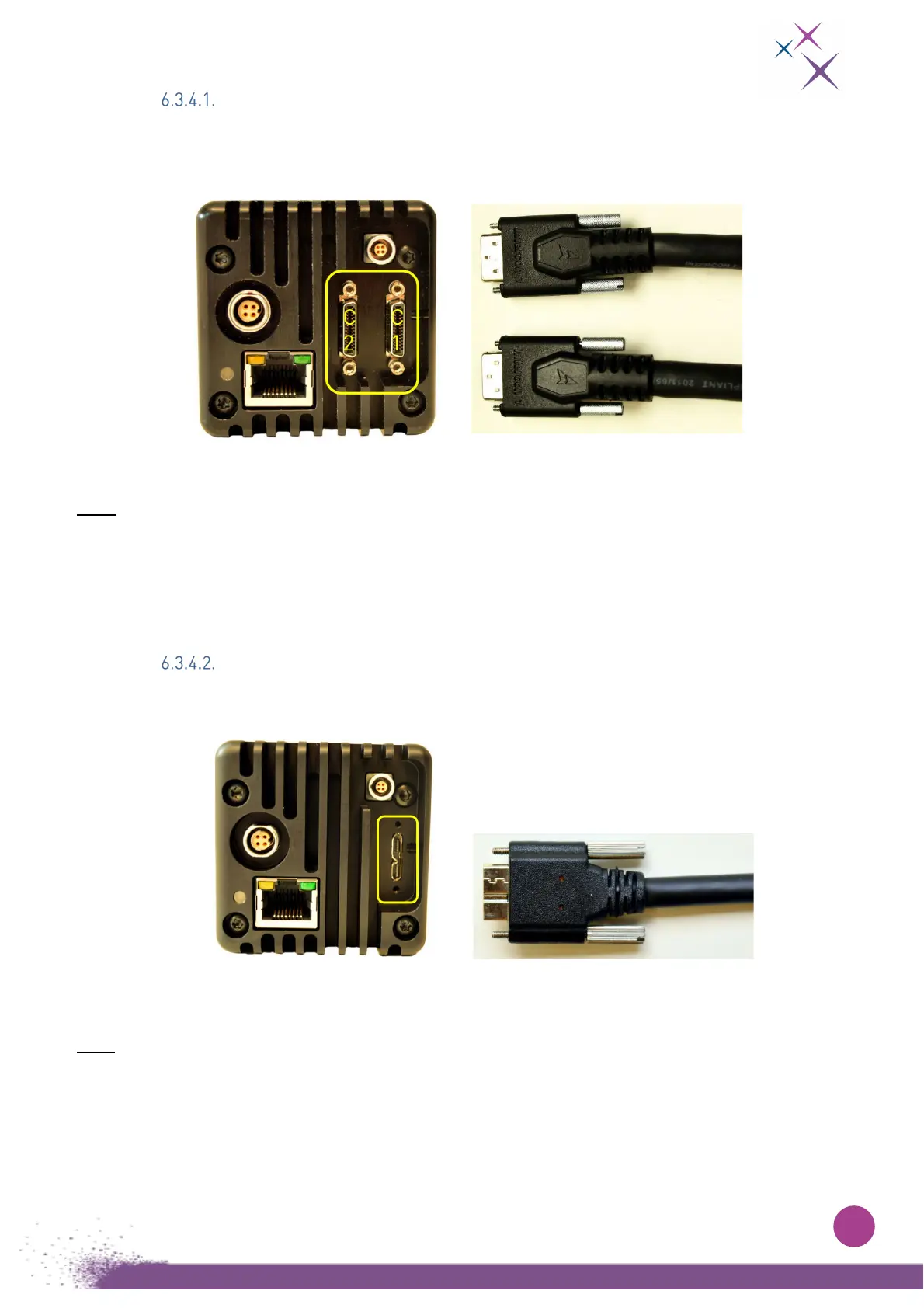
Full interface requires two data cables with male SDR-26 Mini Camera Link
®
connectors as shown in Fig. 5:
Figure 5:
On the left, C-RED 3 back view. The yellow box shows the female Camera Link
®
connectors.
On the right, a picture of a male SDR-26 Mini Camera Link
®
connector.
Note: The Camera Link
®
cables are numbered.
C
onnector 1 must be plugged to the right, and connector 2 to the left. Note that the order of the cables
depends on the frame grabber that is used.
If the cables are reversed, the camera will not be able to send the data properly, however it does not
have any harmful effect on the camera, nor on the grabber.
Micro USB 3.0 Type B
T
he USB3 interface requires a micro-USB 3.0 Type B connector.
Figure 6:
On the left, C-RED 3 back view. The yellow box shows the USB3 connector.
On the right, a picture of the USB 3.0 Type B connector.
Note: C-RED 3 is compatible with USB-B screw locking cables


 To Next Page