Fisherbrand 50152755 | 23
Start-up |
Chapter 5
Installing the Shelf Support Brackets
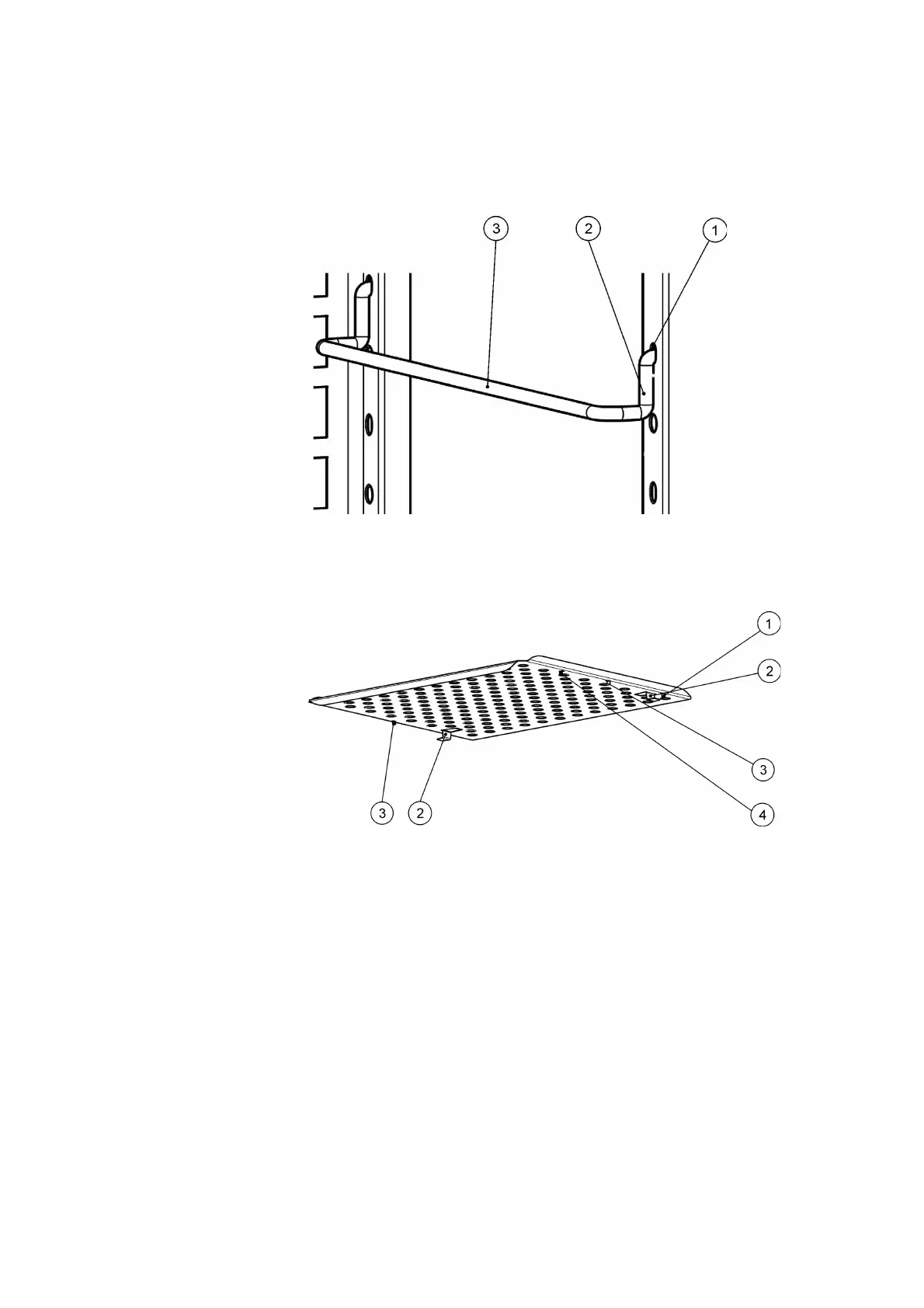
1. Insert the shelf support [3] into the perforations [1] of the support rail and tilt it downwards.
2. Make sure that the two vertical elements [2] of the shelf support butt against the support rail.
Figure 5-3. Shelf Support Installation
Installing the Perforated Shelves
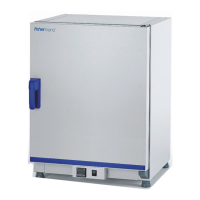
[1] Rear Pull-out Stop
[2] Anti-tilt anchor
[3] Front Pull-out Stop
[4] Shelf
Figure 5-4. Installing the Perforated Shelves
1. Push the shelf [4] onto the shelf support with the tilt protection devices [2] facing the rear
panel of the incubator.
2. Slightly raise the perforated shelf so that the pull-out stops [1] and [3] can slide over the shelf
support.
3. Make sure that the shelves and both of their tilt protection devices are free to move over the
shelf support.


 To Next Page