TRIP COMPUTER
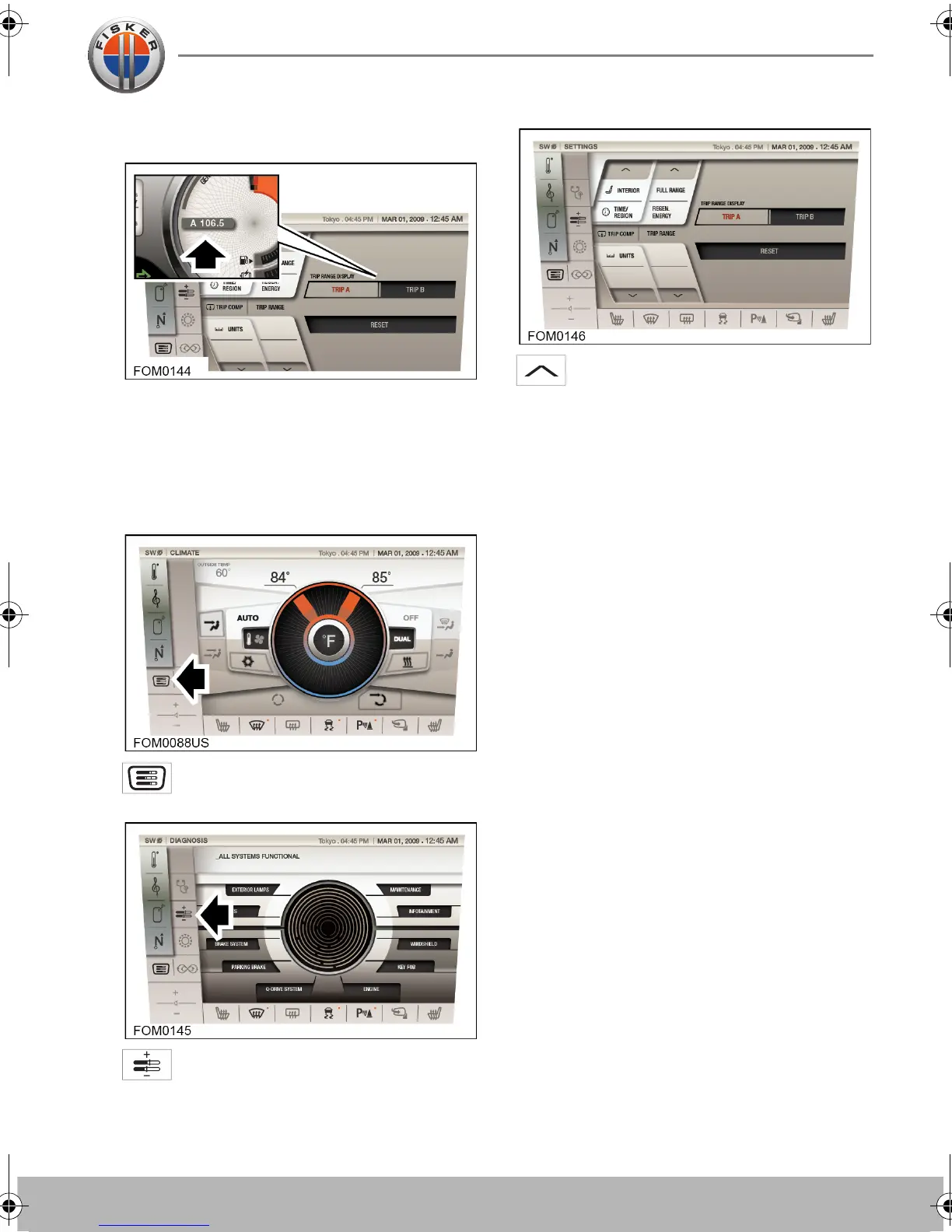
There are two trip range memories
available, A and B. You can specify which
trip memory is viewed on the instrument
cluster via the touch-screen.
Selecting trip A or B
Touch the SYSTEM icon on the
touch-screen.
Touch the SETTINGS icon to access
the vehicle settings area.
Use the up (or down) arrows to
change the currently displayed
settings to TRIP COMP | TRIP RANGE.
The currently displayed trip computer range
will be displayed in orange. Touch the icon
for the trip computer you wish to display.
Resetting trip A or B
To reset a trip range memory, make sure the
trip range you want to reset is highlighted
and touch the RESET icon.
Note: Resetting trip A will not affect the
information stored for trip B and vice versa.
Owner's Handbook - US English.book Page 5 Friday, June 22, 2012 11:28 AM


 To Next Page