3 First Use
3.1 Assembly and Connection
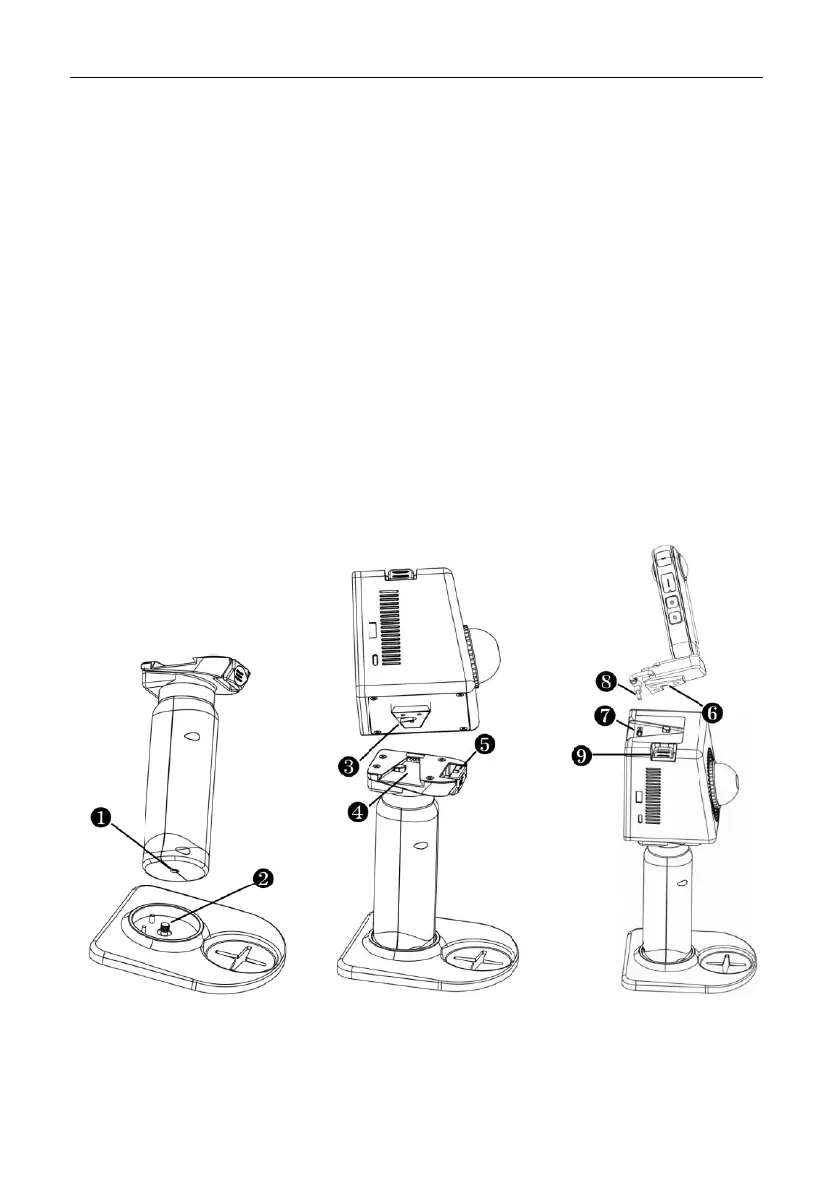
Turn the screw on the base plate clockwise to fit tightly into the threaded hole at
the bottom of the handle. Turn the screw anticlockwise to remove the base plate.
Slide the wedge at the bottom of the LiDAR module into the notch of the handle
in the direction as shown below until you hear a click. To remove the handle, slide the
handle in the opposite direction while pressing the quick-release button .
Slide the wedge at the bottom of the camera module into the notch at the top of
the LiDAR module in the direction as shown below until you hear a click. Then, plug
the camera cable into the Type-C port on the LiDAR module. To remove the camera
module, unplug the cable and then slide the camera module in the opposite direction
while pressing the quick-release button .


 To Next Page